
Beschreibung
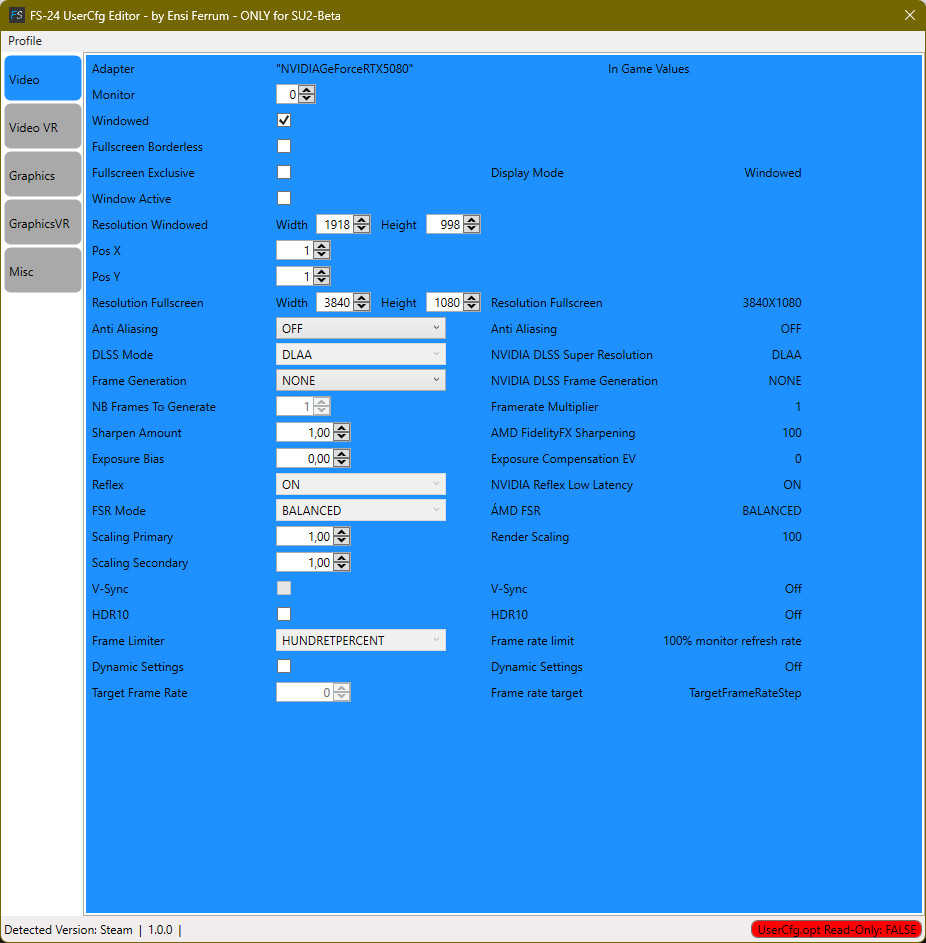
FS-2024 UserCfg Editor
V1.0.0- Lets you set your graphics settings outside of the FS-24.
- Enables exclusive Fullscreen.
- Loads and saves user defined presets.
- Ingame Presets included
- Im-/Export
- complete UserCfg.opt file
- Video Part
- VideoVR Part
- Graphics Part
- GraphicsVR Part
Start the FS-24 UserCfg Editor.
It will find the UserCfg.opt file and opens it.
On initial start a backup of the UserCfg.opt file will be made.
Make your changes.
File -> Save. This saves the changes to the UserCfg.opt (and sets the file to Read Only!)
If you want to fly in VR:
Export current profile (Profiles -> Export -> Profiles, name e.g. “Monitor”)
Graphics tab: Set all to LOW or OFF.
Save profile (Profile -> Save)
Export profile (Profile -> Export -> Profiles, name e.g. “WeltAmDraht”)
Then you can quickly switch from the monitor to the VR profile and back without having to remember or write down all the settings.
OK, Sim must be restarted 😖
Background:
Graphics LOW releases resources that GraphicsVR can use 🤓
Changelog
V1.0.1:
- Fixed Raytraced Shadows in GraphicsVR-tab always ON
- Fixed only part-profile was saved / exported when a complete profile should have been saved / exported after using the Preset Drop-Down boxes on Graphics-tab or GraphicsVR-tab
V1.0.2
- - Added FoveatedRenderingScale for SU-III
V1.0.3
- The wise guys working on the half baked simulator forgot to add some new UI elements to the VR Graphics. Although the data is in the UserCfg.opt file! I have not forgotten to add 'em :-)
- Added Characters Density for SU-III
- Added Traffic AirportVehicleDensity for SU-III
- Added Traffic GroundAircraftDensity for SU-III
- Added Traffic PassiveAircraftQuality for SU-III
- Added Fauna Density for SU-III
- Fixed some bugs
V1.0.4
- Removed Characters Density for SU-III
- Removed Traffic AirportVehicleDensity for SU-III
- Removed Traffic GroundAircraftDensity for SU-III
- Removed Traffic PassiveAircraftQuality for SU-III
- Removed Fauna Density for SU-III
- Added Characters Quantity
- Added Characters Density
- Added Airport Services Quantity
- Added Airport Services Variety
- Added Parked Aircraft Quantity
- Added Parked Aircraft Variety
- Added Aircraft Traffic Quantity
- Added Aircraft Traffic Variety
- Renamed Fauna Quality to Faune Qantity
- Reworked the UI
V1.0.5
- Fixed UI elements missing / misaligned on the Graphics-VR tab
FS-24 UserCfg Editor
The FS-24 UserCfg Editor is a tool designed for configuring graphics settings outside of Microsoft Flight Simulator 2024. It allows users to enable exclusive fullscreen, manage user-defined presets, and easily import or export specific sections of the UserCfg.opt file. The utility provides a streamlined way to adjust settings for both standard and VR modes, facilitating quick transitions between profiles while ensuring a backup is made upon initial use.


Nutzerbewertungen
2 Bewertungen
Versionsgeschichte
V1.0.5 - Fixed UI elements missing / misaligned on the Graphics-VR tab
Ähnliche Addons
Kit Fox 2 Stage 3 - Suicide Fox
Introducing the Kit Fox 2 Stage 3 - Suicide Fox add-on, a daring experience for skilled pilots. With enhanced features like 300+ HP and revised flight model, this beast demands caution in the skies. Brace yourself for a challenging ride with added flap stages, unique horn sound, and eye-catching paint scheme.
von EnsiFerrum
Garmin Navigation Suite Fixes
The Garmin Navigation Suite Fixes add-on addresses the navigation unit updates for select aircraft in Microsoft Flight Simulator 24, enhancing them with the latest G430, G530, and G3X-Touch variants. This package includes various Carenado aircraft along with others like the Flying Iron Spitfire and DHC4 Caribou. It enables full functionality, including all pages and flight plan imports from the EFB. The installation process is streamlined, taking under 10 minutes to complete.
von EnsiFerrum
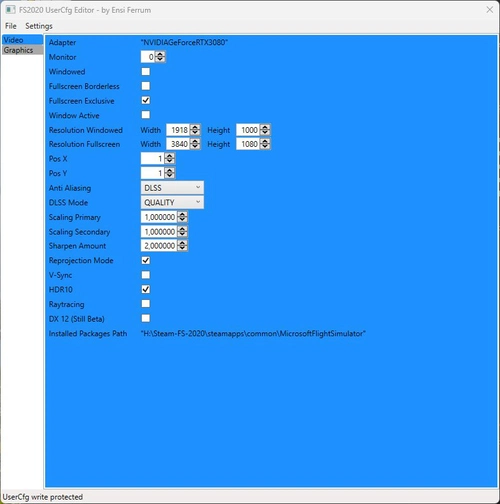
FS2020 - UserCfg Editor
FS-2020 UserCfg Editor V0.9.0.BETA Not finished yet! Lets you set your graphics settings outside of the FS-2020. Enables exclusive Fullscreen. Video Tab is working. Graphics Tab not working. GraphicsVR still to come. Start the FS-2020 UserCfg Editor. It will find the UserCfg.opt file and opens it. Make your changes. File -> Save. This saves the changes to the UserCfg.opt and sets the file to Read Only!
von EnsiFerrum
X-Cub G3X Package
Enhance your X-Cub experience with this mod package, featuring the Garmin G3X system for various X-Cub variants including Standard, Floats, Skis, and NX-Cub. Correcting configuration errors from Asobo, this mod adds aileron and rudder trim functionality and fixes annunciator issues. Explore improved trim controls and warning systems for a more realistic flying experience. Special thanks to STEU3R for contributions to the X-Cub Red Bull model.
von EnsiFerrum
Melden Sie sich an, um an der Diskussion teilzunehmen
AnmeldenKommentare(20)
6 months ago
"Sharpen" option in vr, too much flickerin in the day sky.
6 months ago
10 months ago
about 1 year ago
It would be so good, if it came with tooltips explaining items like "Direct shadows contributing culling threshold" etc. and what the units mean (1=?)
Also, are new settings implemented at once or do I have to reboot the sim?
about 1 year ago
So sad...
about 1 year ago
about 1 year ago
about 1 year ago
about 1 year ago
about 1 year ago
Thank you
about 1 year ago
The app is not starting!
Greetings
about 1 year ago
Please download again.
Sorry for the inconvenience.
about 1 year ago
about 1 year ago
Please download again.
Sorry for the inconvenience.
about 1 year ago
about 1 year ago
Please download again.
Sorry for the inconvenience.
over 1 year ago
over 1 year ago
Next time you report be a bit more specific, it's only happening on the GraphicsVR-tab.
Anyways, THX for the report.
over 1 year ago
over 1 year ago