
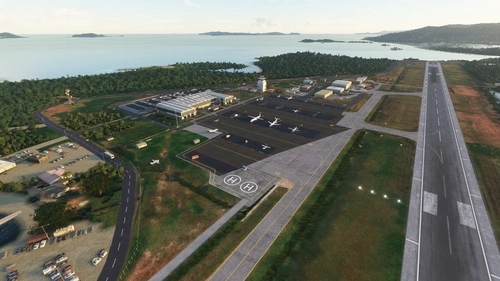
![Cyril E. King Airport (TIST) Updated Scenery Project [LITE VERSION] - Image 1](https://cdn.flightsim.to/images/16/qpBToEUN.jpg)
Beschreibung
CYRIL E. KING AIRPORT UPDATED SCENERY PROJECT
(LITE VERSION)
[UPDATED AS NEW INFO IS DISCOVERED]
ATTENTION!
THIS VERSION IS INTENDED ONLY FOR THOSE WITH MID TO LOW-END SYSTEMS OR THOSE WHO WERE EXPERIENCING CTD (CRASH TO DESKTOP) ERRORS EVEN AFTER V1.1 UPDATE IN THE ORIGINAL VERSION. FOR THOSE WHO WANT TO DOWNLOAD THE ORIGINAL, CHECK DESCRIPTION BELOW!
DESCRIPTION:Due to several complaints and some careful observations, I had to create this 'lite version' of the scenery mod to hopefully solve the CTD issues some users were facing. The size of this airport compared to other sceneries i've done may be a key factor as the scale of apron textures are larger in size which means more VRAM usage. So this is basically a watered down version with less detailed objects and some textures removed to ease memory usage.
For the full in-depth descriptive details on this scenery, check out the Original Version at this link by copying and pasting it in your browser: https://flightsim.to/file/17191/cyril-e-king-airport-tist-updated-scenery-project-v1-0
INSTALLATION:
Open and extract ''lexpro-St Thomas_updated_scenery_project_LITE'' (or the version name you choose to download) to your prefered location on your PC, then unZip and open the folder and copy "Cyril_E_King_Updated_Scenery_Project" folder into where your Community folder is located, (For those who previously installed the Original and choose to install this one after, the file should overwrite) then start the sim and go to TIST - Cyril E. King Airport.
Each time I upload an updated version here, just replace the same "Cyril_E_King_Updated_Scenery_Project" folder in your Community folder to update the scenery. Make back ups to the old folders if necessary. I hope this helps!
Updates to this version may be less than the Original as I don't want to cause any further CTD errors to users.
Location
Cyril E. King Airport (TIST) Updated Scenery Project [LITE VERSION]
Enhance your flight simulation with the Cyril E. King Airport (TIST) Updated Scenery LITE Version. This version is optimized for mid to low-end systems, addressing CTD errors while offering a simplified but efficient airport layout. Follow easy installation steps for a smoother experience while exploring TIST in Microsoft Flight Simulator.

Nutzerbewertungen
1 Bewertungen
Versionsgeschichte
- Basically made this scenery very very sparse to ease VRAM load some more, hopefully to solve some CTD issues that users still experience. - Removed all "dirty", "wear n' tear" textures on all aprons. - Removed some bush/shrubs in various areas. - Removed tire marks from runway 10 - Removed all animated marshals/workers - Removed all static aircraft
Ähnliche Addons
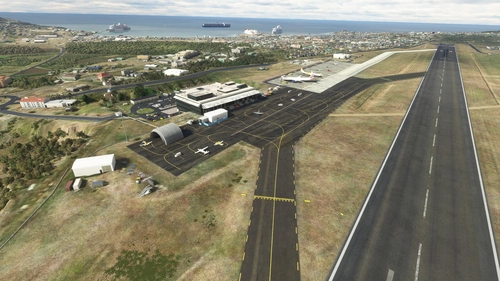
R. L. Bradshaw Int.(TKPK) & Vance Amory Int.(TKPN) Updated Scenery Pack Project 2.5
This is a scenery combo pack project for the R. L. Bradshaw International and Vance W. Amory International Airports on the Islands of St. Kitts & Nevis located in the Caribbean North-West of Antigua. Being a local on the Island of St. Kitts and a frequent Sim flyer since 2002 and after flying around in the default scenery for MSFS2020, I decided to take up the task of using/learning Developer Mode and update the Airport scenery and its surroundings close to IRL. It's still a work in progress here and there. I'm still sorting out any bug/terrain formation issues I get from time to time after compiling. It's not perfect and I'm not 100% accurate but I try for at least 95%. :)
von lexuz2020 (LexPro)
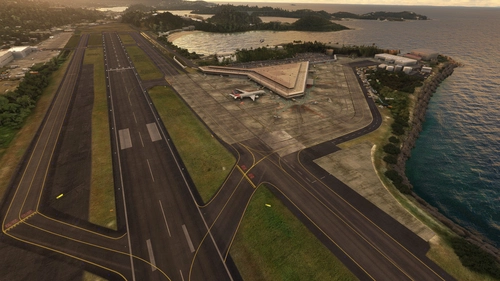
Cyril E. King Airport (TIST) Updated Scenery Project v1.5
The Cyril E. King Airport is the largest international airport in the U.S. Virgin Islands and one of the busiest hubs in the eastern Caribbean. The Airport is a public airport located at No. 70 Lindbergh Bay on the southwestern side of St. Thomas, U.S. Virgin Islands - approximately four miles east of the capital city, Charlotte Amalie. South-West of Beef Island, Tortola and North of St. Criox. It's one of the busiest airports in the eastern Caribbean. Many direct flights are available for international travelers arriving from the U.S., with non-stop service to St. Thomas from Atlanta, Boston, Chicago, Dulles, Fort Lauderdale, Miami, Newark, and New York. It was known as Harry S Truman Airport until 1984, when it was renamed to honor Cyril Emmanuel King, the second elected governor of the U.S. Virgin Islands. A new airport opened in November 1990 and retained the name.
von lexuz2020
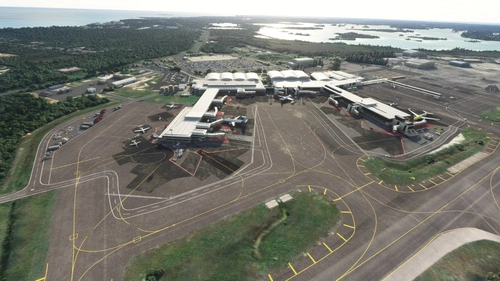
MYNN - Lyden Pindling International Airport Updated Scenery Project
Updated the default airport of Nassau Bahamas for FS2020. Due to the size of this airport, I won't list my usual updated details. Instead i'll show the progress through the first 9 screenshots sequentially from updated to default shots individually. Formerly known as Nassau International Airport, is the largest airport in the Bahamas and the largest international gateway into the country.
von lexuz2020
Terrance B. Lettsome International Airport (TUPJ) Updated Scenery Project v1.5
Tortola is the largest and most populated of the British Virgin Islands, a group of islands that form part of the archipelago of the Virgin Islands. The approach to the airport runway on 07 was and still is a tricky one due to the main island's hilly terrain close to Runway. In the past, the runway was much shorter, which made it even more challenging when lining up to land larger aircrafts like the Dash-8 or ATR-72 turbo props. Now it has an extended runway which made it a bit easier for also private small jets to land. There have been talks also to extend it even further sometime in the future. Despite having runway lights, It is advised not to land at night nor take off at Runway 25, due to the terrain close to Runway 07 and also the small hill near Runway 25.
von lexuz2020
Melden Sie sich an, um an der Diskussion teilzunehmen
AnmeldenKommentare(16)
about 1 year ago
over 5 years ago
this is great I love it.
over 5 years ago
Hi, i have CTD with both version :'(
over 5 years ago
:( sigh...sorry you're still having the issue. I don't know what else to do. If I remove anything else, it won't be an airport to begin with. Seems like it works on a variety amount of other systems with no issue, so maybe it could be your settings or hardware....who knows. I hope it works one of these days. In the mean time, try out the other smaller airports I've done and I hope they work for you. :)
over 5 years ago
Sorry to say but I am still also getting a CTD with this version.
over 5 years ago
Uploading another update with a vary sparse scenery. If this don't work, I don't know what else to do. I won't have a scenery left if remove every item lol.
over 5 years ago
great fix, works fine
over 5 years ago
Awesome! Glad it works! :)
over 5 years ago
Sorry, but msfs crash with both version
over 5 years ago
Ok. Understood. I'm working on another work-around.
What is your video card memory specs?
over 5 years ago
My config is I9 9900K with 32 Go of memory, and my GPU is an Nvidia GeForce RTX 2080 Ti with 11 Go of memory, therefore troubles don't come from my computer
over 5 years ago
Wow...those specs seem a bit higher than mines and I can load it just fine. Very, very odd.
I'm soon about to upload a much sparse 'bland' version. If that doesn't work, I dunno what else will lol
over 5 years ago
Still getting a crash to desktop on this one, not sure whats going on, have not had this issue with any other sceneries. Have a high-mid system, anyone else getting the same issue?
over 5 years ago
Sigh....sorry you're still experiencing this issue. I do realize the file size of this is still a bit larger than my other sceneries so I don't know if it still needs to be reduced.
Here's what i'll do......in the next update, I'm going to totally strip away every 'dirty' texture, every static aircraft, no marshals, barely any objects and remove some vegetation and trees. I'll make this the most basic version and see if I can slowly work my may up a little after, depending on yours and others results after downloading again.
Also just in case, check to see if other mods might be affecting this one.
over 5 years ago
To be honest, the scenery isn't even that big compared to many others I have. I think its something wrong with the files themselves or like you said, a conflict with another mod (even though I have no other sceneries in that area). Anyways, hopefully you can figure it out, the images look beautiful and it deserves to be appreciated!
over 5 years ago
The only thing i've noticed is that this uses up more VRAM than any other scenery i've done, so I was basing it off of that. The files I use, I make sure they are not from any payware and are more than likely what most (if not, everyone) should have in their library currently so they can see them as well. Also, the fact that this version seems to work for some, means it might be the difference in each person's sim settings/configurations.
Thank you. I really do appreciate it and I hope you will be able to load this scenery eventually as more world sim updates come our way that may fix it. Keep trying :)