
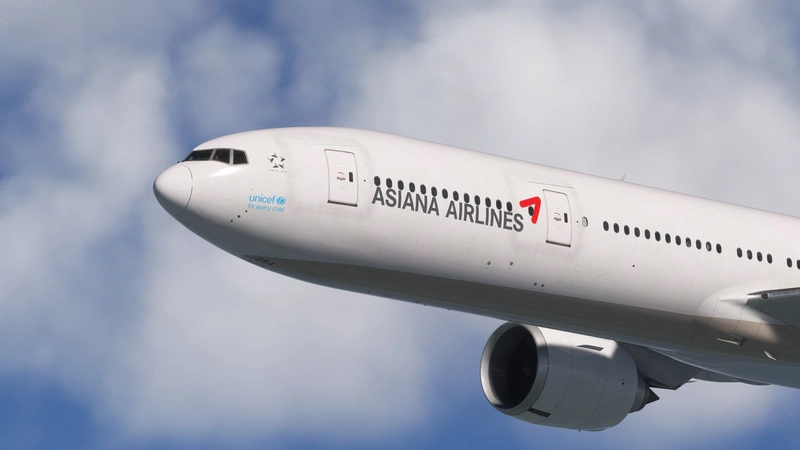
![iniBuilds A350-900 Asiana Airlines [w/Cabin] Livery Pack - Image 1](https://cdn.flightsim.to/images/27/inibuilds-a350-900-asiana-airlines-livery-pack-243079-1740856993-UPs3J.jpg)
Beschreibung
🔹 Key Features:
✅ Authentic Asiana Airlines font and logo placement
✅ Realistic color matching for an accurate representation
✅ Two versions available:
- Pre-merger version (with Kumho logo) – Featured on the thumbnail
- Post-merger version (without Kumho logo) – No Kumho logo on the thumbnail
✅ Includes six liveries:
📌 Pre-merger version (with Kumho logo):
HL8361
HL8521
HL8522
HL8382
📌 Post-merger version (without Kumho logo):
HL7578
HL7771
HL8078
MSFS 2024 Compatibility:
Cabin Update (Works Only in MSFS 2024)
1. Realistic Carpet Texture – Enhanced textures to match the real aircraft.
2. LED AVOD Support – Simulated LED AVOD system for added realism.
3. Asiana-Origin Aircraft Details – Unique Asiana-style dotted wall textures, reflecting the aircraft’s history.
4. Business Class Accuracy – Realistic textures and materials that match the actual aircraft.
5. Premium Economy & Economy Accuracy – Real-world textures and materials faithfully replicated.
6. Realistic Curtain Patterns – Curtains designed to match the actual pattern found on Asiana Airlines A350s.
📌 If you enjoy this livery pack, feel free to leave feedback and ratings—it helps improve future updates! 🎨✈
iniBuilds A350-900 Asiana Airlines [w/Cabin] Livery Pack
This livery pack offers six meticulously crafted Asiana Airlines liveries for the iniBuilds A350-900, featuring both pre-merger and post-merger designs. Each livery is designed for authenticity, showcasing the airlines unique font and logo placement with accurate color matching. The pack includes liveries with and without the Kumho logo, catering to different eras of the airlines branding. Compatibility with MSFS 2024 is planned for a future release.

Nutzerbewertungen
12 Bewertungen
Versionsgeschichte
-1.0.5 Compatibility Update only MSFS2024, notMSFS2020
Ähnliche Addons
![[8K/4K]FBW A380 | Asiana Airlines Livery Pack [w/Cabin]](https://cdn.flightsim.to/images/27/fbw-a380-asiana-airlines-hl7625-243079-1730806109-NIVsX.jpg?width=500)
[8K/4K]FBW A380 | Asiana Airlines Livery Pack [w/Cabin]
Experience the Asiana Airlines A380 with a custom dirty livery featuring hand-painted weathering for a realistic appearance. The add-on also includes detailed cabin textures for Business Smartium and Economy classes, closely reflecting the airlines authentic interiors. While some features, such as the AVOD system, are not currently active in MSFS, the design aims to provide an immersive flying experience. Installation is straightforward by extracting the files into your MSFS Community folder.
von PIZZA_BOY
![[8K/4K] FBW A380 | Korean Air Livery Package [w/Cabin & 4 Liveries]](https://cdn.flightsim.to/images/27/fbw-a380--korean-air-livery-package---hl7628--hl7614-50th-anniversary-special-243079-1730870125-GNhvI.jpg?width=500)
[8K/4K] FBW A380 | Korean Air Livery Package [w/Cabin & 4 Liveries]
This add-on features a detailed livery package for the FBW A380, including the original Korean Air livery (HL7628) and a special 50th Anniversary edition (HL7614). It offers a highly realistic cabin interior with authentic materials and patterns, as well as enhanced exterior textures for added realism. The package also includes accurate engine details specific to Korean Airs GP7200 engines, ensuring an immersive flying experience.
von PIZZA_BOY
![FBW A380 Korean Air HL7628 – New Livery [w/Cabin] (GP7200 / PW Engine)](https://cdn.flightsim.to/images/27/fbw-a380-korean-air-hl7628--new-livery-gp7200--pw-engine-243079-1751891131-WHVlk.jpg?width=500)
FBW A380 Korean Air HL7628 – New Livery [w/Cabin] (GP7200 / PW Engine)
This add-on features a meticulously designed livery for the FBW A380, showcasing Korean Airs HL7628 in the New Corporate Identity scheme. It includes high-resolution textures with a signature metallic blue finish, detailed weathering effects, and a fully recreated cabin interior. Additionally, the livery provides accurately textured cockpit details and custom GP7200 engine visuals, ensuring a realistic flying experience.
von PIZZA_BOY
![iniBuilds A350-900 Korean Air [w/Cabin] HL8597 & HL8598 Livery](https://cdn.flightsim.to/images/27/inibuilds-a350-900-korean-air-hl8597-hl8598-livery-243079-1740856117-idZzb.jpg?width=500)
iniBuilds A350-900 Korean Air [w/Cabin] HL8597 & HL8598 Livery
This add-on features realistic liveries for the iniBuilds Airbus A350-900, specifically representing Korean Air aircraft HL8597 and HL8598. The liveries showcase an authentic font, accurate color matching, and correct placement of registration numbers on the wings. Note that a known issue affects the display of the Korean Air logo on the right wing, which is under review for future updates.
von PIZZA_BOY
Melden Sie sich an, um an der Diskussion teilzunehmen
AnmeldenKommentare(67)
2 months ago
6 months ago
7 months ago
9 months ago
10 months ago
10 months ago
10 months ago
10 months ago
Sad as there are no official Inibuilds Asiana livery for the A350
So you are my only hope...please fix this livery, it is very needed :)
10 months ago
10 months ago
10 months ago
11 months ago
11 months ago
over 1 year ago
over 1 year ago
over 1 year ago
over 1 year ago
over 1 year ago
trouble with msfs 2024 installation. Translate from french: the files names are too long. Reduce it and try again...
Can you help me ?
Many thanks
over 1 year ago
over 1 year ago
Many thanks for your help
Philippe