
![[8K/4K]FBW A380 | Asiana Airlines Livery Pack [w/Cabin] - Image 1](https://cdn.flightsim.to/images/27/fbw-a380-asiana-airlines-hl7625-243079-1730806109-NIVsX.jpg)
Beschreibung
Description:
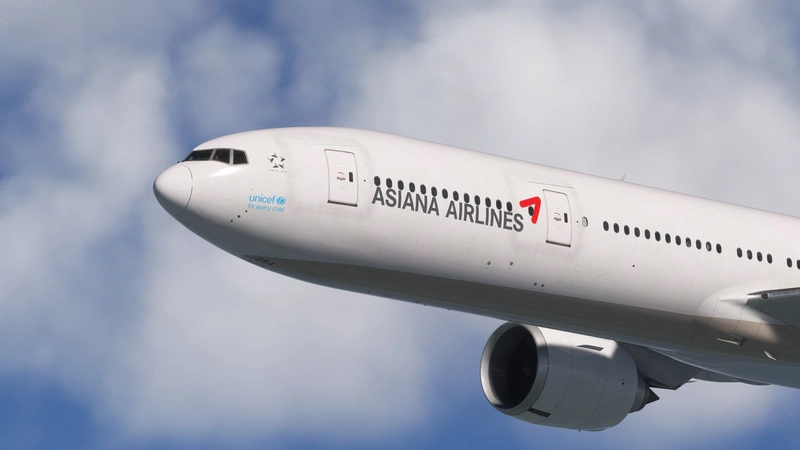
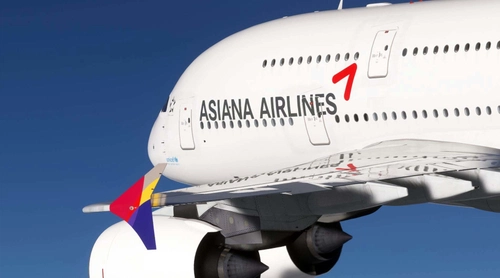
1. Dirty LiveryWhile FBW provides a default dirty kit, I found it overly blotchy and less visually appealing. So, I hand-painted custom weathering to create a balanced, realistic wear effect that enhances the aircraft's appeal without overdoing it. Enjoy a livery that captures Asiana Airlines HL7625 in a naturally aged look!
2. Cabin Details
From Business Smartium to Economy, all classes are represented with authentic seat patterns, wood textures, and more. This livery includes textures inspired directly by the real Asiana cabin for a truly immersive experience.
Note: Some areas, such as the walls near Business and First-Class windows, are modeled by FBW but not fully activated in MSFS yet. I'll update these as soon as they become available in the sim.
AVOD System: Although the AVOD system is modeled in the FBW A380, it’s not currently active in MSFS. Once it’s supported, I’ll update it accordingly. For now, basic colors are applied to the seats, so some mirroring effects might appear.
3.4K Support
Due to file upload size limitations, the 4K version is available for download in the "Additional download" section (the main file only includes the 8K version).
Installation
Simply extract the downloaded ZIP file into your MSFS Community folder.
I’ve done my best to capture every detail for an authentic experience of Asiana’s A380. Check it out and feel the difference for yourself!
[8K/4K]FBW A380 | Asiana Airlines Livery Pack [w/Cabin]
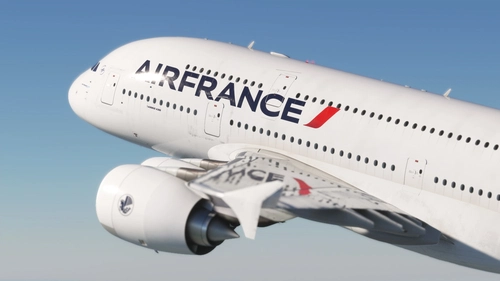
Experience the Asiana Airlines A380 with a custom dirty livery featuring hand-painted weathering for a realistic appearance. The add-on also includes detailed cabin textures for Business Smartium and Economy classes, closely reflecting the airlines authentic interiors. While some features, such as the AVOD system, are not currently active in MSFS, the design aims to provide an immersive flying experience. Installation is straightforward by extracting the files into your MSFS Community folder.

Nutzerbewertungen
11 Bewertungen
Versionsgeschichte
1. 4K Support: Due to file upload size limitations, the 4K version is available for download in the "Additional download" section (the main file only includes the 8K version). 2. Cockpit Window Update: Removed residual default paint sunglasses sticker marks on the forward cockpit windows. 3. Seat Update: The rear observer seats in the cockpit have been updated to fabric seats instead of wool, as they are fabric in reality. The captain and first officer seats remain wool as before.
In Sammlungen enthalten(1)

Ähnliche Addons
![iniBuilds A350-900 Asiana Airlines [w/Cabin] Livery Pack](https://cdn.flightsim.to/images/27/inibuilds-a350-900-asiana-airlines-livery-pack-243079-1740856993-UPs3J.jpg?width=500)
iniBuilds A350-900 Asiana Airlines [w/Cabin] Livery Pack
This livery pack offers six meticulously crafted Asiana Airlines liveries for the iniBuilds A350-900, featuring both pre-merger and post-merger designs. Each livery is designed for authenticity, showcasing the airlines unique font and logo placement with accurate color matching. The pack includes liveries with and without the Kumho logo, catering to different eras of the airlines branding. Compatibility with MSFS 2024 is planned for a future release.
von PIZZA_BOY
![[8K/4K] FBW A380 | Korean Air Livery Package [w/Cabin & 4 Liveries]](https://cdn.flightsim.to/images/27/fbw-a380--korean-air-livery-package---hl7628--hl7614-50th-anniversary-special-243079-1730870125-GNhvI.jpg?width=500)
[8K/4K] FBW A380 | Korean Air Livery Package [w/Cabin & 4 Liveries]
This add-on features a detailed livery package for the FBW A380, including the original Korean Air livery (HL7628) and a special 50th Anniversary edition (HL7614). It offers a highly realistic cabin interior with authentic materials and patterns, as well as enhanced exterior textures for added realism. The package also includes accurate engine details specific to Korean Airs GP7200 engines, ensuring an immersive flying experience.
von PIZZA_BOY
![FBW A380 Korean Air HL7628 – New Livery [w/Cabin] (GP7200 / PW Engine)](https://cdn.flightsim.to/images/27/fbw-a380-korean-air-hl7628--new-livery-gp7200--pw-engine-243079-1751891131-WHVlk.jpg?width=500)
FBW A380 Korean Air HL7628 – New Livery [w/Cabin] (GP7200 / PW Engine)
This add-on features a meticulously designed livery for the FBW A380, showcasing Korean Airs HL7628 in the New Corporate Identity scheme. It includes high-resolution textures with a signature metallic blue finish, detailed weathering effects, and a fully recreated cabin interior. Additionally, the livery provides accurately textured cockpit details and custom GP7200 engine visuals, ensuring a realistic flying experience.
von PIZZA_BOY
![iniBuilds A350-900 Korean Air [w/Cabin] HL8597 & HL8598 Livery](https://cdn.flightsim.to/images/27/inibuilds-a350-900-korean-air-hl8597-hl8598-livery-243079-1740856117-idZzb.jpg?width=500)
iniBuilds A350-900 Korean Air [w/Cabin] HL8597 & HL8598 Livery
This add-on features realistic liveries for the iniBuilds Airbus A350-900, specifically representing Korean Air aircraft HL8597 and HL8598. The liveries showcase an authentic font, accurate color matching, and correct placement of registration numbers on the wings. Note that a known issue affects the display of the Korean Air logo on the right wing, which is under review for future updates.
von PIZZA_BOY
Melden Sie sich an, um an der Diskussion teilzunehmen
AnmeldenKommentare(48)
about 1 month ago
about 2 months ago
3 months ago
4 months ago
4 months ago
4 months ago
5 months ago
5 months ago
5 months ago
7 months ago
7 months ago
9 months ago
9 months ago
10 months ago
10 months ago