
Beschreibung
Auto-throttle for the JustFlight F28 Fellowship
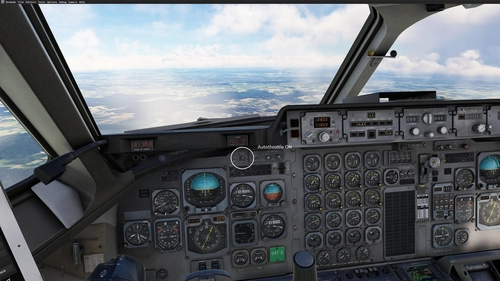
This is a plugin that adds a very simplistic emulation of auto-throttle to the great F28 Fellowship family by JustFlight. I have created it mostly to check out how plugin development for the MSFS works and managing throttle of F28 while in cruise is always a boring task for me, especially if there is a busy airspace around and I may be distracted.
It was tested with v1.3.0 of JF Fokker F28. It is important to note, that it overrides the F28’s panel.cfg — whenever JF will change anything with it (for example adding UNS fmc, other GPS options, and so on) this mod will need to be updated. Also, important note is that testing was mostly done on The F28-1000 and it is likely that further tuning will be required on other variants of the family. It is something I'll get to in the near future, along with overall tuning and smoothening of throttle operation (as can be seen from the preview video, they can be a bit jumpy).
Operation- The mod supports default MSFS bindings for “AUTO_THROTTLE_ARM” and “AUTO_THROTTLE_DISCONNECT” to engage/disengage.
- When engaged — white (inner) marker beacon light next to the speed brake and trim indicators is illuminated.
- The target speed is read from the left (captain) ASI and can be changed by rotating the left speed bug.
- Caution: whenever you click on the card with reference speeds for landing — it also sets a bug, so be ready that AT will try to slow down to Vref + 5 when you click on card to set Vref/flap markers.
- At 50 feet AGL auto throttle disconnects to allow for speedbrake operation while in air and facilitate precise control while flaring. That being said, I suggest flying final approach manually as now the AT has no information about winds, being in high- or low-energy state
- AT is inoperable at or below 50 feet AGL
- AT has some inherent oscillations when capturing speed, especially when engaged with large difference between target and actual speed. This is something I’ll look into in the future updates.
- AT can dip below target speed when acquiring it from a higher speeds. However in testing these dips were no more than 5-8 knots and were corrected quickly enough.
- AT should not be used for the approaches, especially in very gusty conditions as it was not a design feature for this plugin at the moment. That being said, in initial testing it was able to hold speed at Vref+5 in moderate winds and gusts. But also, where is fun in that?
Installation
Unzip the archive and folder into your community folder.
Then in your community folder find `justflight-aircraft-f28\SimObjects\Airplanes\Just Flight Fokker F28-4000\panel\panel.cfg`, make a back-up of it, and then (no, I mean it, make a back-up) file and add following block:
[VCockpit12]
size_mm=0,0
pixel_size=0,0
texture=NO_TEXTURE
background_color=42,42,40
htmlgauge00=KnidarknessVFEGauge/VFE.html, 0,0,1,1
before the "views" block (as of update v2 on line 98)
[VIEWS]
VIEW_FORWARD_DIR=2.000, 0.000, 0.000Autothrottle for JustFlight Fokker F28 Fellowship
Add auto-throttle functionality to your JustFlight Fokker F28 Fellowship with this plugin. Engage/disengage with default MSFS bindings and adjust target speed easily. Please note known limitations and follow installation instructions for optimal performance.


Nutzerbewertungen
9 Bewertungen
Versionsgeschichte
- Tuned PID coefficients for a smoother throttle input and to reduce throttle jittering/jumping
Ähnliche Addons
Auto-throttle for the JustFlight BAE 146
This add-on introduces a basic auto-throttle feature for the JustFlight British Aerospace 146 family. Primarily designed to ease throttle management during cruise, it offers support for default MSFS bindings and features an automatic disconnection at 50 feet AGL. While tested mainly on the BAE 146-300 and BAE 146-100 variants, users should be aware of current limitations, including inherent oscillations and manual intervention required during approaches, particularly in gusty conditions.
von knidarkness

SimScenarios - smart fault injection for Microsoft Flight Simulator
SimScenarios is a tool that enables users to create custom failure scenarios for Microsoft Flight Simulator. It supports aircraft such as the Fenix A320 family, PMDG 737 and 777, and several Black Square models, with over 100 types of failures configurable by triggers like altitude, airspeed, gear, and location. Scenarios can even be shared with others.
von knidarkness
Melden Sie sich an, um an der Diskussion teilzunehmen
AnmeldenKommentare47
Excelent mod, I have not tried it in the PMDG DC-6 yet, but will do that shortly.
Best Regards
FWIW, it's only for f28, won't work with DC-6 :(
Running msfs 2020 and I have insert the block 11 just under the block 10 in the config file of simobjects panel directory . No response at all, I bind the AUTO_THROTTLE_ARM” and “AUTO_THROTTLE_DISCONNECT” to my TCA Boeing quadrant but no result. The standard binding key in the keybord does not give any result either. Very sorry for that as I realy would have such a mod.
Any idea or suggestions would be greatful
Thanks in advance
Bjorn