
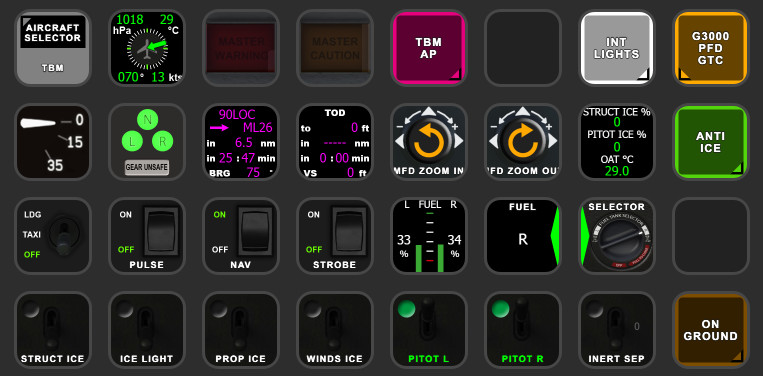
Beschreibung
MSFS TBM 930 StreamDeck XL and PLUS Profile for LORBYs AxisAndOHs (AAO) and its SD Plugin
You need LORBYs AAO and its StreamDeck Plugin to run this StreamDeck profile
SD plugin could be found on the bottom of the download site
I don't use this addon any longer. So don't expect further development.
ATTENTION!
PLEASE READ CAREFULLY!
- When you import SD profiles, make sure to delete the old ones, otherwise you'll get profile copies.
- Make sure to always have the latest AAO and AAO StreamDeck plugin versions!
- I just create the SD profiles! For any connection issues, SD plugin not working, Buttons show "?" or nothing, no reaction of the SD etc., please contact the developer of AAO! And please read the AAO Manual or the short Troubleshooting PDF
- It is - as the title says - just for the StreamDeck XL (!). Please do not ask for a 15 button conversion. This will not happen as this will more than double the amount of development and support for me as I do not have a 15 button SD. Sorry.
- Please ask if you want to use parts of my SD profiles, icons or AAO scripts or whatever! And please ask everytime you start a new project! You have to credit and link me in your description!
- If you use my work, you are then NOT allowed to beg for own donations!
Installation:
- Doubleclick on the TBM 930.streamDeckProfile to install it
- Import the AxisAndOhsScripts_TBM.xml into AAO.
- If you have a StreamDeck PLus, please doubleclick onto the PLUS TBM.streamDeckProfile
- Download and open the "zzz-lorbysi-aao-wtg3000.zip" and drop it into (or link it to) your community folder!
Donations are welcome!!! it is a lot, really a lot of work, and some donations make future projects easier ;) thx!
If you want to donate directly as friend without a PayPal fee, then use this adress, please: www.paypal.com/paypalme/GuenterSteiner
TBM 930 profile for StreamDeck XL and PLUS (for LORBYs AAO SD plugin)
Customize your Microsoft Flight Simulator experience with the TBM 930 StreamDeck XL and PLUS Profile, designed for LORBYs AAO SD Plugin. Enhance your cockpit functionality with features like device controls, cockpit lights, and toggle switches. Ensure a seamless installation by following the detailed instructions provided.

Unterstützer

AceofSpades1086
€100

Thoddy398
€50

Rhinozherous
€50

Villajota
€30

homerun79
€30
jiminiz
€25
mjchernis
€25
SteinErik
€20
SVBeka
€20
jiminiz
€20
VliegPiet
€20
Cloudsurfer744
€20
Santamaria13
€20
Gschneidner
€20
Villajota
€20
CharliechanB
€20
Santamaria13
€20
rrp495
€20
mikeyprez
€20
josemarroyo
€15
WandGitarre2465
€15
andymurph
€15
stribi
€15
MrBill
€13
FlugThomas
€10
Relax
€10
dc9116
€10

ChillMays
€10
NaughtyGnome
€10
wjbutter
€10
Noel_aus
€10
Markus_Pilot_com
€10
flug1997
€10
Mamadou79
€10
Red1963
€10
pmec
€10
phil1810
€10
Troijaa
€10
NaughtyGnome
€5
Factionless183
€5
Oettilein
€5
tubarao2007
€5
kbootb
€5
BertieB
€3
Nutzerbewertungen
17 Bewertungen
Versionsgeschichte
Maybe I have uploaded wrong/old profiles with 4.0, I don't know. Freshly exported and repacked everything.
Ähnliche Addons
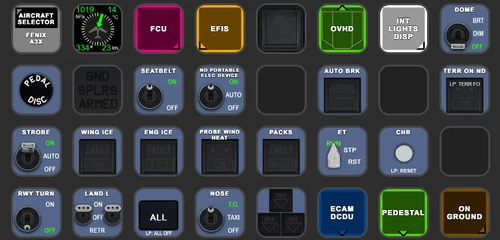
FENIX A3XX AAO Scripts & StreamDeck XL & PLUS Profile
Customize your Microsoft Flight Simulator experience with FENIX A320 AAO Scripts & StreamDeck XL Profile by Guenseli. This add-on offers a seamless integration with LORBYs AAO and StreamDeck Plugin for optimal performance. Explore the detailed installation instructions for enhanced functionality with a VRInsight MCP Combo II. Elevate your simulation setup with this meticulously crafted add-on.
von Guenseli
Icon Pack for Elgato StreamDeck
A collection of over 3500 icons designed for Elgato StreamDeck and similar devices, created by Guenseli. Ideal for personal use with a disclaimer against commercial usage. Icons are detailed and diverse, providing a variety of options for customization. Credits required if used in public projects, with a suggestion for donations to support the creators work.
von Guenseli
PMDG 737 AAO Scripts & StreamDeck XL & PLUS Profile
Enhance your PMDG 737 experience with the PMDG 737 AAO Scripts & StreamDeck XL & PLUS Profile by Guenseli. Make sure to update your Elgato Software to version 6.0 or higher for compatibility. This profile is specifically designed for the StreamDeck XL and requires LORBYs AAO and its StreamDeck Plugin to run smoothly. Get ready to elevate your cockpit with this detailed and user-friendly add-on.
von Guenseli
FBW A320 AAO Scripts & StreamDeck XL & PLUS profile and MCP Combo template
Enhance your FBW A320 experience with tested AAO Scripts and StreamDeck profiles for XL & PLUS versions. Ensure to delete old profiles before import and always use the latest plugin versions for seamless integration. Contact AAO developer for any connection issues and give credit if using parts of these profiles in your projects. Install scripts and profiles for an immersive flight simulation experience.
von Guenseli
Melden Sie sich an, um an der Diskussion teilzunehmen
AnmeldenKommentare(126)
almost 4 years ago
If you have greyed out buttons, no reaction of the StreamDeck, exclamation marks etc, that means you have connections issues between AAO and the StreamDeck.
94% of all support request are due to no proper connections or outdated versions of AAO and/or the AAO SD plugin.
Check ports, check the troubleshooting PDF, contact AAO support.
My Streamdeck profiles work (beside from probably little bugs). If you have such issues, I can't help you, sorry! Support requests can't not solved by me as I'm not the developer of AAO!
about 1 month ago
about 1 month ago
For the other issue, check if you have the latest versions of everything: SD plugin, AAO and StreamDeck software itself
about 1 month ago
Dieser Kommentar wurde gelöscht
about 1 month ago
5 months ago
The only thing missing is the LEVEL button
8 months ago
My issue is some of the buttons work and some don't. Most don't.
Thanks in advance for any help.
8 months ago
You have to be 100% sure that you are using the latest
AAO SD Plugin
AAO
Elgato StreamDeck Software
versions.
Please contact me via PM if you unsure and send me all these software versions, then I can check
If the versions are correct, we can move on investigating
about 1 year ago
Not only on this profile, but on other too. (GPS WP NEXT ID, String)
Do you have a workaround ?
Thanks
about 1 year ago
Except you'll find the right variables.
Will have a look into it ...
about 1 year ago
https://docs.flightsimulator.com/msfs2024/html/6_Programming_APIs/SimVars/Aircraft_SimVars/Aircraft_RadioNavigation_Variables.htm#GPS_IS_ACTIVE_WAY_POINT
Maybe a fs2024 bug
about 1 year ago
The variable does not show anything
about 1 year ago
thanks
over 1 year ago
Is anyone else experiencing this problem? I'm testing with MSFS2020. Regards.
over 1 year ago
over 1 year ago
over 1 year ago
over 1 year ago
Btw, added G3000 bridge from Axesandohs, and the profile works great. Thanks !!!
over 1 year ago
over 1 year ago