
Beschreibung
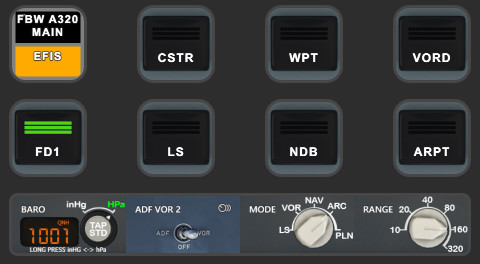
FBW A320 AAO Scripts & StreamDeck XL & PLUS profile
I don't use this addon any longer. So don't expect further development.
ATTENTION!
PLEASE READ CAREFULLY!
- When you import SD profiles, make sure to delete the old ones, otherwise you'll get profile copies.
- Make sure to always have the latest AAO and AAO StreamDeck plugin versions!
- I just create the SD profiles! For any connection issues, SD plugin not working, Buttons show "?" or nothing, no reaction of the SD etc., please contact the developer of AAO! And please read the AAO Manual!
- It is - as the title says - just for the StreamDeck XL (!). Please do not ask for a 15 button conversion. This will not happen as this will more than double the amount of development and support for me as I do not have a 15 button SD. Sorry.
- Please ask if you want to use parts of my SD profiles, icons or AAO scripts or whatever! And please ask everytime you start a new project! You have to credit and link me in your description!
- If you use my work, you are then not allowed to beg for own donations!
Installation:
Import the needed A320 Scripts "AxisAndOhsScripts_FBWA320.xml" into AAO (Scripting --> import Scripts)
Doubleclick (install) the SD Profile FBW A320.streamDeckProfile
For StreamDeck PLUS doubleclik on PLUS FBW A320N.streamDeckProfile
Donations are welcome!!! it is a lot, really a lot of work, and some donations make future projects easier ;) thx!
If you want to donate directly as friend without a PayPal fee, then use this adress, please: www.paypal.com/paypalme/GuenterSteiner
FBW A320 AAO Scripts & StreamDeck XL & PLUS profile and MCP Combo template
Enhance your FBW A320 experience with tested AAO Scripts and StreamDeck profiles for XL & PLUS versions. Ensure to delete old profiles before import and always use the latest plugin versions for seamless integration. Contact AAO developer for any connection issues and give credit if using parts of these profiles in your projects. Install scripts and profiles for an immersive flight simulation experience.

Unterstützer

Chuck.Diaz
€23
riveter
€20

sabres431
€20
Tronson16
€20
Memorialkid
€20
paulhand
€15
BLaabs
€10
emergohh
€10
CSUBuzz
€10
jbond0072000
€10
adwt0125
€10
sim2relax
€10
r.egger
€10
riveter
€10
phoenix4472
€10
phil1810
€10
klausdieterotto
€10
iAmNotDJ
€10
iAmNotDJ
€10
Oettilein
€10
Mamadou79
€10
iAmNotDJ
€10
GuenterEDDM
€10
dvf757
€7
alovella
€5
sleeper_62
€5
Phelby
€5
€5
GIROMAN
€5
Brezerl
€5
Jng1369
€5
Nutzerbewertungen
57 Bewertungen
Versionsgeschichte
changed LL, Strobe and Taxi from B:Vars to IE:Vars People with inverted switches, please report back if that changes anything for them? But be sure to have always the latest SD plugin version!! If this version works now, these people do have problems with B:Vars and have to check their AAO setup.
Ähnliche Addons
FENIX A3XX AAO Scripts & StreamDeck XL & PLUS Profile
Customize your Microsoft Flight Simulator experience with FENIX A320 AAO Scripts & StreamDeck XL Profile by Guenseli. This add-on offers a seamless integration with LORBYs AAO and StreamDeck Plugin for optimal performance. Explore the detailed installation instructions for enhanced functionality with a VRInsight MCP Combo II. Elevate your simulation setup with this meticulously crafted add-on.
von Guenseli
Icon Pack for Elgato StreamDeck
A collection of over 3500 icons designed for Elgato StreamDeck and similar devices, created by Guenseli. Ideal for personal use with a disclaimer against commercial usage. Icons are detailed and diverse, providing a variety of options for customization. Credits required if used in public projects, with a suggestion for donations to support the creators work.
von Guenseli
PMDG 737 AAO Scripts & StreamDeck XL & PLUS Profile
Enhance your PMDG 737 experience with the PMDG 737 AAO Scripts & StreamDeck XL & PLUS Profile by Guenseli. Make sure to update your Elgato Software to version 6.0 or higher for compatibility. This profile is specifically designed for the StreamDeck XL and requires LORBYs AAO and its StreamDeck Plugin to run smoothly. Get ready to elevate your cockpit with this detailed and user-friendly add-on.
von Guenseli
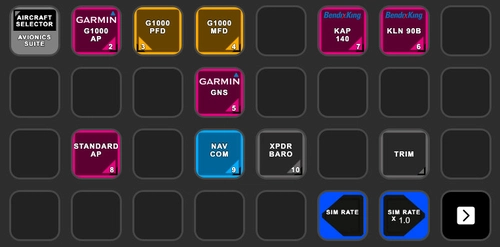
Avionics Suite for StreamDeck XL & PLUS
Enhance your Flight Simulator experience with the Avionics Suite for StreamDeck XL & PLUS, featuring G1000, GNS units, autopilot functions, and more for AxisAndOHS users. Ensure to follow installation instructions carefully and stay up to date with the latest plugins and versions for optimal performance. Customizable profiles for easier navigation and direct access to specific avionics pages, providing a convenient and immersive simulation experience. Support the developers work by considering a donation if you find the add-on helpful.
von Guenseli
Melden Sie sich an, um an der Diskussion teilzunehmen
AnmeldenKommentare(328)
almost 4 years ago
If you have greyed out buttons, no reaction of the StreamDeck, exclamation marks etc, that means you have connections issues between AAO and the StreamDeck.
94% of all support request are due to no proper connections or outdated versions of AAO and/or the AAO SD plugin.
Check ports, check the troubleshooting PDF, contact AAO support.
My Streamdeck profiles work (beside from probably little bugs). If you have such issues, I can't help you, sorry! Support requests can't not solved by me as I'm not the developer of AAO!
9 months ago
after a long break, I started using MSFS 2020 again with the FBW A32NX and noticed that some Stream Deck functions were no longer working correctly.
To fix this, I decided to tweak a few things, and I managed to get most of it working again.
Tested versions:
- Microsoft Flight Simulator 2020 (latest version)
- FBW A32NX DEV version 4569ac8
- AxisAndOhs version 4.56 b19
- Stream Deck software version 7.1.1 (22340)
In this package, I modified some scripts and several calls between the Stream Deck and AxisAndOhs.
Affected Stream Deck pages:
-On Ground – Page 2
-FCU – Page 3
-EFIS – Page 4
-ECAM – Page 5
-OVHD – Page 6
The compressed file contains:
-An updated Stream Deck profile
-Updated AxisAndOhs scripts
-A sound effects folder
If you want to use the sound effects, copy the folder, without rename it, to the root of drive C:
(for example: C:\A320_Sounds_Effects).
I added sound effects triggered by AxisAndOhs because some AAO events change the simulator state without a physical button press, which would otherwise result in no audio feedback.
If you don’t want any sound effects, simply remove, rename, or move the A320_Sounds_Effects folder.
I have asked the original creator of this package for permission to publish a fork. While waiting for their response, I’m sharing my work with the community.
DOWNLOAD HERE:
https://drive.google.com/drive/folders/17KSKZqlveEDkcdh4m1j7Y2EBFi4vgVvW?usp=sharing
I hope you find it useful.
Thanks againt to Guenseli for the great work!
Let’s keep this thread updated.
9 months ago
For those whom had same issue than me : When importing SD profile, software ask if we are sure and after clicked to "Yes", nothing happens. Issue is caused by the version of SD software. My Stream Deck software was on version 7.0.3 (22071) and I wasn't able to update on same version than yours because it gave me an error when tried to update direct from software. So I downloaded last version 7.2.0 (22454) from their website and now import profile is running fine.
About "T.O. CONFIG" button, as I use FBW stable version, the button was correctly pushed in the sim with your script but nothing happens. So I changed to this code and now it works :
1·(>H:A32NX_ECP_TO_CONF_TEST_PRESSED)
(WAIT:250)
0·(>H:A32NX_ECP_TO_CONF_TEST_RELEASED)
"BRK FAN" button is working well but the status on SD doesn't come back when it's ON or HOT. Here is modified script (again for last stable FBW version) :
(L:A32NX_BRAKES_HOT,·Number)·1·==·if{·1·}·els{·0·}
(>L:FBWA320BRKFANSEQ1)
(L:A32NX_BRAKE_FAN_BTN_PRESSED,·Number)·1·==·if{·1·}·els{·0·}
(>L:FBWA320BRKFANSEQ2)
9 months ago
Thanks also for sharing the Stream Deck version issue and solution, that will definitely help other users who might run into the same problem.
Just to clarify: all my tests and development are currently done using the FBW A32NX DEV version, not the Stable one.
Regarding the T.O. CONFIG and BRK FAN buttons: thank you for the suggested changes and for pointing out the differences with the FBW stable version. I’ve now updated the scripts accordingly using your suggestions.
I’ve re-uploaded the compressed file on Google Drive, and it now includes:
- The updated T.O. CONFIG logic;
- The updated CLR left and CLR right buttons logic;
- The revised BRK FAN script with correct status feedback on the Stream Deck;
Thanks again for your contribution — it’s always great when improvements come from real-world usage. Happy flying! ✈️
over 1 year ago
9 months ago
If you'd like, I can send you both so you can tell me if they work.
(tested with dev version "4569ac8" of FBW A32NX)
over 1 year ago
about 1 year ago
1 (L:A32NX_OVHD_ELEC_EXT_PWR_PB_IS_ON, Bool) - (>L:A32NX_OVHD_ELEC_EXT_PWR_PB_IS_ON, Bool)
Paste it into the AAO scripts editor and click 'Test'. It should toggle the Ext Pwr button.
If it works correctly you can create the script and the Stream Deck action.
over 1 year ago
about 1 year ago
almost 2 years ago
almost 2 years ago
Hope author notice this situation and update.
almost 2 years ago
about 2 years ago
almost 2 years ago
almost 2 years ago
over 2 years ago
over 2 years ago
over 2 years ago
almost 2 years ago
Push and Pull do not work for heading or speed, they do work for Altitude.
Thank you