
Beschreibung
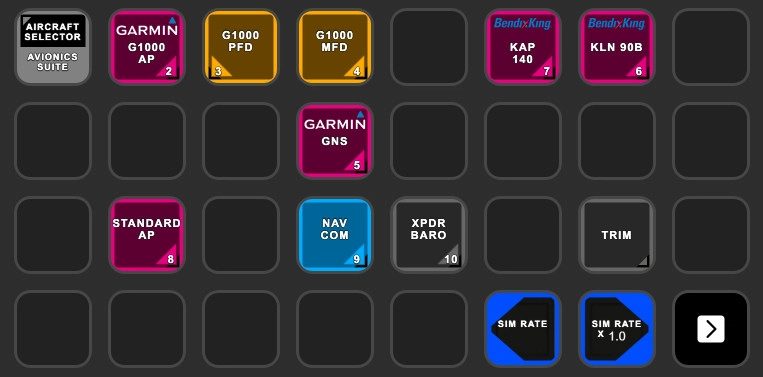
Avionics Suite for StreamDeck XL & PLUS (AAO)
G1000, GNS 530, GNS 430, KAP140 (only XL), Standard AP, NAV, COM, XPDR, BARO, G1000 PFD, G1000 MFD and G3X and KLN90B (both only PLUS)
for AxisAndOHS and its StreamDeck plugin
NOTE:
You need the latest StreamDeck plugin from the AAO download page. ("Plugin for the Elgato Stream Deck")
You need also the "MSFS: G1000 Bridge" from the same side
Tested only in MSFS2024!
ATTENTION!
PLEASE READ CAREFULLY!
- When you import SD profiles, make sure to delete the old ones, otherwise you'll get profile copies.
- Make sure to always have the latest AAO and AAO StreamDeck plugin versions!
- I just create the SD profiles! For any connection issues, SD plugin not working, Buttons show "?" or nothing, no reaction of the SD etc., please contact the developer of AAO! And please read the AAO Manual or the short Troubleshooting PDF
- It is - as the title says - just for the StreamDeck XL (!). Please do not ask for a 15 button conversion. This will not happen as this will more than double the amount of development and support for me as I do not have a 15 button SD. Sorry.
- Please ask if you want to use parts of my SD profiles, icons or AAO scripts or whatever! And please ask everytime you start a new project! You have to credit and link me in your description!
- If you use my work, you are then NOT allowed to beg for own donations!
Installation:
doubleclick on Standard Avionics Suite.streamDeckProfile
doubleclick on PLUS Standard Avionics Suite.streamDeckProfile to install for the SD PLUS
Download and open the "zzz-lorbysi-aao-wtg1000.zip" and drop it into (or link it to) your community folder! Then you have variable texts on the G1000 PFD/MFD buttons
No scripts needed!
To use the KLN 90B you have to download and install the package from Github: GitHub - falcon71/kln90b: KLN 90B for MSFS
Donations are welcome!!! it is a lot, really a lot of work, and some donations make future projects easier ;) thx!
If you want to donate directly as friend without a PayPal fee, then use this adress, please: www.paypal.com/paypalme/GuenterSteiner
Avionics Suite for StreamDeck XL & PLUS
Enhance your Flight Simulator experience with the Avionics Suite for StreamDeck XL & PLUS, featuring G1000, GNS units, autopilot functions, and more for AxisAndOHS users. Ensure to follow installation instructions carefully and stay up to date with the latest plugins and versions for optimal performance. Customizable profiles for easier navigation and direct access to specific avionics pages, providing a convenient and immersive simulation experience. Support the developers work by considering a donation if you find the add-on helpful.

Unterstützer

aaronpriest
€100

Thoddy398
€50
reehoe
€34
FujitsuPolycom
€25
Basilrug
$25
Thoddy398
€25
Guepfl
€25
NSCC06
€20
gellio1121
€20

BuffaloBill19
€20
mjchernis
€20
mikeindiatang71
€15
Relax
€15
Akkordarbeiter
€10
€10
Bomberpaul
€10
ericbakker
€10

Villajota
€10
PHSYM
€10
Villajota
€10
phamks
€10
Arndt777
€10
blackhawk5
€10
SalvaMSFS
€10
Sartor
€10

B777ER
€10
Helibrewer
€10
€5
Thoger
€5
kwmcb
€5
abernstein
€5
NoixVolante
€5
mcgradj
€3
cgts
€3
Nutzerbewertungen
24 Bewertungen
Versionsgeschichte
Sorry to bother you again with an upate. I discovered, that the GNS units do not work with certain addons. With default they work, but not with some 3rd party. I changed now the variables back to ones which cover hopefully all needs. And COM / NAV button logic changed. All in all, GNS part of the Avionics Suite, for XL and PLUS, is completely reworked. Couldn't have tested every single function, so please report errors. Thanks
Ähnliche Addons
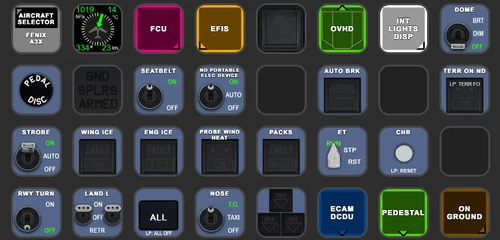
FENIX A3XX AAO Scripts & StreamDeck XL & PLUS Profile
Customize your Microsoft Flight Simulator experience with FENIX A320 AAO Scripts & StreamDeck XL Profile by Guenseli. This add-on offers a seamless integration with LORBYs AAO and StreamDeck Plugin for optimal performance. Explore the detailed installation instructions for enhanced functionality with a VRInsight MCP Combo II. Elevate your simulation setup with this meticulously crafted add-on.
von Guenseli
Icon Pack for Elgato StreamDeck
A collection of over 3500 icons designed for Elgato StreamDeck and similar devices, created by Guenseli. Ideal for personal use with a disclaimer against commercial usage. Icons are detailed and diverse, providing a variety of options for customization. Credits required if used in public projects, with a suggestion for donations to support the creators work.
von Guenseli
PMDG 737 AAO Scripts & StreamDeck XL & PLUS Profile
Enhance your PMDG 737 experience with the PMDG 737 AAO Scripts & StreamDeck XL & PLUS Profile by Guenseli. Make sure to update your Elgato Software to version 6.0 or higher for compatibility. This profile is specifically designed for the StreamDeck XL and requires LORBYs AAO and its StreamDeck Plugin to run smoothly. Get ready to elevate your cockpit with this detailed and user-friendly add-on.
von Guenseli
FBW A320 AAO Scripts & StreamDeck XL & PLUS profile and MCP Combo template
Enhance your FBW A320 experience with tested AAO Scripts and StreamDeck profiles for XL & PLUS versions. Ensure to delete old profiles before import and always use the latest plugin versions for seamless integration. Contact AAO developer for any connection issues and give credit if using parts of these profiles in your projects. Install scripts and profiles for an immersive flight simulation experience.
von Guenseli
Melden Sie sich an, um an der Diskussion teilzunehmen
AnmeldenKommentare(154)
about 1 hour ago
6 months ago
6 months ago
I don't have a XL +
And I currently do not plan it. Maybe that changes, when a majority of users have switched over to the XL +.
But if I get it now, I have to maintain two versions, XL and XL +, or I abandon the XL which will hurt a lot of users.
So, we will see how it develops
9 months ago
9 months ago
Yes, wrong one.
Should be replaced with:
AS430_RightSmallKnob_Push, Number
Sorry, will be fixed with nect update. Thanks for reporting!
12 months ago
Best regards ! Alain
12 months ago
Then the T206H must be the culprit I assume. Every addon and every developer chooses different methods and in this case it would mean I have to do a extra profile for it. This isn't something that can be "fixed".
sorry
about 1 year ago
Steadm Deck 7.0.0 (22005)
AxisAndOhs Integration 45.01
AxisAndOhs 4.54 b08
G1000 Bridge 0.3.1
about 1 year ago
about 1 year ago
thank you for your work!
I just tried the KLN90 with the latest version of the A2A Aerostar. None of the buttons are working. Are they using different vars? Thank you!
about 1 year ago
Are you sure to use latest AAO version and StreamDeck plugin version?
It's working here...
about 1 year ago
about 1 year ago
I'm curious, you have an ABC/123 screen for the Garmin MFD, but my MFD in the Kodiak doesn't seem to accept any keys from those buttons. Am I missing something or those are for some other G1000 panels?
about 1 year ago
If so, SWS has most probably used other variables unfortunately.
There have been many versions of the G1000 with different variables. Some developer probably do not update them, because it is customized
over 1 year ago
over 1 year ago
Dedicated work yet again.
All the best from North Devon.
over 1 year ago
I recently added the G1000 Bridge, which i missed, and the softkeys controls are a huge detail update. I watched a couple videos on this and understand and appreciate your effort to make this all come together. More kudos and many thanks for Avionics Suite. Woohoo !!!
over 1 year ago
first of all, thank you for your job which is very nice, and works pretty fine
however I have a problem with numeric and alpha numeric keys of the MFD, they don't seem to work, nothing append, the variable used is AS1000_ControlPad_x and doesn't seem to be known by the sim ...
all the rest is working fine
I am using your avionic suite with FS2020, I have installed version 3.2 but I have the same result with version 2_8_2020
I probably did something wrong but I cannot figure what .
Could you be kind enough to help me ?
thank you in advance
over 1 year ago
I know that there is no keypad on the real G1000, but you have simulate one in the addon, so I guess it should work
doe's one of you can help me to understand what is wrong in my installation ?
thank you in advance
I confirm that all the other functionalities are working fine and that it is a pleasure to use this addon who replace quite completely the mouse,
thanks' Guenseli for this huge job
over 1 year ago
1. AAO is up to date
2. AAO StreamDeck Plugin is up to date
3. I went through the trouble shooting PDF
4. Installed the Standard Avionics Suite.streamDeckProfile
5. Download and open the "zzz-lorbysi-aao-wtg1000.zip" - in the community folder
6. Ran AAO as Administrator
7. Restarted StreamDeck
8. Restarted AAO
9. Rebooted the PC
10. MSFS 2024 - Cessna 172 Skyhawk
11. Windows 11
Any ideas on how to get this working?