

Beschreibung
An enhanced GSX Pro profile for Vienna International Airport (LOWW), featuring customized ground handling, dynamic VDGS information, airline-specific gate assignments, optional Low-Cost Walk-in Handling, and automatic Jetway/Stairs operations.
The profile is designed to provide a more realistic and immersive ground handling experience at Vienna.
Profile Features
- Customized GSX parking positions and ground handling
- Custom pushback procedures at stands where required
- VDGS support with dynamic flight information
- Automatic Jetway and Stairs handling (optional, Full Handler only)
- Airline-specific gate assignments
- Optional Low-Cost / Walk-in Handling (not available at every gate)
- SimBrief and VATSIM CDM integration
- Persistent user preferences
- Optional Lite Handler without automatic Jetway/Stairs operations
IMPORTANT NOTAM
GSX_LOWW_ENHANCEMENTPACK_AUA9085 – MAIN VERSION
This is the main and actively maintained version since July 2026.
Designed for Gaya Simulations LOWW with one of the supported Enhancement Packages installed.
GSX_LOWW_STANDALONE_AUA9085 – DEPRECATED
This version was designed for the original Gaya Simulations LOWW scenery without Enhancement Packages.
Support for the STANDALONE version was discontinued in May 2026.
Due to scenery limitations, the following stands may be missing in the standalone version:
- B47, B49, B51, B53, B57, B59, B61, B63, B67, B69, B96
- K50, K51
- Some F remote stands
These limitations do not apply to the Enhancement Pack version.
Installation & Handler Versions
1. Install the GSX Profile
- Extract the downloaded archive.
- Open the main profile folder.
- Copy loww-enhc-AUA9085.ini and loww-enhc-AUA9085.py files into:
%APPDATA%\Virtuali\GSX\MSFS\ - Replace existing files if you are updating from an older version.
- Restart Couatl/GSX to load the updated profile and handler.
2. Choose Your Handler
Two handler versions are available. Both support dynamic VDGS information and optional Low-Cost Walk-in Handling.
FULL HANDLER
Included in the main profile folder.
Features:
- Dynamic VDGS with SimBrief and VATSIM CDM
- Automatic Jetway and Stairs operations
- Optional Low-Cost / Walk-in Handling
- VATSIM CID configuration
- Persistent user preferences
LITE HANDLER – Optional
Located in the folder:
OPTIONAL_LITE_HANDLER
The Lite version is intended for users who prefer to operate GSX Jetways and Stairs manually while keeping the dynamic VDGS and Low-Cost functions.
Features:
- Dynamic VDGS with SimBrief and VATSIM CDM
- Automatic VDGS updates and countdown
- VATSIM CID configuration
- Optional Low-Cost / Walk-in Handling
- No automatic Jetway or Stairs service requests
- No Jetway/Stairs automation popup
To install the Lite Handler:
- Install the main GSX
.iniprofile as described above. - Open the
OPTIONAL_LITE_HANDLERfolder. - Copy
loww-enhc-AUA9085_handler.pyinto:%APPDATA%\Virtuali\GSX\MSFS\ - Replace the existing standard handler when prompted.
- Restart Couatl/GSX
IMPORTANT
Use only one handler version at a time. The Lite Handler replaces the Full Handler; it is not an additional script.
Custom Handler Script
The included Python handler extends GSX Pro with dynamic flight information and airline-specific ground handling behavior.
The following features apply to both handler versions unless otherwise stated.
1. Dynamic VDGS Integration
The VDGS continuously updates flight information using available SimBrief and/or VATSIM CDM data.
Features include:
- Automatic detection of SID and TOBT changes
- Dynamic SID and departure runway updates
- Temporary UPDATED SID messages when the SID changes through ATC or SimBrief
- Temporary UPDATED TOBT notifications
- Automatic fallback between VATSIM CDM and SimBrief information
- Automatic NO SID display when no SID is available, instead of showing
DCT
Dynamic TTOT Calculation
Taxi times are calculated according to the assigned parking stand and departure runway, as taxi durations can vary significantly across LOWW.
The VDGS updates automatically without requiring a manual profile reload.
2. Automatic Jetway & Stairs Handling (Full Handler Only)
The Full Handler can automatically request Jetway and Stairs services after GSX has initialized the aircraft's parking position.
Features include:
- Automatic Jetway connection where applicable
- Automatic Stairs requests
- Improved handling of manual Boarding and Deboarding requests
- Automatic service termination during departure-related operations
This feature is optional. On first use, you can choose:
- YES: Enable automatic handling
- NO: Disable automatic handling
- LATER: Ask again on a future visit
Your preference is saved.
Using the Lite Handler?
Automatic Jetway/Stairs operations are completely disabled. You can continue using the standard GSX menu to operate these services manually.
3. Low-Cost / Walk-in Handling
For configured airlines such as Ryanair, Lauda, Malta Air, and Wizz Air, the handler can change GSX ground handling behavior at selected parking positions.
When enabled and applicable:
- GSX Jetway usage is disabled for the selected airline and stand (C31–C35 and C40–C42).
- Passenger Stairs remain available.
- Passengers may walk between the terminal and aircraft where suitable walking routes are configured.
- Existing bus settings remain in use if no suitable walking route is available.
Low-Cost Handling is controlled by a separate YES / NO / LATER popup and is independent of the normal Jetway/Stairs automation setting.
Low-Cost Handling is available in both the Full and Lite Handler.
4. Airline-Specific Gate Assignments
Airline-specific gate assignments are configured directly in the GSX airport profile (.ini).
These assignments are based on operational preferences at Vienna International Airport.
Examples include:
- Austrian Airlines / Star Alliance: F gates and selected remote positions
- Ryanair Group: C gates and selected B/D positions
- Other European carriers: Selected C and D gates
- Cargo operators: Assigned cargo and remote apron areas
GSX uses the configured airline codes to provide airline-specific parking suggestions when the aircraft's airline is recognized.
The handler does not override GSX's native parking suitability checks.
Note: Gate assignments represent operational preferences, not exclusive real-world parking rights. GSX may still display other parking positions depending on the selected menu view and GSX settings. The number of "suitable parkings" is not necessarily an airline-specific count.
Configuration & Saved Settings
When the handler is used for the first time, you may be asked to configure Low-Cost Handling, your VATSIM CID, and (with the Full Handler) automatic Jetway/Stairs operations.
The preferences are stored in GSX's persistent handler settings under:
%APPDATA%\Virtuali\Handlers\
Available Settings:
loww_automation_enabled (Full Handler only)
1= Automatic Jetway/Stairs enabled0= Automatic Jetway/Stairs disabled
loww_lowcost_walkin_enabled (Full & Lite)
1= Low-Cost / Walk-in Handling enabled0= Low-Cost / Walk-in Handling disabled
vatsim_cid (Full & Lite)
- Enter your VATSIM CID (e.g.
1234567) 0= VATSIM integration disabled
Preferences can be changed later. Restart Couatl/GSX after manually modifying stored settings.
IMPORTANT – De-Icing Stands
To use the customized De-Icing Stand correctly, you must STOP at the FIRST BLUE MARKER of the stand.
Gaya Simulations LOWW - Vienna / Wien GSX Profile
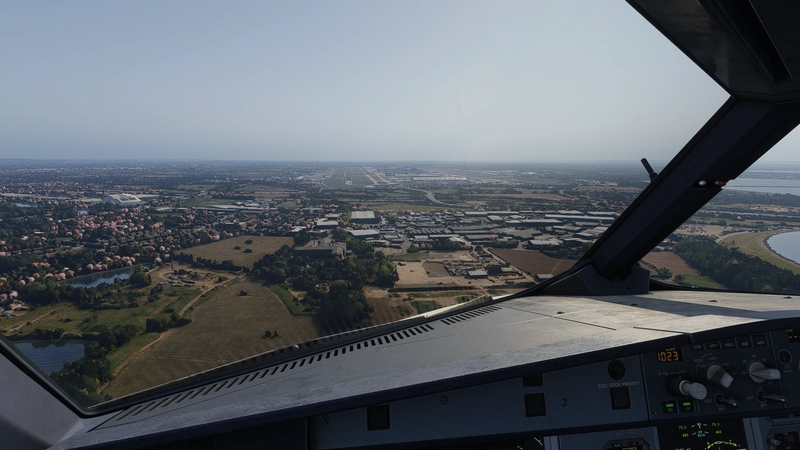
Enhance your Vienna experience with the Gaya Simulations LOWW v2 add-on, featuring VDGS support and custom pushbacks for a realistic airport environment. This profile includes missing stands not recognized by GSX, with remote de-icing stands added in the latest update for enhanced immersion. Make sure to reposition after loading to avoid any issues, and provide feedback for continuous improvements.
Mitwirkende
Unterstützer

Nutzerbewertungen
36 Bewertungen
Versionsgeschichte
- Add Low Cost Handling on specific Gates No Jetway will be served, only Stairs and Walk-in for Passengers - Add Airline Gate assignment - Modified some Pushback behaviours for F-Gates - Add "lite" Handler Version to the Download The Lite version is intended for users who prefer to operate GSX Jetways and Stairs manually while keeping the dynamic VDGS and Low-Cost functions.
In Sammlungen enthalten(1)



Ähnliche Addons
iniBuilds Innsbruck LOWI GSX Profile
This GSX profile tailors ground services at iniBuilds Innsbruck LOWI, adding custom pushback procedures at all stands. Gates close to terminal doors feature walk-in capabilities, creating a more realistic passenger experience. The profile removes unnecessary parking stands, ensuring only airline-appropriate positions are listed for selection. Suitable for those seeking improved ground operations at Innsbruck Airport.
von AUA9085

EasyCPDLC Modernized Version VATSIM
EasyCPDLC Modernized Version is a standalone CPDLC client for VATSIM pilots using the Hoppie ACARS network. This updated fork features a redesigned interface with Airbus and Boeing layouts, improved flight plan handling, and enhanced weather request options. It supports aircraft lacking native CPDLC functionality and offers integration with MSFS and Flow Pro. The tool runs on Windows with .NET 10 and requires VATSIM and Hoppie credentials.
von AUA9085
Kommentar-Zusammenfassung
Das allgemeine Stimmungsbild im Kommentarbereich des Gaya Simulations LOWW – Vienna GSX Profils ist überwiegend positiv. Viele Nutzer loben die Detailarbeit und die häufigen Updates des Profils sowie die schnelle Reaktion des Entwicklers auf Rückmeldungen. Gleichzeitig werden technische Probleme und Einschränkungen der Szenerie häufig angesprochen, etwa fehlende oder falsch benannte Gates, Fehler beim Andocken von Jetways und VDGS, fehlerhafte Positionen von Bodenfahrzeugen und Schwierigkeiten beim Boarding (z.B. unsichtbare Passagiere oder falsche Laufwege). Auch Kompatibilitätsprobleme zwischen verschiedenen Szenerie- oder Enhancement-Versionen und Fragen zur Installation und Konfiguration treten immer wieder auf. Mehrfach wird darauf hingewiesen, dass viele Einschränkungen durch die Basisszenerie und nicht durch das GSX-Profil bedingt sind. Die Diskussion um die Nutzung von KI-generierten Vorschaubildern prägte einen Teil des Austauschs, hatte jedoch keinen Einfluss auf die technische Qualität. In den Kommentaren werden auch Hinweise und Workarounds zur Fehlerbehebung gegeben, etwa das Repositionieren des Flugzeugs im GSX-Menü oder das Überprüfen auf doppelte Profile. Insgesamt wird das Profil als wertvolle Ergänzung gesehen, erfordert jedoch eine sorgfältige Einrichtung und ist teils durch externe Faktoren limitiert.
Zusammengefasst am 13. Nov. 2026
Melden Sie sich an, um an der Diskussion teilzunehmen
AnmeldenKommentare212
can i use the actual 3.17a version with the non-enhancement (standard) version from gayasim?
I would suggest to wait until the Rebooted Version of Vienna comes out on which Gaya is currently working on. :)
3.17a is only working for the enhanced version.
Can you check if you probably have 2 LOWW profiles, on that Stand there should never come Stairs to the Aircraft.
gsx absolutely can have multiple operator specific items, ive multiple profiles that do it its either in the .py or handler file I just haven't a clue how they work, even do a low cost carrier version where theyre walk in gates
EDIT: Yeah this is possible but It takes some time to create all the Pathways for the Pax: )
With which Aircraft have you tested it?
Anyway, you are right. The problem here is, that GSX tries to connect the Jetway to 2L and it looks like the 777 is not close enough to the gate. I will fix this and push a update. :)