

Beschreibung
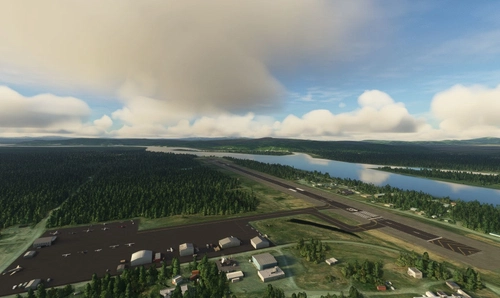
Welcome to McCarthy Airport located in McCarthy, Alaska. This airport doesn't exist in Microsoft Flight Simulator so I thought I'd bring it to life. I mean who doesn't love some bush flying?
(Work in progress, releasing and updating as MSFS SDK grows)
The entire airport was built from reference images and all built in-sim, not using ADE. I did add subtle things like lights surrounding the parking-gates to give it a more appealing and 'home' feel. The general aesthetic look is exactly the same from the parked planes and trucks on the side to the fuel depot at the opposite end of the hangar.
This is hands down the best add-on for your bush flying needs.
Fan of bush flying in Alaska? Download Talkeetna Village Strip while your at it.
RunwayRunway/Airport:
- ICAO: PAMX
- Runway: 1
- 1 taxiway path
- Fuel depot
- Car parking lot (can be seen from a fly over)
- 1 windsock
Other added stuff:
- Custom built Hangar
- GA parking lights
- 3 small GA stands with taxi-pushback/ground crew.
---
Notes:- Q: How can I give feedback?
- A: If you'd like to give me feedback of my mods, head to my personal Discord Server: https://discord.gg/ycbMseh
- You can keep track on who travels to this airport via Volanta. Just search for 'PAMX.'
Like what you experience? Feel free to 'Follow' the add-on to get the latest updates/news or Follow my userpage to get the newest add-ons/liveries that I release.
In the meantime, check out my other airports that I created here.
Häufig gestellte Fragen
Location
McCarthy Airport (PAMX)
Discover McCarthy Airport (PAMX) nestled in Alaska, a handcrafted addition for bush flying enthusiasts in Microsoft Flight Simulator. Experience a true-to-life representation of this unique airport, complete with custom-built structures and detailed surroundings. Stay tuned for updates and immerse yourself in authentic bush flying adventures.


Nutzerbewertungen
1 Bewertungen
Versionsgeschichte
- Changed: Major overhaul to the outside vegetation to save FPS.
In Sammlungen enthalten(1)

Ähnliche Addons

Walt Disney Landmarks/POI's
Explore famous Walt Disney landmarks and points of interest with this add-on, featuring various Disney parks worldwide. Easily navigate to Disney World parks, Disneyland, and even Disneys Private Island from the World Map. Begin your virtual Disney adventure without leaving your home.
von azgoodaz

Amboy Airfield/Runway (Route 66)
Experience a reenvisioned Amboy Airfield/Runway (Route 66) in Microsoft Flight Simulator. Inspired by real-life events, this project includes custom buildings and details like Roys Gas Station and the Amboy Church. Fly into this iconic location where pilots gather to visit, eat, and enjoy unique aviation history.
von azgoodaz

Walt Disney Runway
Explore the reenvisioned Walt Disney Runway in Microsoft Flight Simulator, offering a nostalgic VIP experience with small runway lights and a touch of Disney magic. Project 33 features a unique airport layout with stands, taxiways, and a custom "mouse" logo atop the ATC tower. Enjoy a flight into or out of this fictional airport, imagining what could have been if Walt Disneys dream of a Disney city had come to life.
von azgoodaz

Talkeetna Village Strip Airport (AK44)
Explore the charm of bush flying at Talkeetna Village Strip Airport in Alaska, a unique addition to Microsoft Flight Simulator. Immerse yourself in the authentic aesthetic of this airstrip recreated from reference images within the sim. This add-on offers GA parking, fixed scenery enhancements, and a helicopter-friendly environment. Keep track of your flights to this airport with Volanta and discover more creations by the developer.
von azgoodaz
Melden Sie sich an, um an der Diskussion teilzunehmen
AnmeldenKommentare(7)
over 4 years ago
Thanks for this.
Is the dependency "Alaska water height fix-Anchorage and Southern National Parks" still recommended/needed for SU8 ?
almost 5 years ago
Elevation shows as zero, should be 1533
over 4 years ago
I don't know I can fix this type of data. Might be hard-coded in-sim.
about 5 years ago
Runway is too dark. McCarthy is very light gravel.
about 5 years ago
Read the FAQ. Fixed the issue.
about 5 years ago
Tick ‘enable coloration’ and you can make it lighter.
about 5 years ago
I forgot that even existed. Updated the add-on. Thank you for this.