
Flightsim.to
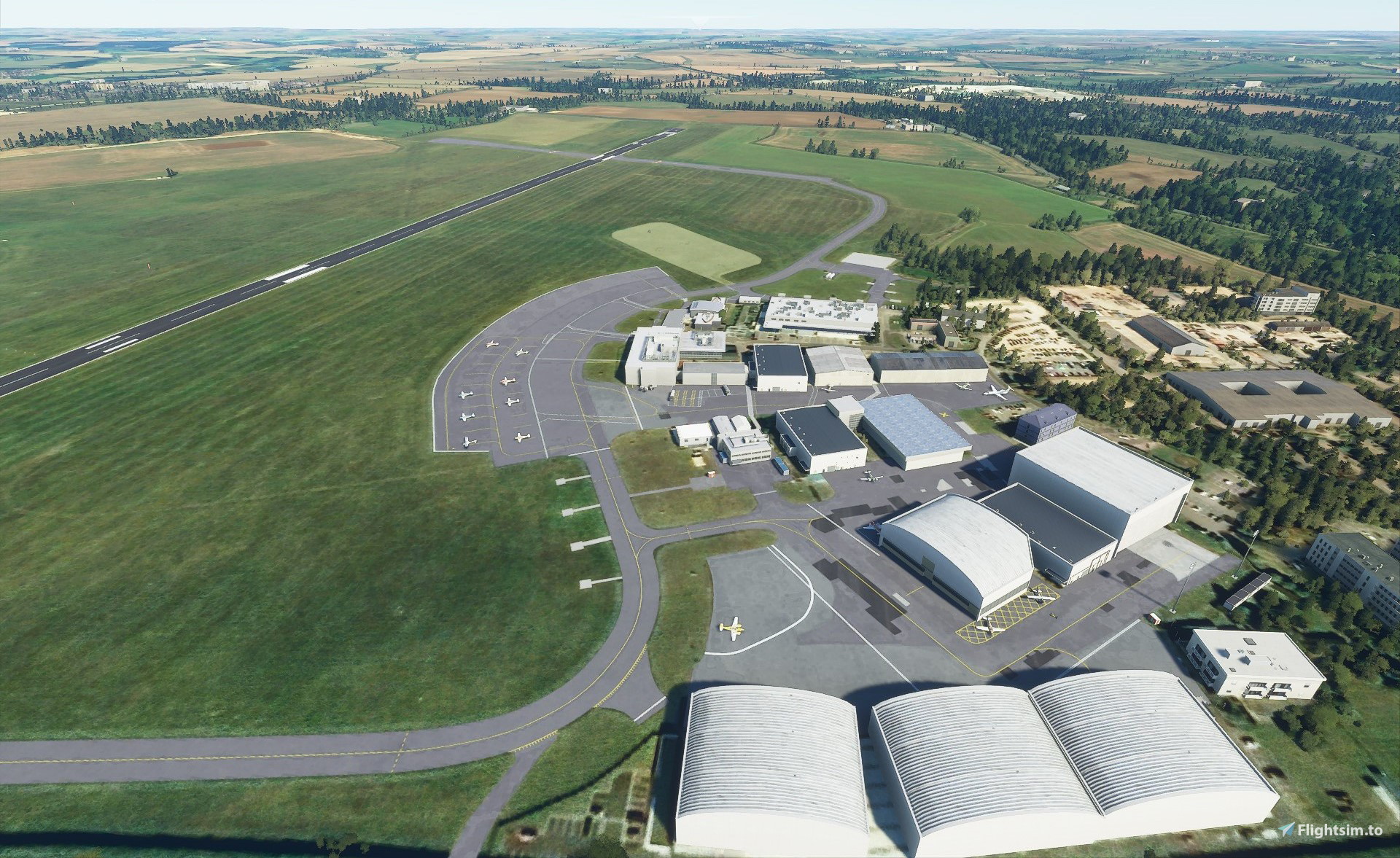
    EGTK - Oxford Airport - Image 1

    Beschreibung

    Oxford airport was a project which I initially embarked upon to replace a non existant airport in the simulator for my personal use. It has always been primarily a personal project, and with the release of a new payware option that need no longer exists. Although I have had fun with the airport, I do not forsee any future updates to it. Thanks to everyone for their support!


    London Oxford airport is a relatively small airport to the North West of London, which sees primarily private jets and general aviation aircraft.


    The airport is unfortunately only available as a runway in the base simulator, and therefore this has become my first project while familiarizing myself with the SDK.


    The airport has been constructed to be as close to the real thing within the contraints of the SDK and without custom models.

    Current Version: 1.0.2 Version History

    Version History is available in the discussions tab

    Known Issues


    Night Lighting is not present

    There is little night lighting available outside of the main runways, this is due to issues with the SDK and scenery creator, which place taxiway edge lights hundreds of meters from the runway. This is not an issue I am able to fix at present.


    Odd types of vehicles are parked in some areas

    Unfortunately there is little reference material available on the types of script needed to change the vehicles which are able to spawn, however it is being worked on.


    Refuelling areas are not designated

    Currently there is no way to stop a refueling area generating extra equipment, which is randomised each time, and therefore causes issues with taxiway width and buildings.


    Installation


    Download the files, and paste them in the following folder, depending on your purchased edition.

    Steam

    C:\Users\[name]\AppData\Roaming\Microsoft Flight Simulator\Packages\Community


    Microsoft Store

    C:\Users\[user]\AppData\Local\Packages\Microsoft.FlightSimulator_[random_letters]\LocalCache\Packages\Community


    Disk

    C:\Users\[user]\AppData\Local\MSFSPackages\Community

    Kommentare(10)

    Melden Sie sich an, um an der Diskussion teilzunehmen

    Anmelden
    S

    about 3 years ago

    Great scenery. Only fault is it is missing taxiway B and E.

    S

    about 4 years ago

    Thank you for creating this. Works well for me in SU9.

    m

    over 5 years ago

    Great to see this airport covered - thank you! One issue I'm having - when loading up, the runways seem to be flipped - if you choose 19, it starts you on 01, and if you choose 01, it starts you on 19 - anyone else seeing this issue?
    B
    BenjwriAuthor

    over 5 years ago

    Wow! I have no idea how I didn't see that! Thanks for reporting, I've just pushed 1.0.2, which has switched the spawn positions!
    P

    over 5 years ago

    Well done. Loving all the building placement and curved taxiways. It definitely stands out from all other airports, has it's distinctive vibe.
    B
    BenjwriAuthor

    over 5 years ago

    @MonsterMatti Weird, I have the scenery installed in the exact way you will. I'm not at all sure how something I did would have caused this, as all the methods used are documented in the SDK. Therefore I believe this to be a bug either with the core simulator or the aircraft, which is out of my control. It's probably worth creating a ticket with Asobo to see if they can relocate or fix it.
    M

    over 5 years ago

    I then disabled your scenery and EDTK worked fine for me again. so i figured it got something to do with your scenery. maybe you cant find the bug because you eddited the scenery on your computer. I had this issue berfore with another scenery where it worked fione for the creator but for someone with the drag and drop file it didnt work properly.
    Its just a weird bug and hard to describe
    M

    over 5 years ago

    thank you for your quick response :) I tried to take off directly from the runway but the throttle didnt work and also the spoilers were enabled. I then slewed to the other side of the runway and at least the spoilers worked again. I also tried it at other airports but all just worked fine for me.
    B
    BenjwriAuthor

    over 5 years ago

    @MonsterMatti Are you able to provide steps to reproduce this? So far I have been unable to find the described issues with the Lonitude. This might be something to report to Asobo on the helpdesk (https://flightsimulator.zendesk.com/hc/en-us/requests/new), as I cannot see anything I have done which would cause an issue with an aircraft's system, and therefore I believe it may be to do with the airport.
    M

    over 5 years ago

    hey, this airport scenery looks great but seems to be broken. As soon as I'm landing with the cessna Longitude i cant manage my throttle control. also taking off doesnt work with the longitude. Havent tried the other planes yet but this is the only airport this has happened to me.
    MSFS 2020MSFS 2024

    EGTK - Oxford Airport

    Experience the charm of London Oxford Airport in Microsoft Flight Simulator with this detailed add-on. Constructed with attention to detail, this small airport primarily serves private jets and general aviation aircraft. Enhance your simming experience with this accurate representation within the constraints of the SDK.

    Downloads4K
    Version1.0.2
    Dateigröße18.83 KB
    VeröffentlichtVor 5 Jahren
    AktualisiertVor 5 Jahren

    Nutzerbewertungen

    4.5

    3 Bewertungen

    5
    33%
    4
    33%
    3
    0%
    2
    0%
    1
    0%

    More Information

    Simulator
    MSFS2020
    KategorieAirports
    Sub-CategoryIntl. Airports
    ICAOEGTK

    Versionsgeschichte

    Keine Versionsgeschichte verfügbar.
    Ähnliche Addons