
Beschreibung
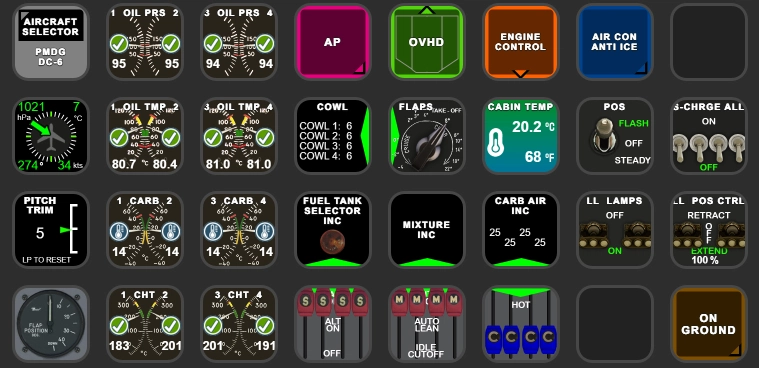
PMDG DC-6 AAO Scripts & StreamDeck XL Profile, incl. AAO Scripts
for LORBYs AxisAndOHs (AAO) and its SD Plugin
by Guenseli
You need LORBYs AAO and its StreamDeck Plugin to run this StreamDeck profile.
Note:
This is a complete new profile from ground up. So bugs are to be expected!
Because of that, the old version 2.0 is still available here also.
Engine condition gauges on my StreamDeck profile do not 100% fit the status of the PMDG EFB, but the VC gauges itself as I think the PMDG EFB has probably bugs.
ATTENTION!
PLEASE READ CAREFULLY!
- When you import SD profiles, make sure to delete the old ones, otherwise you'll get profile copies.
- Make sure to always have the latest AAO and AAO StreamDeck plugin versions!
- I just create the SD profiles! For any connection issues, SD plugin not working, Buttons show "?" or nothing, no reaction of the SD etc., please contact the developer of AAO! And please read the AAO Manual!
- It is - as the title says - just for the StreamDeck XL (!). Please do not ask for a 15 button conversion. This will not happen as this will more than double the amount of development and support for me as I do not have a 15 button SD. Sorry.
- Please ask if you want to use parts of my SD profiles, icons or AAO scripts or whatever! And please ask everytime you start a new project!
- You have to credit and link me in your description!
- If you use my work, you are then not allowed to beg for own donations!
Installation:
Installation:
Import PMDG DC6_Scripts.xml Scripts into AAO according the manual.
Install PMDG DC6.streamDeckProfile on StreamDeck XL (double click)
Scripts can be used for other hardware also, of course
Tested and created only with MSFS2024, should work with MSFS2020 also, but no guarantee
Donations are welcome!!! it is a lot, really a lot of work, and some donations make future projects easier ;) thx!
If you want to donate directly as friend without a PayPal fee, then use this adress, please: www.paypal.com/paypalme/GuenterSteiner
PMDG DC-6 AAO Scripts & StreamDeck XL Profile
Enhance your PMDG DC-6 experience with AAO Scripts & StreamDeck XL Profile by Guenseli. Requires LORBYs AxisAndOHs (AAO) and its StreamDeck Plugin. Install the scripts into AAO and the DC-6 profile on StreamDeck XL for optimal use. Please adhere to guidelines provided for a smooth operation.

Unterstützer

Nutzerbewertungen
19 Bewertungen
Versionsgeschichte
Fixed and reworked engine gauges. Thanks to Tatar44 who found the original Vars, gauges and EFB Engine Stress Visualizer is now the same.
Ähnliche Addons
FENIX A3XX AAO Scripts & StreamDeck XL & PLUS Profile
Customize your Microsoft Flight Simulator experience with FENIX A320 AAO Scripts & StreamDeck XL Profile by Guenseli. This add-on offers a seamless integration with LORBYs AAO and StreamDeck Plugin for optimal performance. Explore the detailed installation instructions for enhanced functionality with a VRInsight MCP Combo II. Elevate your simulation setup with this meticulously crafted add-on.
von Guenseli
Icon Pack for Elgato StreamDeck
A collection of over 3500 icons designed for Elgato StreamDeck and similar devices, created by Guenseli. Ideal for personal use with a disclaimer against commercial usage. Icons are detailed and diverse, providing a variety of options for customization. Credits required if used in public projects, with a suggestion for donations to support the creators work.
von Guenseli
PMDG 737 AAO Scripts & StreamDeck XL & PLUS Profile
Enhance your PMDG 737 experience with the PMDG 737 AAO Scripts & StreamDeck XL & PLUS Profile by Guenseli. Make sure to update your Elgato Software to version 6.0 or higher for compatibility. This profile is specifically designed for the StreamDeck XL and requires LORBYs AAO and its StreamDeck Plugin to run smoothly. Get ready to elevate your cockpit with this detailed and user-friendly add-on.
von Guenseli
FBW A320 AAO Scripts & StreamDeck XL & PLUS profile and MCP Combo template
Enhance your FBW A320 experience with tested AAO Scripts and StreamDeck profiles for XL & PLUS versions. Ensure to delete old profiles before import and always use the latest plugin versions for seamless integration. Contact AAO developer for any connection issues and give credit if using parts of these profiles in your projects. Install scripts and profiles for an immersive flight simulation experience.
von Guenseli
Melden Sie sich an, um an der Diskussion teilzunehmen
AnmeldenKommentare(64)
almost 4 years ago
If you have greyed out buttons, no reaction of the StreamDeck, exclamation marks etc, that means you have connections issues between AAO and the StreamDeck.
94% of all support request are due to no proper connections or outdated versions of AAO and/or the AAO SD plugin.
Check ports, check the troubleshooting PDF, contact AAO support.
My Streamdeck profiles work (beside from probably little bugs). If you have such issues, I can't help you, sorry! Support requests can't not solved by me as I'm not the developer of AAO!
3 months ago
3 months ago
May I signal you a very very tiny bug in the CALC OILP routine where A:ENG COMBUSTION:1 is used for engine 4 instead of A:ENG COMBUSTION:4 (I made a fix but didn't test it yet.
4 months ago
4 months ago
Thanks for the update. Was about to ask for a SD+ update but i see thats already in the works.
Ive got 2 things that might need fixing:
1.) Eng Control page 1-3 dont have a link to the AIR CON/ANTI ICE page but ENG4 Page has so not sure if that intended
2.) Could you change the toggle sequence for the MAIN/ALT Fuel Boost Pump Buttons? Afaik you shouldnt go directly to HIGH setting but build pressure on LOW first. Currently you have to go through HIGH to get to LOW which is extra work i think
4 months ago
2) Ah, ok, that was intentional as I thought it is first with high. Will change that.
4 months ago
4 months ago
4 months ago
4 months ago
4 months ago
But my plan is to make a complete new profile from ground up ...
4 months ago
As a thought going forward if there's anyway to include on a seperate page perhaps the AFE Page from the EFB that would be an added bonus.
about 2 years ago
over 2 years ago
I do have one question, when I am pressing the Mixture buttons, it only shows cut-off or rich on the eng mixture image on the StreamDeck, however, it works fine in the DC-6 in the sim, cut-off-auto lean-auto rich, and then back down in that order. Is this a bug, or is this a limitation because of how they programmed the mixture to work?
over 2 years ago
I just checked everything and it works here as it should.
Could you maybe send some sreenshots via PM, please?
thx
over 2 years ago
over 2 years ago
over 2 years ago
over 3 years ago
Hello,
In your installation guide you mention to "Open the folder MCP Display Installation and read the ReadMe" I did not find an MCP Display Installation folder in the download. Where can I find this folder?
Thank You
over 3 years ago
Sorry, the description was outadet, corrected it now.
Have a look again, there's now a link for the MCP Combo Display profiles bundle where it is included
over 3 years ago
Thank you! Downloading and updating now.