
Beschreibung
AtmosphereMod is an experimental mod that aims to make MSFS 2024 look more realistic. It's still at an early stage. It changes how the weather is generated and how clouds and lighting are rendered, and it offers many settings so you can find your ideal look.
AtmosphereMod is a ReShade add-on, not a colour filter (LUT) like most ReShade presets. Instead, it patches the sim's own shaders and changes the way the sim draws the haze, the sky and the clouds. It uses real-world physics and the sim's own live weather, so there's no need for REX Atmos, Active Sky or StrataWx. However, it can only work within the sim's technical limits. It's not perfect, and it probably never will be. It's an experiment.
You can adjust every aspect of the mod live, on an EFB page in the sim, save your settings as presets and import presets others share, and switch the mod on and off on the fly (also with Ctrl+Shift+F9). Most screenshots are direct comparisons of the same moment with the mod off and on.
AtmosphereMod is for Microsoft Flight Simulator 2024 only, on PC (MS Store and Steam versions).
Please note
- This mod is experimental and a work in progress.
- Weather generation is at an early stage. If it doesn't play along, you can simply switch it off in the settings.
- Requires ReShade 6.8 or newer (reshade.me). Important: install the version with full add-on support!
- Using OptiShade? AtmosphereMod is also on OptiShade's Components page, which downloads the same release from GitHub: run Install AtmosphereMod.cmd as usual. OptiShade brings its own ReShade, and users have reported AtmosphereMod working with it. Keep only one ReShade installed.
- Using RenoDX's HDR mod? Install AtmosphereMod with
Install AtmosphereMod.cmd --renodx(from Command Prompt, in the folder you unzipped) so the two mods work together. Without RenoDX you don't need this. - The mod has its own fly-through clouds. Turn off other effects that simulate flying through clouds, such as TriTriSim GFX's wing fade effect or CloudSurf: they will most likely conflict with it.
- After a sim update or a mod update, run the installer again.
Installing
- Install ReShade with full add-on support for MSFS 2024, and start the sim once with it.
- Close the sim, unzip the download anywhere (not into the Community folder) and double-click Install AtmosphereMod.cmd. It patches the sim's shaders on your PC; no game files are included.
- Start the sim.
If Windows shows "Windows protected your PC", click More info → Run anyway. To update, run the new version's installer: your settings and presets are kept. Uninstall AtmosphereMod.cmd removes everything. The included README explains every setting.
If you'd like a visual installation guide, I recommend watching this video by GManfly69 explaining the complete setup in detail.
Feedback
Please report bugs on GitHub or in the comments. If you have ideas or other feedback, feel free to post them here.
If the mod runs slowly for you, please send me a performance report: tap Performance report at the end of the EFB app's page, hold a view with clouds still and tap Start. For about 36 seconds the mod switches itself on and off while it times the frames and the GPU's work on them. Then it shows you the result and, if you like, sends it to me with your PC's and the sim's settings, so I can see where the mod runs well and where it needs work. You see everything before it's sent, and nothing is sent unless you tap Send.
AtmosphereMod is free. If you'd like to support it, you can buy me a coffee. Thank you!
Freeware for personal use; please don't re-upload it. Not affiliated with or endorsed by Microsoft, Asobo Studio or ReShade.
To see the mod in action watch MrSaturday's beautiful video on YouTube! ✈️
AtmosphereMod: Experimental Haze, Sky and Cloud Lighting
Patches MSFS 2024’s shaders for a more physically accurate atmosphere: haze, sky, clouds and weather. AtmosphereMod is an experimental ReShade add-on. Haze forms a layer with a top, set from the live METARs; the sky uses measured Rayleigh and ozone scattering; clouds are lit with forward and multiple scattering, including the aircraft’s shadow and a glory; and cloud density and layers follow the reported weather. Requires ReShade 6.8 or newer with full add-on support. MS Store and Steam versions.
Starred
Handverlesen von unserem Team — dieses Addon verbessert das MSFS-Erlebnis erheblich und ist ein Must-have für dein Setup.


Nutzerbewertungen
166 Bewertungen
Versionsgeschichte
Hotkeys you can change in the EFB app, a key for the in-cloud fog, METARs that follow historical weather, and installer fixes. Install over any earlier version: your tunables.ini, presets and hotkeys are kept. Hotkeys - The EFB app's new Hotkeys tab changes the mod's keys: tap Change, then press the new keys in the sim. F1 to F12 with any of Ctrl, Shift and Alt, or a letter or digit with Ctrl or Alt. Clear leaves an action without a key, and Default puts back the original one (Ctrl+Shift+F9 to F12). - A new action switches the fog inside clouds (Visibility inside clouds) off for now and on again, for when it shows just below a cloud. It has no key until you choose one. Your setting stays as it is, and the fog is on again at the next start. - Glass Cockpit DLSS Fix (one of OptiShade's components) uses Ctrl+Shift+F9 and Ctrl+Shift+F11 by default. While it's loaded, the Hotkeys tab tells you where its keys are the mod's. Weather from the METARs - The haze could stay with a faraway station for the rest of a flight: a METAR gives only the day of the month, and a station's report from a previous month looked newer than all the others, so every current report was ignored. Reports are now dated by the sim's clock. - Historical weather: the haze and the clouds now follow it. Starting a flight with live weather and then setting the time back made the mod ignore the sim's historical reports for the whole flight. - Changing the time in flight (live weather to historical and back) brings the other weather within seconds, without the usual fades. So does the start of a flight or a teleport. Installer - Updating or uninstalling no longer stops at a read-only folder in Community ("Access is denied"). It clears the mark and tries again, and if Windows still refuses, it names the folder to delete. - It runs under Wine or Proton on Linux without the PowerShell workaround. Known issues - At night, city lights can shine through the parts of clouds the mod adds or makes denser. (new, will be looked into)
Ähnliche Addons

EFB+ for PMDG 737 & 777
EFB+ transforms the EFB (tablet) of supported PMDG aircraft, including the 737 and 777 series. It adds four new pages: a moving-map Flight page built from your SimBrief plan, a Briefing page with an interactive flight log, live airport weather, and a Navigraph/LIDO chart browser - plus a redesigned home screen and a day/night theme. MSFS2024's built-in LIDO charts sit alongside the existing Navigraph option, and a dynamic wallpaper follows your airline from your SimBrief callsign. A GSX app and an interactive checklist app round it out. Installation is automated and fully reversible.
von tomwhoca
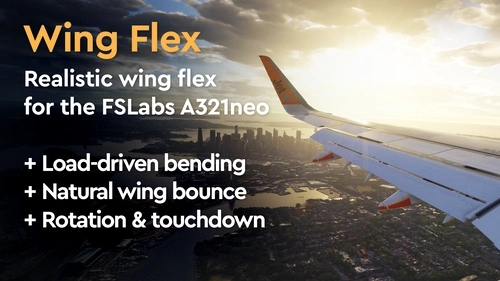
Realistic Wing Flex for FSLabs A321neo
This add-on introduces a physics-based wing flex animation for the FSLabs A321neo in Microsoft Flight Simulator 2024. The wing responds realistically to actual in-game loads, including taxi, takeoff, turbulence and landing scenarios. The mod only changes the wing flex behavior without modifying the 3D model, systems or flight dynamics. Installation and removal are managed via simple batch files, and the original files remain unaltered.
von tomwhoca
Kommentar-Zusammenfassung
Das allgemeine Stimmungsbild im Kommentarbereich ist sehr positiv; viele Nutzer bezeichnen das Mod als eine große Bereicherung für ihr Flugsimulator-Erlebnis. Besonders gelobt werden die verbesserten visuellen Effekte wie realistischere Dunst-, Wolken- und Lichtdarstellungen, vor allem auch in VR. Ein häufig genannter Kritikpunkt ist jedoch die teils deutliche Auswirkung auf die Systemleistung, insbesondere bei Mittelklasse- oder älterer Hardware, wobei mehrere Nutzer merkliche FPS-Einbrüche bei dichterem Wetter melden. Der Installationsprozess gestaltet sich für weniger erfahrene Anwender häufig als schwierig, vor allem wegen der Voraussetzung einer vollständigen ReShade-Installation mit Add-on-Unterstützung; oftmals werden klarere Anleitungen oder Videotutorials gefordert. Die Kompatibilität mit anderen Wetter-Add-ons wie Active Sky oder REX Atmos ist ein häufiges Thema; vielfach wird über eine reibungslose gleichzeitige Nutzung berichtet, wobei darauf hingewiesen wird, Doppelungen bei den Funktionen zu vermeiden. Einzelne Nutzer berichten von Fehlern wie Problemen bei der Wolkenschichtung, zu aggressivem Dunst, UI-Problemen sowie gelegentlichen Abstürzen oder Rucklern. In den Kommentaren finden sich zudem Tipps und Workarounds, etwa das Deaktivieren bestimmter Effekte oder Empfehlungen zu ReShade-Einstellungen. Für Updates ist ein vorheriges Deinstallieren laut Nutzermeinungen meist nicht nötig.
Zusammengefasst am 13. Nov. 2026
Melden Sie sich an, um an der Diskussion teilzunehmen
AnmeldenKommentare804
PLEASE: If you encounter any performance issues send me a performance report via the EFB app. This will help me to gain insight into performance on various systems. Reports are anonymous by default, but you can choose to include your contact details if you wish. Thank you very much!
If you encounter any problems installing or running the mod, please check the troubleshooting section on GitHub. If you think you have found a bug, the best place to report it is the Issues page on GitHub. Thank you!
On my setup, this mod causes roughly a 15/20 FPS drop on average, although that can vary depending on the amount of haze being generated and the number of clouds rendered at any given time.
With this mod installed, most scenarios top out around 55-65 FPS, again with Frame Generation enabled. In the worst conditions, FPS can drop to around 45. Overall, that's roughly a 20-25% performance hit, and in some situations it can be as high as 50%.
That said, the visual improvement is impressive. It almost feels like pushing cloud quality and particle effects beyond the Ultra setting, which is why the performance impact can be significant, especially on older hardware.
With that being said, great work. The mod looks fantastic, and hopefully future updates can bring some additional optimization without compromising the visual quality.
I've also made a donation, and I can only say it again — you've achieved what we've been waiting for from Asobo for about 5 years — keep it up!
BR !
My only complaint is that I use the Skytrails mod, and the lines appear above the clouds (And the same thing happens with city lights at night, which pierce through the clouds)—is there any way to fix that?
Thanks a lot for your work.
Very well done. Looking forward to future updates!
Thanks for the work so far!