
Beschreibung
Free Airport Mapping DB (amdbgen + amdb-bridge)
Free airport moving-map data for aircraft with OANS, ANF or BTV. No Navigraph subscription, no API keys, any airport in the world.
DO NOT USE THIS IF U HAVE A NAVIGRAPH SUBSCRIPTION!Strictly Incompatible!
What it does
- Builds a full airport mapping database (45 layers: runways, taxiways, aprons, guidance lines, holding positions, stands, terminals, signs, lights) from the X-Plane Scenery Gateway and OpenStreetMap.
- Serves it to your aircraft exactly the way Navigraph's AMDB service does, so the aircraft code is untouched. Tested with the FlyByWire A380X (OANS + BTV), the iniBuilds A350 (ANF) and the GM5 A220 Airport Moving Map.
- Also makes Jeppesen-style airport diagrams as PDF.
- Compatible with the FBW A380, Inbuilds A350, Synaptic A220, PMDB 737/777 Series and Fenix A320
- Note: Charts may not be perfect/convey as much information as Jeppesen Charts!
- To use the retrofitted map tick the required option in the installer, Go to the aircraft and rotate the zoom knob below 10NM.Then select a runway and taxiway as usual, click anywhere on the map to bring up the map data menu and click Arm BTV. After this BTV will be armed.
How to use
- Unzip, run
amdb-bridge serveand answer three storage questions on the first start. - Load your aircraft. Airports are generated on first use (20 to 40 s) and cached after that.
amdb-bridge prefetch --simbrief YOURNAMEbuilds your whole route ahead of time. - Unlink navigraph and relink it to unlock charts capability!
- Close the bridge with Ctrl+C when you're done; it cleans up after itself.
- Please suggest more features and follow my profile!
Requires administrator rights while running (it redirects one hostname on your PC). Data is for simulation only, not for real-world navigation
Open source, MIT: github.com/Vihaan2012-cmyk/Free-Airport-Mapping-DB
Not affiliated with, endorsed by or connected to Navigraph in any way; all data comes from free open sources.,vibecoded
Free OANS/ANF/BTV And Airport Charts For MSFS2020 And MSFS2024
This add-on provides a free, open-source airport mapping database for aircraft equipped with OANS, ANF, or BTV systems in MSFS 2020 and 2024. It generates detailed airport maps using data from X-Plane Scenery Gateway and OpenStreetMap, without requiring a Navigraph subscription or API keys. Supported aircraft include FBW A380, iniBuilds A350, and Synaptic A220. The tool also produces Jeppesen-style PDF airport diagrams and caches maps for future use.The Tool Also generates free Airport Charts Using Inbuild MSFS Navdata!


Nutzerbewertungen
55 Bewertungen
Versionsgeschichte
A380 Compatibly A350 Compatibility Fenix A320 Compatibility Fix host rewrite persistence. Fix overlapping ND Maps.
Ähnliche Addons
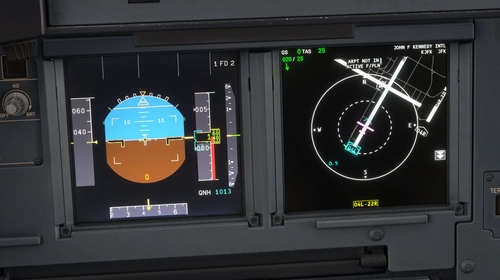
OANS/BTV For Fenix A320/21/19
This addon implements the Onboard Airport Navigation System and Brake to Vacate functionality for the Fenix A320, A321, and A319 in Microsoft Flight Simulator. It enables advanced taxi and landing features, allowing for navigation displays and runway exit planning. The addon uses freely available navigation data sources without a Navigraph key requirement. Installation is managed through a setup script included in the package.
von Royale2072
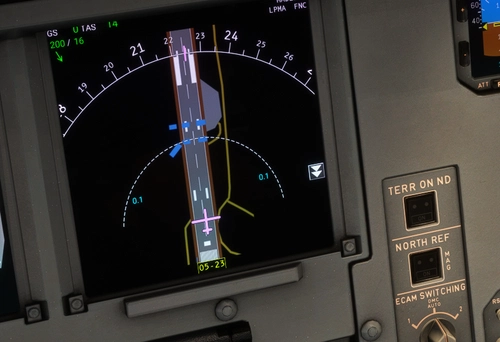
Free OANS/BTV For Headwind A330
This add-on introduces the Onboard Airport Navigation System and Brake to Vacate technology to the Headwind A330 in Microsoft Flight Simulator. It allows pilots to utilize airport navigation features and manage runway exits more efficiently. The add-on operates using freely available navigation data sources. Installation requires running a setup script before launching the simulator.
von Royale2072
Kommentar-Zusammenfassung
Die Rückmeldungen zu diesem Add-on sind durchwachsen. Viele Nutzer schätzen die gebotene Funktionalität, insbesondere die kostenlosen Karten und Flughafenübersichten für verschiedene Flugzeuge, und heben hervor, dass es eine wichtige Alternative zu kostenpflichtigen Diensten wie Navigraph ist. Häufig wird jedoch kritisiert, dass die Windows-Hosts-Datei verändert wird, was zu Problemen mit Diensten wie SimBrief oder Navigraph führt und manuelles Eingreifen zur Wiederherstellung erfordert. Zudem gibt es Kompatibilitätsprobleme mit bestimmten Flugzeugmodellen und Versionen, wie z. B. FBW A380X, iniBuilds A350 oder A220, insbesondere bei Marketplace-Versionen oder nach bestimmten Updates. Anwender berichten auch von Performanceproblemen, Abstürzen und Schwierigkeiten bei Installation oder Zoomfunktionen. Zu den genannten Tipps und Lösungen zählen das Starten der App vor dem Simulator, das Ausführen als Administrator, spezielle Codes zur Vermeidung von Abstürzen sowie das Wiederherstellen der Hosts-Datei bei gesperrten Diensten. Mehrere Nutzer berichten auch von Sicherheitswarnungen durch Antivirenprogramme, die teilweise als Fehlalarme angesehen werden.
Zusammengefasst am 13. Nov. 2026
Melden Sie sich an, um an der Diskussion teilzunehmen
AnmeldenKommentare304
Can you make it comatible with the A400M ? That would be phenomenal
Overrall its amazing, thank you!
"Charts: EGLL has no procedures in the simulator's navigation data"
"invalid polygon, fewer than 4 points
cleanLine()
cleanCoords()
simplifyGeom()"
Dieser Kommentar wurde gelöscht