
Beschreibung
Black Square Caravan Professional Passenger Mod for FS2024
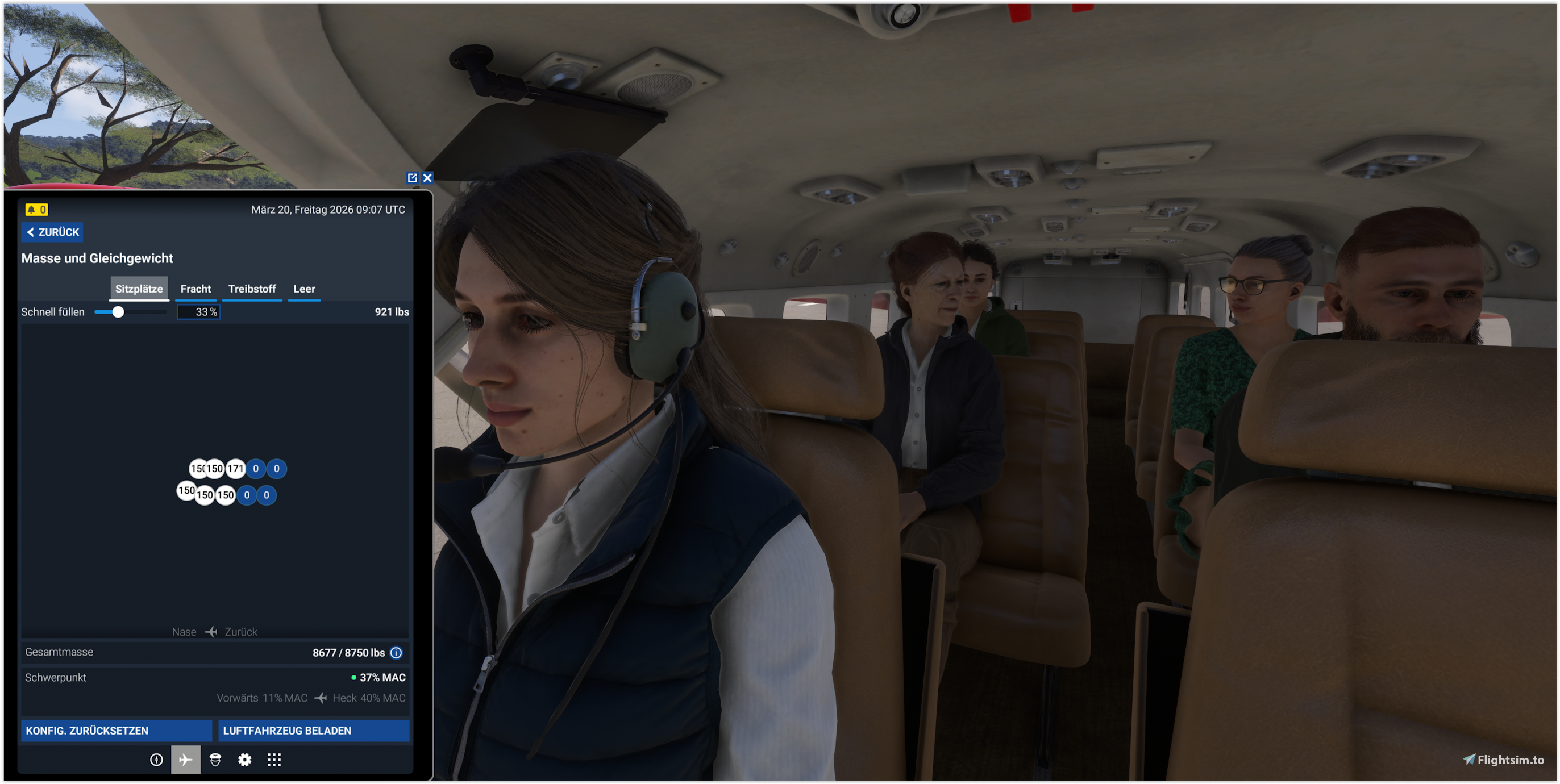
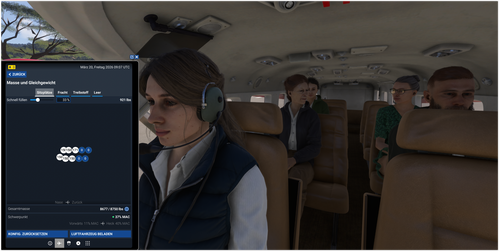
This mod adds a co-pilot and passengers to the Black Square Caravan Professional models.
You can have passengers board and disembark using the standard load manager.
Add the corresponding weight to the individual seats.
This mod only works with MSFS2024 !!
The passenger feature does not appear to be fully developed yet and has its limitations.
By default, only a maximum of five passengers will be loaded.
This mod is merely a stopgap until we receive proper passenger models for the simulator and Black Square adds them by default.
If it doesn’t work properly for you or you don’t like it,
simply delete this mod.
Installation
Simply unzip the zipfile zzz_bksq-caravanpro-passenger-mod into your FS2024 Community folder.
Uninstallation
Simply delete the file zzz_bksq-caravanpro-passenger-mod from your FS2024 Community folder.
Have fun!
BB
Black Square Caravan Professional Passenger Mod for FS2024
This mod adds a co-pilot and passenger models to the Black Square Caravan Professional in MSFS2024, with boarding and disembarking managed through the standard load manager. Seat weights are adjusted manually and a maximum of five passengers can be displayed. It is intended as a temporary solution due to current limitations in passenger features. Compatibility is strictly for MSFS2024 only.

Nutzerbewertungen
10 Bewertungen
Versionsgeschichte
Keine Versionsgeschichte verfügbar.
Ähnliche Addons
Black Square Baron Professional Passenger Mod for FS2024
The Black Square Baron Professional Passenger Mod for FS2024 introduces co-pilots and passengers to the BKSQ Baron Professional. This mod allows users to load and unload passengers via the standard load manager and add weight to individual seat positions. It is specifically designed for Microsoft Flight Simulator 2024 and may not be fully developed. Instructions for installation and uninstallation are provided for user convenience.
von Bluebear
Black Square Bonanza Professional Passenger Mod for FS2024
The Black Square Bonanza Professional Passenger Mod for FS2024 enhances the BKSQ Bonanza models by adding a co-pilot and passengers. Users can manage passenger loading and unloading through the standard load manager, allowing for weight adjustments at each seat position. Please note that this mod is designed specifically for Microsoft Flight Simulator 2024 and may not be fully developed, with potential issues in functionality.
von Bluebear

Black Square TBM 850 Passenger Mod for FS2024
The Black Square TBM 850 Passenger Mod for FS2024 introduces a co-pilot and passenger feature for the BKSQ TBM 850 aircraft. Users can manage passenger loading and unloading through the standard load manager, allowing for weight adjustments at each seat position. This mod is specifically designed for Microsoft Flight Simulator 2024 and may be in a preliminary state, with potential operational issues. Installation and uninstallation processes are straightforward, involving the community folder.
von Bluebear
Black Square Caravan Professional Variants Passenger Mod for FS2024
This mod adds visible co-pilot and passenger models to the Black Square Caravan Professional Amphibian and Super Cargomaster variants in Microsoft Flight Simulator 2024. Passengers can board and disembark using the load manager, with weight assigned to each seat. The feature has current limitations, such as a maximum of five passengers, serving as a temporary solution until more robust MSFS2024 support is available. Only compatible with MSFS2024.
von Bluebear
Melden Sie sich an, um an der Diskussion teilzunehmen
AnmeldenKommentare36
However, on the SWS Kodiak, their own passengers and fraight models are to be loaded, using the cargo loading mode, not passenger mode.
I read on the forums a post in the Bonanza mod about how to make this work cold/dark. Tried it and it worked.
-Start from a GA-Medium parking spot
-Turn on AV1 (with battery or ground power so you don't kill the battery)
-Open ATC/Communication Tab
-Click on Ground Services in the ATC menu and request to start passenger boarding
-Use the EFB to open the flight planner
-Open the Payload and Fuel tab to configure and load passengers/cargo
-You cannot use the EFB Aircraft/Mass and Balance tab, it will show loading as not an option. You must do it from the flight planner and payload tab
-Once you have the weights were you want, click Load Passengers/Cargo. You will see the passengers load in from front to back
-Request ATC to stop boarding
-Go fly
You may have to go into the Blacksquare tablet to correct weights/fuel/cargo, but this will make the passengers appear. As far as I can tell this works in every one of these mods. You are not able to make this work unless a passenger loading option is available in the ground services tab.
BTW, I wasn't getting the copilot before and now I am, so that's better for me after I got the mod. Excellent work on the mod Bluebear. Thank you!
User TJ_Turner has discovered that the MSFS2024 Marketplace versions differ from the Just Flight versions.
The question is: Which of the two versions do the users experiencing these issues have?
It appears that the folders in the MSFS version have different names, which is why the Passenger mod isn’t working.
I only own the Just Flight versions and unfortunately can’t verify this.
But you might be onto something. Maybe how you installed it matters.
I have my Just Flight aircraft installed on a different drive than where the Sim is installed. I'll have to do some experimenting to see if anything changes with the aircraft install location.
In SETTINGS I had CHARACTERS QUANTITY set to OFF.
Setting it to Anything but OFF allowed me to add passengers with this mod.
I was suspicious when I recently got a hold of the SWS Kodiak 100 and no passengers were loading into that plane either.
Checking the settings and changing CHARACTER QUANTITY to HIGH gave me passengers in both planes.
I had CHARACTER QUANTITY set to OFF to get a little extra performance due to having RTX 3070 Ti GPU.
Now to take these people on a quick flight to see if they are a performance hit... ;-)
The CHARACTERS QUANTITY setting also allows for more than five passengers to be loaded.
I my case, I have seven plus the CoPilot.
I’ve also noticed that you get more than five passengers if you set “CHARACTER QUANTITY” to “HIGH.”
But I’ve never tried setting it to “OFF.”
Thank you very much for your help, this will certainly be useful to other users who also see no passengers or only a few. 👍
Thanks again Bluebear for this mod! I will be taking passengers on some great sightseeing tours now.
As far as I know, Nick (BKSQ) isn't happy with the current situation regarding passengers and co-pilots in FS24, since the corresponding figures don't integrate well with the models and sometimes get their legs or arms stuck in the cockpit walls. However, I'm pretty sure he'll include them by default as soon as the default figures are improved.
THANK YOU