
Fenix Livery Builder MSFS 2024. Create ready-to-fly packages directly from your PNG textures! (Release: Late October / FBW A32NX coming next)
Hi everyone,
I’m excited to share a tool I’ve been developing to eliminate a major source of frustration for livery painters in MSFS 2024: the Fenix Livery Builder MSFS 2024. The tool is nearing completion and will be released toward the end of this month (October)!
What does the tool do, and why is it a game-changer?
Up until now, transforming your raw PNG textures into a working, loadable package for MSFS 2024 has been quite a tedious process. The new simulator utilizes a completely different package structure and a brand-new graphics format compared to MSFS 2020. Painters previously had to deal with complex folder hierarchies, manual XML or JSON files, and time-consuming texture compilation via the SDK.
My tool completely automates this entire workflow in the background. You simply feed it the raw PNG files straight from your graphics software, fill out the text fields in the UI (such as ATC Airline, ICAO, and Registration), and click "Create Livery Package".
The tool automatically converts your images into the correct, native MSFS 2024 format, builds the entire required folder structure, and compiles a finished community package. MSFS 2024 will instantly recognize, display, and load your livery in the hangar menu, without you ever having to touch a single line of code or JSON.
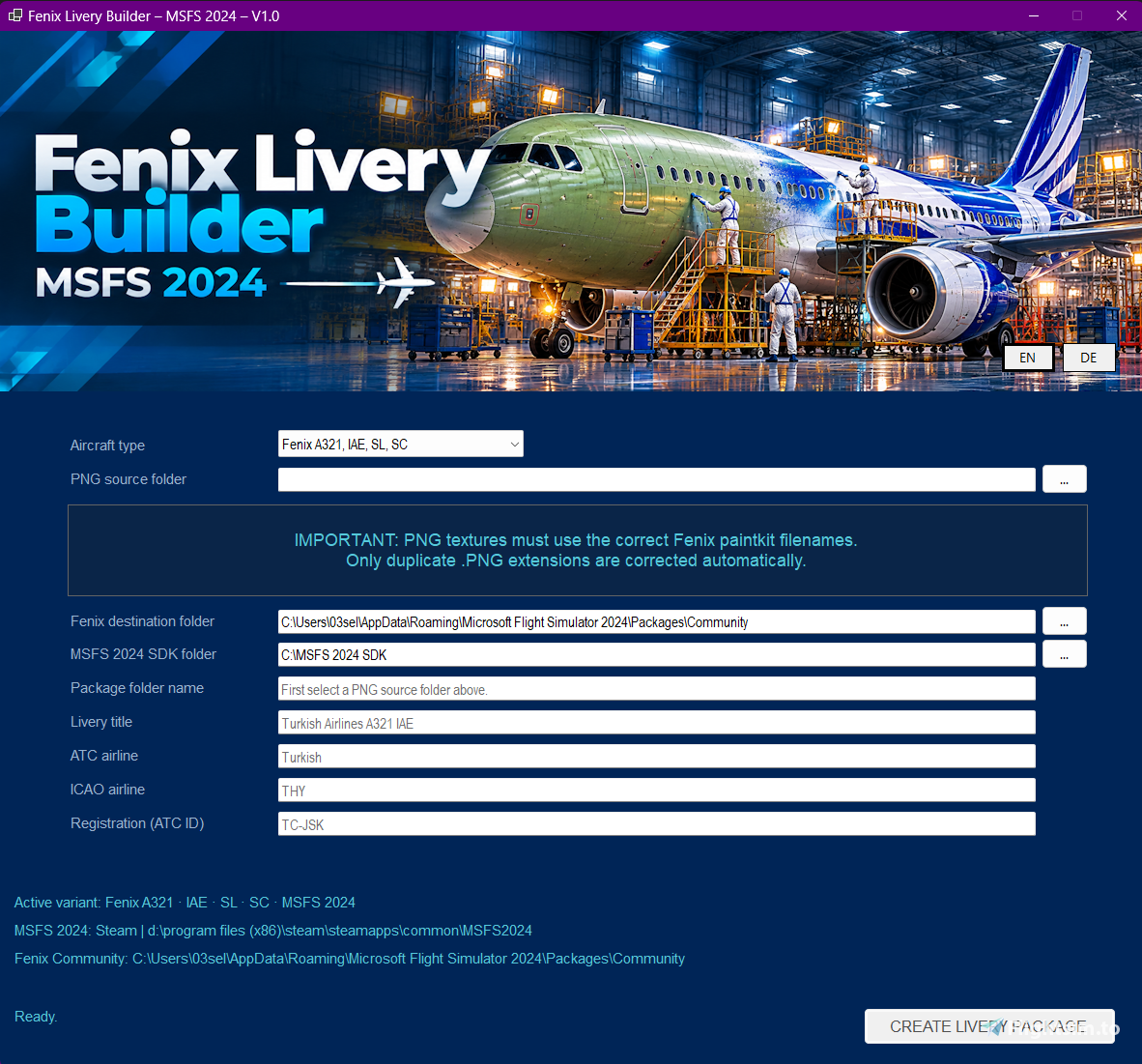
Key Features at a Glance:
- Automatic Format Conversion: Your PNGs are natively converted directly into the new MSFS 2024 texture format.
- Complete Package Compilation: No manual creation of
manifest.json,metadata.json, or configuration files required. - Smart Error Correction: The tool automatically detects common painting mistakes (such as accidental double file extensions like
.png.png) and fixes them before starting the build. - Clean & Simple UI: A straightforward, user-friendly interface that guides you step-by-step.
Current Support & Roadmap:
- At Launch (Late October): Full, native support for all Fenix A321 variants (IAE, IAE SL, SC).
- Next Planned Update (Already in the works): Full support for the FlyByWire A32NX!
- Future Outlook: I will gradually expand support to include other major airliners (models from PMDG, Aerosoft, and iniBuilds are planned, the focus is strictly on commercial airliners, no general aviation).
Important Requirements & Rules:
- MSFS 2024 SDK Required: Due to legal and licensing reasons, I cannot distribute the official Microsoft build tools with this program. Users must organize this themselves. The tool commands the official
fspackagetool.exein the background. Therefore, you must have the official MSFS 2024 SDK installed on your PC and specify its directory in the app.
(Note: The SDK can be downloaded for free via the simulator's Developer Mode or through the official developer hub: Link to MSFS Developer Portal) - Correct Filenames: Your PNG textures must strictly follow the exact naming conventions dictated by the official Fenix paintkit.
I’m looking forward to hearing your feedback, bug reports, or suggestions in this thread once the tool goes live at the end of the month.
Happy painting and blue skies!