
Beschreibung
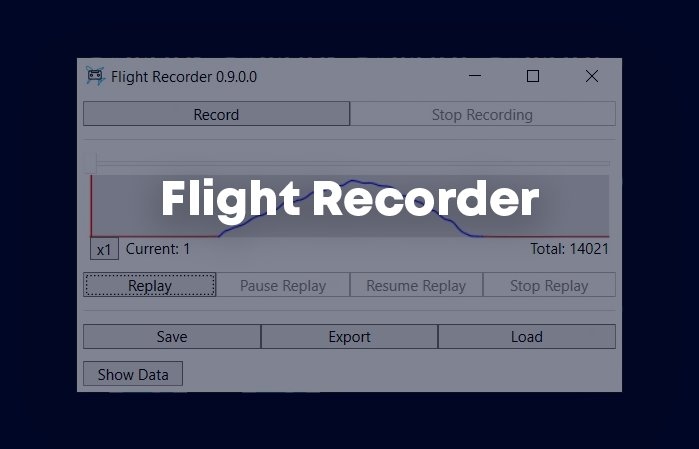
I have recently written a simple tool to record and replay my flight and would like to share it with the community.
And thanks IamSean for allowing me to include his video as a showcase of the tool's capability and the awesome graphic fidelity of MSFS.
Extract and run FlightRecorder.Client.exe.
Features- Record and replay with your aircraft or an AI aircraft in the sim
- Change replaying speed
- NOTE: when speeding up, your computer might not be able to load scenery fast enough and that will negatively affect frame rate.
- Trimming the recording to remove unnecessary parts at the start & end
- Save recording into a file to replay later or on another computer
- Export the recorded data into CSV or KML for further analysis
- Quickly jump to any time in your recording (disabled during an active replay)
Notes: The tool records this list of variables from SimConnect Structs.cs for each sim frame. Some of them are only for analysis and display and don’t affect replay.
Incompatibiity- FBW A32NX, PMDG B737 and several others
- Some complex aircraft implement custom internal hydraulic and flight control system that ignore built-in SimConnect. This means the aircraft will not react to the replay data Flight Recorder send to the sim. You will see that certain variables get replayed properly, and some don't.
- When starting a replay, your aircraft might be teleported to a far away location which doesn't have loaded terrain. This means the ground can jump up/down really quickly and you might get a crash (not CTD) due to damaged landing gear. Disable crash detection might be a good idea if you frequently replay your flight.
- I don’t know a reliable way to tell if an engine is running or not, so this tool does not auto-start the engine (because it doesn’t know when). Hence, you should start recording/replaying when engine is already running (or the aircraft will move without a running engine) and stop recording before turning off the engine (not really a problem, but the tool might not shut the engine down for you). Not doing that won't prevent you from replaying or using any features, but replay can look like your aircraft is powered by magic ;).
- To prevent fighting with MSFS own calculation, the tool sends freeze command when you start replay and unfreeze when you stop replay.
This means replaying might conflict with other tools leverating the same freeze feature (e.g. YourControl when you are not in control or other replay tools). - AI aircraft jitters back and forth during replay, especially at high speed. I'm still trying to figure out the reason.
If you have any issue with the tool, please report it in our GitHub page with information for troubleshooting such as screenshots, logs and profile exports.
https://github.com/nguyenquyhy/Flight-Recorder/issues
You can also join my Discord server for further discussion https://discord.gg/azqQrWWEbV.
Source Code: https://github.com/nguyenquyhy/Flight-Recorder
Releases: https://github.com/nguyenquyhy/Flight-Recorder/releases
Don't forget to Like and Follow the tool for exciting future updates!
Häufig gestellte Fragen
Flight Recorder
A tool to record and replay flights in Microsoft Flight Simulator, with the ability to adjust replay speed and trim recordings. Allows saving recordings for later replay and exporting data for analysis. Note: Some complex aircraft may not react properly to replay data. Join the community and report any issues for troubleshooting and updates.
Starred
Handverlesen von unserem Team — dieses Addon verbessert das MSFS-Erlebnis erheblich und ist ein Must-have für dein Setup.


Unterstützer

pfrench42
$40
CarlosL
$20
MarQ737
$20
sfw50
$20
sarouman76
$20
Nellogs55
$15
4Prawns
$15

Derpyair
$15
$10
tony.dobesch
$10
Silicon_Based
$10
tjvenhaus
$10
hugott
$10
zaubereruwe
$10
Frankrio
$10
HighFlyer63
$10
Bolf
$10

Miggy
$10
jokersh
$10
TheChasMan2019
$10
DeG2122
$10
Tracker153
$10
Plutolamm266680
$10
CRIrvine
$10
remmet
$10
C172CUTLASS
$10
gporzio
$10
ggreenman
$10
mokusmisi
$10
WombiiActual
$10
THL_EDDB
$10
Tipp55
$10
ChrisOak
$10
DAN799DG
$10
DaSlamminSalmon
$10
WingOfRad
$10
tfisher
$10
ugoclaude
$10
Awoyo11
$5
MVDK54
$5
Jokki63
$5
Ampol1
$5
thomasklicka
$5
amadorsolloso
$5
GL_MSFS
$5
Sun2day
$5
SalParadise
$5
doogy1971
$5
DarJor33
$5
Jueg88
$5
teddytalker
$5
sherw58161
$5
MarkAT
$5
dbrewka
$5
egranger
$5
traceisrad
$5
Franzl4974
$5
alphabravo_2021
$5
NameLamm722
$5
RGY
$5
simongick
$5
Bodyguard240
$5
aps62
$5
larrygoss
$5
sidekick65
$5
LaurentS
$5
mrrocker
$5
vagordon1
$5
Franzl4974
$5
Hyperas
$5
freddofrog27
$5
Niels1
$3
Trust24
$3
elimay421
$3
kentandmerran
$3
JMU
$3
Guonzo
$3
zappat
$3
Hababanero
$2
fidokati453
$2
TenPatrol
$2
bramar67
CA$1
HSchl
$1
JCPagaza
$1
FerrousTunic773
$1
LaurentS
$1
$1
Nutzerbewertungen
346 Bewertungen
Versionsgeschichte
- Allow changing shortcut key combinations (Flight Recorder still needs a restart afterward to apply new settings) - Upgrade to .NET 8 (to avoid crashes, do not extract this version on top of previous ones)





Melden Sie sich an, um an der Diskussion teilzunehmen
AnmeldenKommentare(1,190)
about 5 hours ago
about 1 month ago
about 1 month ago
about 1 month ago
3 months ago
about 1 month ago
10 days ago
3 months ago
4 months ago
3 months ago
about 1 month ago
4 months ago
12 days ago
5 months ago
5 months ago
5 months ago
5 months ago
5 months ago
For all the guys complaining that it doesn't work, learn to read. It says it clearly: "Incompatibility
FBW A32NX, PMDG B737 and several others
Some complex aircraft implement custom internal hydraulic and flight control systems that ignore the built-in SimConnect. This means the aircraft will not react to the replay data Flight Recorder sends to the sim. You will see that certain variables get replayed properly, and some don't."
So there are two solutions: 1. Take it as is and thank the developer, or 2. Do it yourself, if you're that good!
5 months ago
6 months ago