
Beschreibung
Now support Stream Deck+ and available in Stream Deck store!
We have started a discussion thread in GitHub to share pre-built profiles https://github.com/nguyenquyhy/Flight-Tracker-StreamDeck/discussions/128. Everyone is welcome to post their creation!
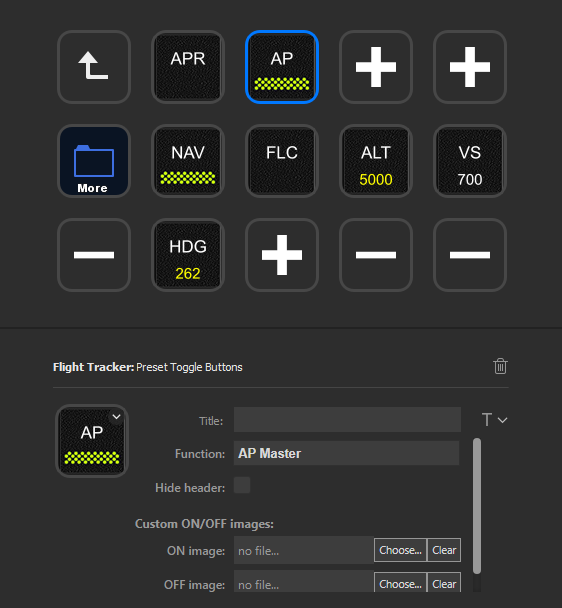
This is a plugin for Elgato Stream Deck that provides you with buttons to interface with Microsoft Flight Simulator via SimConnect. There are some preset buttons allowing you to simply drag & drop and choose the required function. There are also generic buttons and gauges allowing you to access a wide selection of SimConnect variables and events.
The buttons from this plugin have several benefits comparing to buttons with key bindings:
- The buttons do not emulate keypress, so you don’t have to worry about matching keyboard binding in-game. You don’t have to worry about other software happen to mistakenly take those keys in either.
- The buttons interact with the sim directly via SimConnect, so the sim does not have to be in focus. You can be reading chart (or any other software), and all buttons will still works.
- It can show a lot of information from the sim.
- The buttons can perform some more “advanced” interactions than normal Stream Deck buttons. For examples.
- Holding COM/NAV button shows you a numpad to enter frequency (not available on Stream Deck Mini due to limited buttons).
- Holding HDG button sync current heading.
- Tapping +/- button increase/decrease 1 unit while holding does so at 10 units.
- Click More Actions button in the bottom right corner of Stream Deck software
- Search for Flight Tracker & click Install
- Accept the prompt to install the plugin and the profiles. The profile is a special numpad, allowing you to enter COM/NAV frequency and transponder code.
- You should now see Flight Tracker group in your list of buttons.
- Download latest version and unzip
- Double click the file tech.flighttracker.streamdeck.streamDeckPlugin to install
- If you manually created the folder tech.flighttracker.streamdeck.sdPlugin previously in %appdata%\Elgato\StreamDeck\Plugins, you will see an error saying "This custom action is already installed." In this case you will need to manually remove that folder before trying again.
- Accept the prompt to install the plugin and the profiles. The profile is a special numpad, allowing you to enter COM/NAV frequency and transponder code.
- You should now see Flight Tracker group in your list of buttons.
https://github.com/nguyenquyhy/Flight-Tracker-StreamDeck/blob/master/docs/USERGUIDE.md
Reporting IssueIf you have any issue with the plugin, it is better to report it in our GitHub page so that you can attach useful information for troubleshooting such as screenshots, logs and profile exports.
https://github.com/nguyenquyhy/Flight-Tracker-StreamDeck/issues
If you have any questions or suggestions, please feel free to issue at the link above or leave a comment here.
You can also join my Discord server for further discussion https://discord.gg/azqQrWWEbV.
Other useful linksSource Code: https://github.com/nguyenquyhy/Flight-Tracker-StreamDeck
Releases: https://github.com/nguyenquyhy/Flight-Tracker-StreamDeck/releases
Don't forget to Like and Follow the plugin for exciting future updates!
Kommentare(243)
Melden Sie sich an, um an der Diskussion teilzunehmen
Anmelden4 months ago
8 months ago
For years I have been enjoying multiple profiles for aircraft controls and instrument readouts. Suddenly it stopped working. The plugin populates the various buttons, but doesn;'t receive or transmit from/to FS2024 any more.
I'm using the latest mobiflight wasm module which is shown as enabled in FS2024, but debug window says stopped and no variables seem to have been recognised (I didn't need the wasm module before as far as I recall).
I have spent many days going through every small detail of my setup, reinstalled SD and FlightTracker and reset FS2024, but I'm still stuck.
Comms fine for LittleNavMap, so FS2024 seems to be OK there.
Grateful for any hints.
9 months ago
Thank you!
9 months ago
̶F̶r̶e̶q̶u̶e̶n̶c̶y̶ ̶i̶s̶ ̶n̶o̶t̶ ̶u̶p̶d̶a̶t̶e̶d̶ ̶o̶n̶ ̶s̶t̶r̶e̶a̶m̶ ̶d̶e̶c̶k̶ ̶a̶n̶y̶m̶o̶r̶e̶ ̶b̶u̶t̶ ̶o̶n̶l̶y̶ ̶i̶n̶ ̶s̶i̶m̶ ̶a̶n̶d̶ ̶t̶h̶e̶ ̶f̶u̶n̶c̶t̶i̶o̶n̶a̶l̶i̶t̶y̶ ̶d̶o̶e̶s̶ ̶n̶o̶t̶ ̶b̶e̶h̶a̶v̶e̶ ̶w̶e̶l̶l̶.̶ ̶
̶W̶o̶u̶l̶d̶ ̶r̶e̶a̶l̶l̶y̶ ̶l̶i̶k̶e̶ ̶t̶o̶ ̶s̶e̶e̶ ̶a̶ ̶f̶i̶x̶.̶ ̶
EDIT: This is not a bug by this plugin but confirmed bug by Fenix. To be fixed "soon".
11 months ago
Category: FlightStreamDeck.SimConnectFSX.SimConnectFlightConnector
EventId: 0
Exception received
Exception:
System.Runtime.InteropServices.COMException (0xC000014B): 0xC000014B
at Microsoft.FlightSimulator.SimConnect.SimConnect.ReceiveDispatch(SignalProcDelegate pfcnSignal)
at FlightStreamDeck.SimConnectFSX.SimConnectFlightConnector.HandleSimConnectEvents(Int32 message, Boolean& isHandled) in E:\Codes\_nguyenquyhy\FlightStreamDeck\FlightStreamDeck.SimConnectFSX\SimConnectFlightConnector.cs:line 64
about 1 year ago
11 months ago
over 1 year ago
over 1 year ago
over 1 year ago
I just get a SD+, I noticed that with the VS potar > the value does not appear.
It is OK for the other
Thanks :)
over 1 year ago
over 1 year ago
over 1 year ago
Flight Tracker StreamDeck plugin
Enhance your Microsoft Flight Simulator experience with the Flight Tracker StreamDeck plugin, now available in the Stream Deck store. This plugin allows for seamless interface with the simulator via SimConnect, offering preset buttons and gauges for easy access to a wide range of functions. Benefit from direct SimConnect interaction, no need to match keyboard bindings, and enjoy advanced interactions such as frequency input and heading sync.

Unterstützer
Nutzerbewertungen
38 Bewertungen
Versionsgeschichte
**Happy New Year everyone!** - Add `RECIP ENG COWL FLAP POSITION:2` - Fix dial cannot set negative VS - Fix overlapping text in Generic gauge
about 2 months ago