
Beschreibung
-- Tested in SU6 and working correctly --
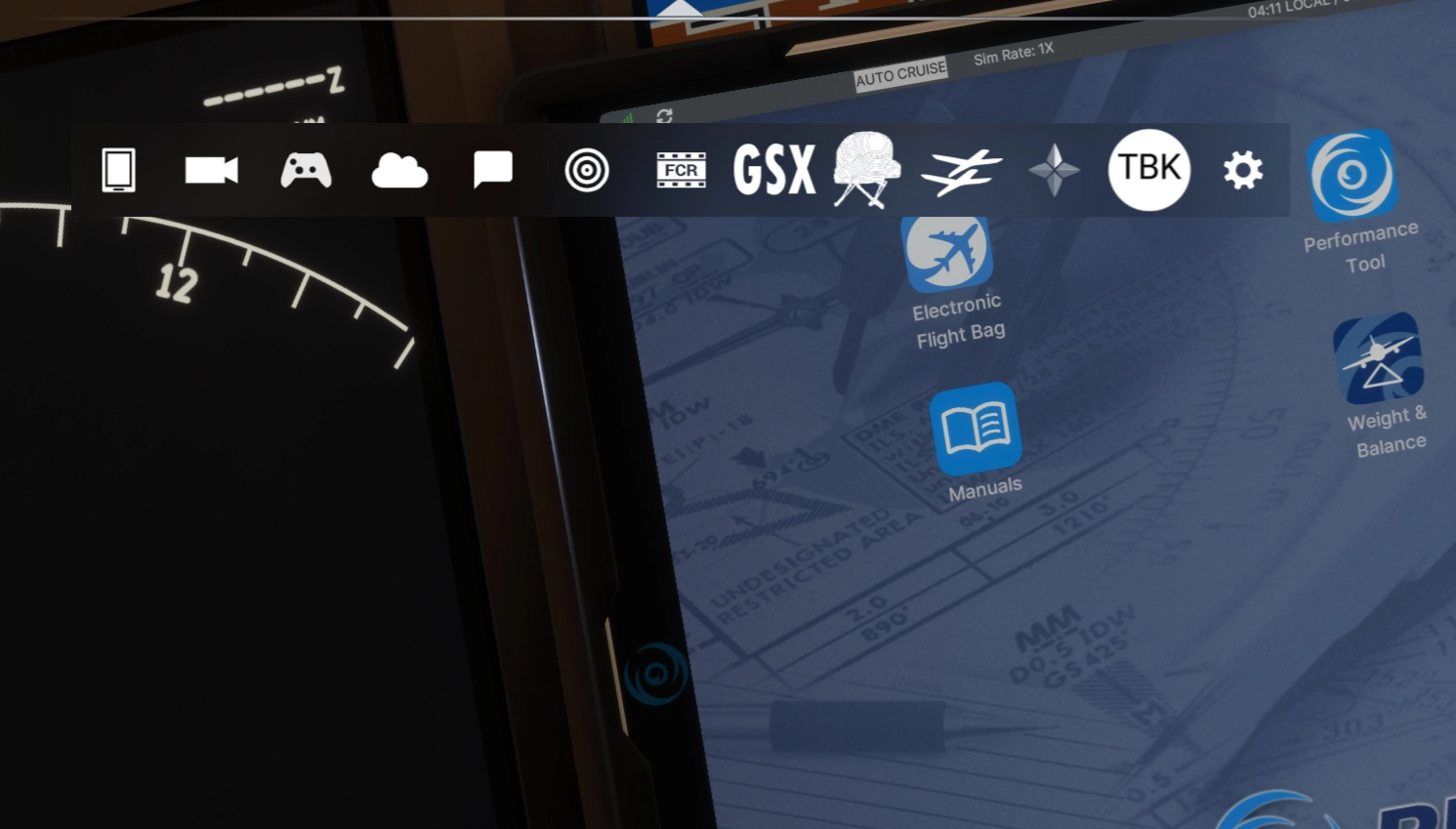
The Toolbar Mod for MSFS2024 toggles the toolbar on and off completely from your main sim window!. This mod not only provides more immersion and better screenshots, but it gives you back important screen real state lost to the huge invasive MSFS2024 toolbar.
Tired of trying to click that overhead button and the toolbar gets in the way? Suffer no more!!!
Installation is simple: unzip and drag the mod folder into your community folder. Once you load the simulator and go flying, the MSFS Toolbar is by default hidden for you. Use the default key combination: CTRL-ALT-T to bring it back. Use the same key combination and it's gone again. Simple!.
As of this (1.0.1) version, you are able to customize the key combination by editing a file. See instructions below.
=====================CHANGELOG========================
1.0.1 - 24/OCT/2025
Fixes:
- Compatibility with other mods (such as "DroneSim Compact Bar")
- Improved compatibility with other screen resolutions
Added:
- Customizable keybindings (see instructions below)
1.0.0 - 20/OCT/2025 - Initial Release
=========CHANGING DEFAULT KEY COMBINATION=============
Edit the file ToolBarOverride.js located in the mod (ie:LocalCache\Community2024\Community\evaamo-tbk-mod\html_ui\InGamePanels\tbk\)
Find the settings in the section "Settings: Customize keybinding here"
const SETTINGS = {
    keybinding: {
      modifiers: {
        ctrl: true,  // Require Ctrl key
        alt: true,   // Require Alt key
        shift: false // Require Shift key
      },
      keyCode: 84   // Key code for 't'. See common key codes above.
    }
};- Set modifiers.ctrl, modifiers.alt, modifiers.shift to true/false to enable/disable each modifier.
- Set keyCode to the desired key's code (e.g., 84 for 't', 75 for 'k').
- Common key codes:
* A=65, B=66, C=67, ..., Z=90
* 0=48, 1=49, ..., 9=57
* F1=112, F2=113, ..., F12=123
* Enter=13, Space=32, Esc=27, Tab=9 - Full list: https://keycode.info
Example: For Shift+Ctrl+K, set { ctrl: true, alt: false, shift: true, keyCode: 75 }
=====================IMPORTANT=========================
Tested only in MSFS 2024 and SU3 and SU4 (Beta).
This has been tested as much as possible. However, there's TONS of room for improvement.
Please leave feedback in the comments if you find an issue (or hit LIKE if you enjoy using it!)
=====================COMPATIBLE========================
If you have many Icons in the Toolbar, you should use the The Wrapping-toolbar by luzat .
If you like would like a reduced-sized Toolbar, DroneSim created a fantastic compact bar
Both options are more reliable than the weird scrolling behavior by Asobo's default Toolbar.
=====================CREDITS===========================
Kudos to the folks at Parallel 42 for their msfs-toolbar-interop idea!!!
Toolbar Mod
The Toolbar Mod for MSFS2024 allows users to fully toggle the simulators toolbar on and off, enhancing immersion while retaining valuable screen space. This mod aims to eliminate hindrances when interacting with cockpit elements and custom views. Installation is straightforward, requiring users to place the mod folder in their community folder and utilize a simple key combination for activation. Compatibility is currently tested with MSFS 2024 and SU3, with feedback encouraged for future updates.

Nutzerbewertungen
18 Bewertungen
Versionsgeschichte
- Compatibility improvement with other mods (DroneSim compact bar is one) - Settings inside javascript file to change key-bindings
Melden Sie sich an, um an der Diskussion teilzunehmen
AnmeldenKommentare(94)
about 1 month ago
Just one question, what's the purpose of the TBK icon in the toolbar? Clicking it nothing happen, so I don't get if it has any function. Thanks!
about 1 month ago
about 1 month ago
about 1 month ago
about 2 months ago
about 1 month ago
about 1 month ago
about 1 month ago
about 2 months ago
3 months ago
3 months ago
Your addon makes 100% of the visible area clickable, which is super nice.
Still don't understand why Asobo didn't create an option to disable the toolbar or make it smaller. Worst user experience with the toolbar.
3 months ago
4 months ago
4 months ago
5 months ago
5 months ago
4 months ago
6 months ago
In my case, I've bind this to spacebar to show up the toolbar and disappears when releasing it. Eventually you can bind it to a joystick too.
Makes it even easier for me!
7 months ago
7 months ago