
Beschreibung
❤️ If you like my app, please like and comment, it's important 🙏
MFS Apps Control (EN, French below)
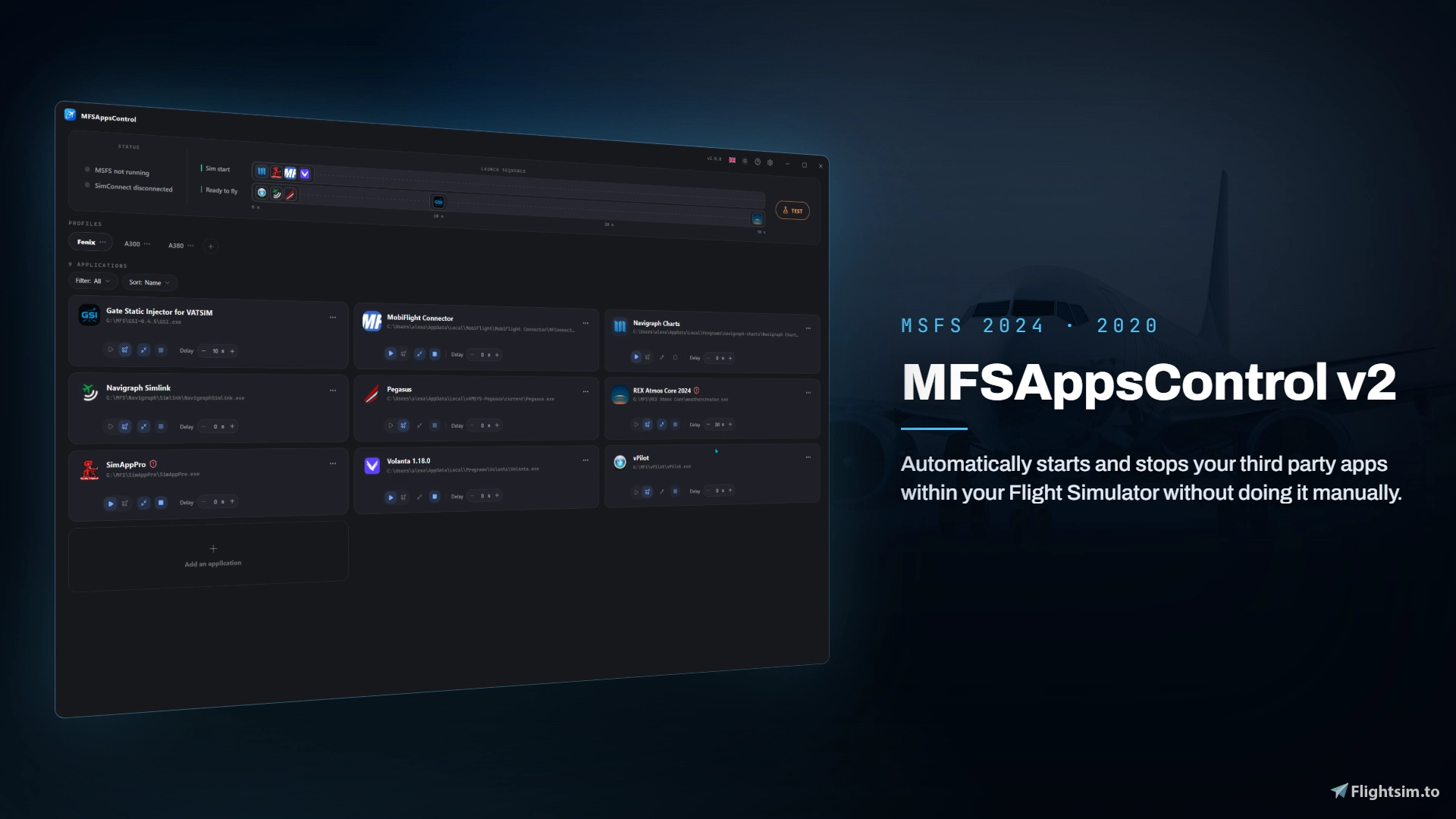
Windows desktop application that monitors Microsoft Flight Simulator (2024 and 2020) and automatically starts / stops the simmer's third-party applications (vPilot, Navigraph, MobiFlight, FSUIPC, Active Sky, REX Atmos…), organized into profiles that can follow the aircraft you fly.
Set it up once, then just fly: your tools open when MSFS starts or when you reach the aircraft, the right profile is picked for the aircraft you load, and everything closes cleanly when you quit the simulator.
📖 Quick How-To-Use
- Install the application with the installer
- Start the application
- Create your profiles and add the apps you want to start/stop. Put the ones you use with every aircraft in Shared.
- Optionally, link your aircraft to their profile: the right profile becomes active by itself when the flight loads.
- Minimize the app to keep it running in the background in the tray, and run MFS.
✨ Features
Automatic start and stop
- Each application starts with the simulator, or once the aircraft is ready to fly, detected through SimConnect.
- A delay of up to 10 minutes can be set for each application, and the whole sequence is shown on a timeline.
- When the simulator closes, the applications set to "auto stop" are closed cleanly, without leaving background processes behind.
- Applications you start yourself are detected too.
- A Test button plays the whole sequence without starting the simulator, to check your profiles in seconds.
- One switch turns the automatic sequence on or off, from the window or the tray, where the icon shows its state with a green or red dot.
Profiles that follow your aircraft
- Create a profile per aircraft or per habit, then duplicate, rename, reorder or delete them as you like.
- The Shared profile holds the applications you use with every aircraft: set up once, they launch with any profile.
- Link a profile to your aircraft, variants and liveries included: when a flight loads with one of them, its profile becomes active by itself.
- C
hange aircraft without restarting the simulator: the applications of the previous profile close, those of the new one start, and the ones both use keep running.
- Profiles and applications can be edited at any time, in flight too.
Easy application management
- Pick an application from the list of installed flight sim software: its name, icon and path are filled in automatically.
- Portable applications are added by browsing for their executable.
- Each application has its own launch arguments, and can start minimized so it does not steal the focus from the simulator.
- Applications that need administrator rights are recognized and handled for you.
Light and out of your way
- Starts with Windows and waits in the notification area, ready before you fly.
- Light and dark themes.
- Available in six languages: English, French, German, Spanish, Italian and Portuguese.
- Tells you when a new version is out, and installs it in one click.
- Installer and application are now digitally signed.
Support
- A support archive with the logs and the configuration is generated in one click, ready to attach to a request.
- A short journal of every session is always kept in the logs, so a problem can be traced.
- A user manual is available in the same six languages: https://mfsappscontrol.stalexcorp.fr/
- Official Discord server for bug/feature request: https://discord.gg/peNzhxVPj3
❤️ Si vous apprécié mon application, liker et mettez un commentaire, c'est important🙏
MFS Apps Control (FR)
Application de bureau Windows qui surveille Microsoft Flight Simulator (2024 et 2020) et lance ou arrête automatiquement les applications tierces du simulateur (vPilot, Navigraph, MobiFlight, FSUIPC, Active Sky, REX Atmos…), regroupées dans des profils qui peuvent suivre l'avion que vous pilotez.
Configurez une fois, puis volez : vos outils s'ouvrent au démarrage de MSFS ou à l'arrivée dans l'avion, le bon profil est choisi selon l'avion chargé, et tout se ferme proprement quand vous quittez le simulateur.
📖 Guide d'utilisation rapide
- Installez l'application à l'aide du programme d'installation
- Lancez l'application
- Créez vos profils et ajoutez les applications que vous souhaitez démarrer ou arrêter. Placez dans Partagé celles que vous utilisez avec tous vos avions.
- Si vous le souhaitez, liez vos avions à leur profil : le bon profil devient actif tout seul au chargement du vol.
- Réduisez l'application dans la zone de notification pour qu'elle tourne en arrière-plan, puis lancez MFS.
✨ Fonctionnalités
MFSAppsControl a été entièrement repensé.
Il ne s'agit pas d'une mise à jour de la version 1.x : l'interface et le système sont entièrement nouveaux et allégés. C'est comme s'il s'agissait d'une toute nouvelle application.
Lancement et arrêt automatiques
- Chaque application démarre avec le simulateur, ou une fois l'avion prêt à voler, détecté via SimConnect.
- Un délai allant jusqu'à 10 minutes se règle pour chaque application, et toute la séquence s'affiche sur une chronologie.
- À la fermeture du simulateur, les applications en « arrêt automatique » sont fermées proprement, sans laisser de processus en arrière-plan.
- Les applications que vous lancez vous-même sont détectées aussi.
- Un bouton Tester joue toute la séquence sans démarrer le simulateur, pour vérifier vos profils en quelques secondes.
- Un interrupteur active ou désactive la séquence automatique, depuis la fenêtre ou la zone de notification, dont l'icône affiche l'état par une pastille verte ou rouge.
Des profils qui suivent votre avion
- Créez un profil par avion ou par habitude, puis dupliquez, renommez, réorganisez ou supprimez-les à votre guise.
- Le profil Partagé réunit les applications que vous utilisez avec tous vos avions : configurées une seule fois, elles se lancent avec n'importe quel profil.
- Liez un profil à vos avions, variantes et livrées comprises : quand un vol se charge avec l'un d'eux, son profil devient actif tout seul.
- Changez d'avion sans relancer le simulateur : les applications de l'ancien profil se ferment, celles du nouveau démarrent, et celles que les deux utilisent continuent de tourner.
- Profils et applications se modifient à tout moment, en vol aussi.
Gestion simple des applications
- Choisissez une application dans la liste des logiciels de simulation installés : son nom, son icône et son chemin sont renseignés automatiquement.
- Les applications portables s'ajoutent en parcourant leur exécutable.
- Chaque application a ses propres arguments de lancement, et peut démarrer réduite pour ne pas voler le focus au simulateur.
- Les applications qui demandent les droits administrateur sont reconnues et gérées pour vous.
Légère et discrète
- Démarre avec Windows et attend dans la zone de notification, prête avant votre vol.
- Thèmes clair et sombre.
- Disponible en six langues : anglais, français, allemand, espagnol, italien et portugais.
- Vous prévient quand une nouvelle version sort, et l'installe en un clic.
- Installeur et application maintenant sont signés numériquement.
Support
- Une archive de support avec les journaux et la configuration se génère en un clic, prête à joindre à une demande.
- Un court journal de chaque session est toujours conservé dans les logs, pour retracer un problème.
- Un manuel d'utilisation est disponible dans les six mêmes langues : https://mfsappscontrol.stalexcorp.fr/
- Serveur Discord officiel pour signaler des bugs ou proposer des fonctionnalités : https://discord.gg/peNzhxVPj3
MFS Apps Control
Windows app to start/stop third party apps within Microsoft Flight Simulator 2020/2024 on a modern UI by profile.


Unterstützer



Nutzerbewertungen
12 Bewertungen
Versionsgeschichte
FEATURES - Shared profile A new Shared profile holds the applications you use with every aircraft, such as Volanta or Navigraph Charts. They are set up once, launch with whichever profile is active, and appear on the same timeline. Shared cannot be deleted or duplicated. - Grouping into Shared, offered and never imposed Right after this update, MFSAppsControl lists the applications all your profiles have in common and offers to group them into Shared. Everything is ticked by default: untick what should stay where it is, or decline and nothing moves. The same offer comes back when you add an application that another profile already has, and "Move to Shared", in a card's menu, does it by hand. An application counts as the same when its path and arguments match. When profiles disagree on its settings, the most common ones are kept, and the delay kept is shown before you confirm. - Profiles linked to aircraft Link a profile to one or more aircraft, variants and liveries included: from the banner, which now shows the aircraft loaded in the simulator, or from "Linked aircraft…" in a profile's menu, which lists your Community and Marketplace aircraft with the simulator running or not. A linked profile shows a link icon on its tab. When a flight loads with a linked aircraft and the automatic sequence is on, its profile becomes active by itself. Browsing aircraft at the main menu changes nothing. - Change aircraft without restarting the simulator Nothing locks during a session any more: profiles and applications can be edited at any time, in flight too. Only a card whose countdown is running stays locked until it ends or is cancelled. Switching profile stops and starts nothing on the spot. When the next flight loads, the applications of the previous profile close, and those of the new one launched with the simulator start right away; its ready-to-fly applications follow once you reach the aircraft. The ones both profiles share keep running. An application added during a session starts after what is left of its delay, and ready-to-fly applications now launch once per simulator session rather than at every flight. - Automatic sequence on and off The new "Auto sequence" switch, above Test, and the "Automatic sequence" item of the notification area menu turn the automation off: nothing is launched or stopped with the simulator, closing included. The notification area icon carries a green dot when it is on and a red one when it is off, and the choice is kept across restarts. - Session journal The simulator starting and closing, the ready-to-fly moment, and every application launched or stopped are now always written to the logs, whatever the log detail chosen, so a support request shows what happened during a session. FIXES - Detection after a simulator crash When MSFS crashed or was closed forcibly, the ready-to-fly detection, and with it the aircraft detection, did not come back for the next session until MFSAppsControl was restarted. It now reconnects on its own.
Ähnliche Addons

LFPG Charles De Gaulle 2024 - Enhancements
This add‑on enhances the default LFPG scenery by fixing collision issues, correcting bridge elevations, restoring missing taxi lines and markings, and improving several terrain and traffic areas based on real‑world references. It delivers a smoother, more accurate, and VATSIM‑ready experience at Charles de Gaulle Airport while waiting for an official update
von Stalexlife

GSX Profile - Asobo LFPG Paris-Charles de Gaulle (Roissy) by Stalex
This GSX profile customizes ground services for the default Asobo LFPG Paris-Charles de Gaulle airport scenery. Features include tailored spawn and stop positions, defined pushback procedures, VDGS integration with VATSIM CDM, and airline-specific ground service assignments. The profile is in prerelease status with regular updates planned and current limitations on some stands and cargo areas. Compatibility is limited to the default or enhancement scenery for LFPG.
von Stalexlife
Melden Sie sich an, um an der Diskussion teilzunehmen
AnmeldenKommentare44
I'm opened to any idea for simmers :).
Thanks, very usefull, specially the profile linked to the aircraft.
One request: add application to close when MSFS starts up and to restart when MSFS is closed
I'm opened to any idea for simmers :).
I do have 1 suggestion. As someone who likes to keep their windows startup apps completely clean, I would value the option of being able to start this app with MSFS.
So MSFS starts -> This app gets launched by MSFS -> App launches startup apps.
I tried adding this app to the exe.xml and have it start with MSFS, but when doing so it does unfortunately not start the apps.
As explained in the doc, it's not possible because it has to detect start of mfs so if you're process is already running, the sequence will not start because it's not possible to safely ensure the startup of apps while your sim is already running.
The app is really lightweight (max 100mb of ram) and could stay running in background safely with using start with windows option to let it work in background.
Sorry for the long delay but I'm fully happy with this new one and using it a lot of time recently !
Enjoy !
Have noticed an issue. I have MSFS2024 on my Taskbar which starts Steam, then the Game. If MFS App is running it opens my 7 apps correctly and quickly then AUTO CLOSES everything and re-launches them all again as the Game loads. Everything works correctly, it just loads, stops and closes then reloads everything again.
However, if I go to Steam Library and start MSFS 2024 from there, it properly only opens the apps once and all is good. If I again try from the direct icon start, it does the 2 step dance. It's triggered by a direct launch vs a steam library launch.
Yes my bad, I got stucked with the huge update of LFPG and still working on a strong version of this app in term of UI/UX and services. They are always pros and cons on some part and had to restart from scratch many times to find the best final version. I will have more time now and will priorize it because it's also a game changer for me to not have to clic somewhere to start/stop all my apps and just running MFS.
Stay tuned, it will come soon !
Also does the app load programs/apps in the order i see on the screen? I have two apps that in order to work right need to start in the correct order. Thanks!
Auto Close means the app will be closed when mfs is closed.
Not sure to fully understand your issue about that start, the app will start all programs following the start of MFS where checkbox is checked for that.
About order, it will start one by one following list but it triggere the start in ms so list is not the reality, depend of how many time an app start (so it's own delay) but the app himself, will just trigger a start process on all app defined. I have a feature request to allow to define a delay on each app.