
Beschreibung
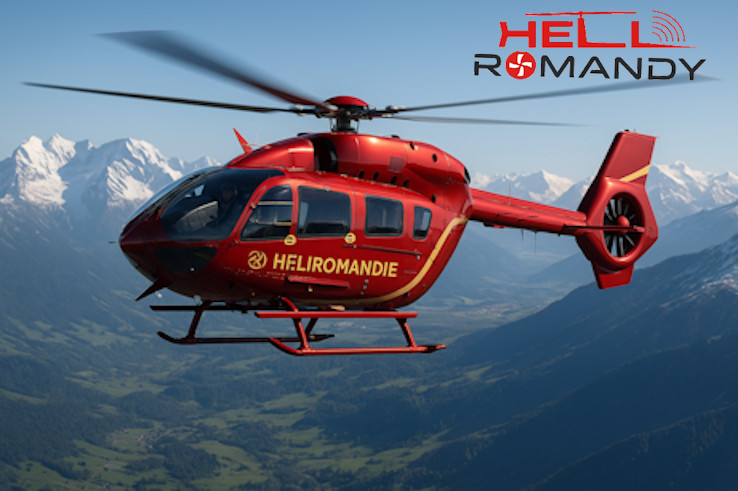
This add-on is an improvmed and realistic Mod of the excellent freeware Airbus H135 provided by Hype Performance Group in MSFS 2020/2024.
Key Modifications:
- Reduced artificial stability in pitch, roll, and yaw for a more organic hover feel – light micro-corrections are now required, just like the real aircraft.
- Increased rotor inertias (~+15%) to add realistic “mass” in maneuvers and transitions.
- Slightly increased tail rotor authority to match real anti-torque effectiveness at high power.
- Higher induced drag to make full-power climbs feel less “perfect” and require collective management.
- More noticeable in-ground effect (IGE) for a more lifelike cushion during low-altitude operations.
Refined engine configuration based on EASA Arrius 2B2/2B2Plus data:
- N1 100% reference: 54,117 rpm (per EASA TCDS)
- N2 100% reference: 5,898 rpm (derived from 6,252 rpm @ 106%)
- Power ratings for reference: MCP 621 shp, TOP 660 shp, OEI 819 shp
- Kept the modern fuel flow model without artificial scaling.
🔄 How to install:
Download the h135-tweak-pack ZIP file.
Extract into your Community folder.
Launch MSFS and select HPG H135 from the aircraft list.
❓ FAQ – How MSFS handles mods
Q: Why doesn’t your mod include all the H135 files?
A: Because it doesn’t need to. In MSFS, a mod only contains the files that are modified. The simulator automatically loads the base H135 package first, then replaces the matching files with the ones from the mod.
Q: Why is the folder structure important?
A: The mod must keep the same internal folder structure as the original aircraft, otherwise MSFS won’t know which files to replace. That’s why you see folders like SimObjects/Airplanes/hpg-airbus-h135 inside the mod.
Q: Does this mean my original H135 is changed?
A: No. The base H135 remains intact. The mod sits in your Community folder and only overrides certain files during loading. If you remove the mod, MSFS will go back to the original H135 automatically.
Q: Do I need to copy/rename anything?
A: No. Just drop the mod folder into Community. No renaming, no overwriting.
⚖ Credits & License:
This project is an overlay tweak for the freeware HPG H135 and does not include any HPG files.
It requires the original HPG H135 to be installed from hypeperformancegroup.com.
The original H135 is licensed CC BY-NC-ND 4.0 by Hype Performance Group.
This mod contains only configuration files created by Romandy AI Studio and does not redistribute any copyrighted material.
Not affiliated with or endorsed by Hype Performance Group.
As usually, we based our mods on the real life documentations
Our motto is simple: Built on REALSIM philosophy: no guesswork, only real-world data
Follow us on Instagram to be informed of the latest updates (and fun moments behind the scenes of the creation of the Mods)
Abhängigkeiten
HPG H135 Improvment Mod
This add-on enhances the freeware Airbus H135 by Hype Performance Group, introducing refinements to flight mechanics and engine parameters. Key modifications include improved handling characteristics, increased rotor inertias, and refined engine configurations based on real-world data. The adjustments aim to create a more realistic flying experience without altering the original assets, ensuring compatibility with future updates. Users will need the original H135 installed to utilize this overlay tweak.


Nutzerbewertungen
1 Bewertungen
Versionsgeschichte
Keine Versionsgeschichte verfügbar.
Ähnliche Addons

Bell 407 Realism Chab Mod
The Bell 407 Chab Mod offers a more realistic experience of the Bell 407 helicopter in Microsoft Flight Simulator 2020. It includes adjustments to control responsiveness, including cyclic sensitivity and collective response, as well as improved stability while maintaining manual control feel. Modifications also encompass engine performance settings based on official documentation, enhancing fuel pressure behavior for a more authentic flight experience. The add-on consists of modified configuration files for streamlined installation.
von Romandy AI Studio

DR400 Realism Mod
The DR400R Cadet Realistic Mod transforms the default Asobo DR400 into an accurate simulation of a trainer aircraft, utilizing real-world flight manuals and pilot feedback. Key improvements include a reworked flight model, realistic engine performance, and enhanced cockpit systems, all aligning with genuine specifications. This mod is designed for students and flight schools looking for an authentic training supplement within Microsoft Flight Simulator.
von RomandyStudio
B429 NextGen
The B429 Realism Mod offers a comprehensive overhaul of the Bell 429 NextGen helicopter, utilizing real-world documentation to enhance flight dynamics and performance. Key features include realistic specifications for the PW207D1 engines, accurate limitations for torque and ITT, and finely-tuned flight characteristics based on Bells official manuals. This mod is compatible with MSFS 2020 and 2024, making it ideal for training, emergency medical services, and IFR operations.
von RomandyStudio

EC135 Realism Mod (by Romandy)
The EC135 Improvement Mod enhances the default EC135 helicopter in MSFS 2024 by reducing excessive stability, resulting in more realistic handling characteristics. This mod introduces moderate counter-damping, allowing for lively transitions and requiring pilot corrections during hover. It is specifically designed for the EC135 and offers adjustable settings through a simple configuration file. The add-on operates without autopilot functions, ensuring a more authentic flying experience.
von Romandy AI Studio
Melden Sie sich an, um an der Diskussion teilzunehmen
AnmeldenKommentare(18)
about 1 year ago
about 1 year ago
about 1 year ago
You explain that you place your mod "next to" the base H135 folder, but files with the exact same name can't be placed next to each other. They have to be overwritten or skipped.
Does this mean that users need to rename your folder to ?
about 1 year ago
- You don’t need to overwrite or rename anything. The mod should be placed as a separate folder inside your Community directory, right next to the base hpg-airbus-h135 folder.
- MSFS automatically merges the files of both packages when they have the same internal structure. This means:
You keep the original H135 untouched.
- The mod simply overrides specific files during loading.
- If you ever want to remove it, you just delete the mod’s folder and the H135 goes back to default.
So no renaming required — just drop the mod folder as it is into Community.
12 months ago
Community\hpg-airbus-h135*
Community\h135-tweak-pack\hpg-airbus-h135**
*HPG's original folder
**RomandyStudio folder
When done like this, MSFS will only overwrite the correct elements of HPG's original addon.
However if you use Addons Linker, it ignores parent folder structures and loads only addon folders that contain the manifest file, which in this case is RomandyStudio's hpg-airbus-h135 folder. Since the Communiity folder cannot have two folders of the same name (at the same folder level) the result is that HPG's original folder is completely overwritten.
about 1 year ago
Also in your aircraft.cfg found this line :
IMPORTANT: Adjust the path below to match the exact HPG H135 package name you see under Official\OneStore\ (e.g., hpg-aircraft-h135).
base_container = "..\..\Official\OneStore\hpg-aircraft-h135\SimObjects\Rotorcraft\HPG-H135"
Original HPG135 is installed in community folder, not in "Official store", do I have to fix that path in your cfg file? Maybe you can change your cfg so we can just put your mod in original HPG 135 folder replacing the files?
One more thing: there're two versions of a H135 in original HPG folder: H-135 DEV HIGH SKIDS and H-135 DEV SERIES PROJECT. Your mod contains only High Skids version, so it seemsed like another version will not get your mod's omprovement. Am I wrong?
Thanks for the mod, but I think those installing issues need a little clearify.
about 1 year ago
Thanks a lot for your feedback!!! It really helps!😊
If Addon Linker asks to replace files, that’s normal — the folder name matches the original HPG H135 so it can override the right files. If yours is in the Community folder instead of Official\OneStore, just update the base_container path in aircraft.cfg to match your setup.
This mod currently improves only the H-135 DEV HIGH SKIDS variant. The “Series Project” version isn’t modified yet.
About MSFS 2024: At first I wasn't sure if the tweaks were compatible, then I was told "yes it works" so I added this compatibility.
I’ll make the install steps clearer in the next update. Thanks again for helping improve the mod! 🚁
about 1 year ago
about 1 year ago
Short answer: yes, a smaller aircraft.cfg is OK—if the mod uses base_container.
In that setup, the sim loads the original HPG H135 config first, then applies only the lines we override in our (smaller) aircraft.cfg. So it doesn’t need to be “full”; it just needs the sections/entries we’re changing.
Important:
Make sure the base_container path points to your actual HPG H135 folder (Community vs Official\OneStore).
Keep the mod as a separate package that references the HPG H135 via base_container.
Replacing the original files directly is not recommended—that’s when you’d need a full, 1:1 aircraft.cfg.
In fact we can include the full .cfg files because it is Hype's property. That's why the modders use this method. Hype is ok with that and the Microsoft community encourages add-on modifications. But you have to respect the work of other developers. I don't know if that answers your question
about 1 year ago
base_container = "..\..\Community\hpg-aircraft-h135\SimObjects\Rotorcraft\HPG-H135"
But there's no "Realistic" version appeared in hangar next to the original H135
about 1 year ago
hpg-airbus-h135\Simobjects\Airplanes\H-135 DEV HIGH SKIDS
Did I write those string right?
about 1 year ago
In your case, the original aircraft is located here:
hpg-airbus-h135\SimObjects\Airplanes\H-135 DEV HIGH SKIDS
So your base_container line should be:
base_container = "..\..\Official\OneStore\hpg-airbus-h135\SimObjects\Airplanes\H-135 DEV HIGH SKIDS"
(Replace Official\OneStore with Community if your H135 is installed in Community.)
Important thing:
The path and folder names must match exactly (including spaces, hyphens, and uppercase/lowercase).
about 1 year ago
about 1 year ago
about 1 year ago
PS: I tested it for MSFS 2024 and it works as well
about 1 year ago
We were not aware of the compatibility with MSFS 2024. However, the H135 must be installed first in MSFS, and then the file can be unzipped in comunity folder 😉