Flightsim.to
    FlightFX Cessna Citation X - N230SM (Dynamic Registration) - Image 1

    Beschreibung

    This is a repaint for the excellent FlightFX Cessna Citation X. N230SM (s/n 750-0152) is a 2001 Cessna Citation X. This livery comes in four variants: with and without winglets, and with either a painted or a dynamic registration number.

    Installation

    Simply drag and drop the 'livery-c750-n230sm' folder into your MSFS 2020 or MSFS 2024 Community folder.

    Credits

    Livery created by Tim-HH using Adobe Substance 3D Painter and Adobe Photoshop.

    Kommentare(21)

    Melden Sie sich an, um an der Diskussion teilzunehmen

    Anmelden
    M

    10 months ago

    An awesome livery for a great plane! Very well done!
    T
    TimHHAuthor

    10 months ago

    Thanks a lot! :-)
    I

    10 months ago

    can u make a non dynamic registration one for fs24
    T
    TimHHAuthor

    10 months ago

    It’s already included. But you have to manually remove the dynamic registration until Asobo fixes the problem.
    I

    10 months ago

    sometime it overlap
    p

    11 months ago

    I installed the livery like every other livery by placing it in the community folder. If i load up MSFS2020 I can see the livery but no thumbnail and when I select it, it just is a basic white livery when parket at the apron. Am I doing something wrong? I Purchased the Base Aircraft via Marketplace.
    T
    TimHHAuthor

    11 months ago

    That sounds as if you have installed the 2024 version into 2020. Please make sure that you download the correct version for your simulator.
    p

    11 months ago

    thanks... didn't see the optopm before haha... stupid me :P Thank you tim! Amazing as always! Still rocking my grandpas duke on the sim too ;)
    E

    11 months ago

    Hi, I'm on 2024, is it currently not possible to make the registration appear in the cockpit like in 2020 using atc_id? Do I have to manually type in the registration every time in the customization menu?
    T
    TimHHAuthor

    11 months ago

    No, that should work just fine with the updated version of this livery. The main problem with 2024 is that one can’t hide the dynamic registration number. So if you are using the variant with the painted registration number, you have to manually remove the registration number from the customization tab. Otherwise you will see two registration numbers on the tail.
    I

    11 months ago

    good livery but what is the selcal code. also why it say VTX750 inside the cockpit
    T
    TimHHAuthor

    11 months ago

    The registration number now appears correctly in the VC! I'd appreciate the 5th star :-)
    I

    11 months ago

    ok thanks the reg shows correctly in the cockpit. however what is this plane selcal code
    T
    TimHHAuthor

    11 months ago

    Unfortunately I have no idea about the selcal code.
    Z

    11 months ago

    Beautiful paint, Tim!!
    P

    11 months ago

    Awesome Job! Livery works great in 2020. Only reason its not 5 stars is because registration shows up as VTX750 on the cockpit placard. Happy to update my review when fixed. Thank you!
    Edit: fixed! thank you so much :)
    r

    11 months ago

    Just type the callsign into the callsign in 2020. It works there just fine.
    P

    11 months ago

    I did figure that one out, but it would be real nice if you didn't have to do that as its easy to forget to clear your callsign once you start a different flight
    T
    TimHHAuthor

    11 months ago

    Thanks for the feedback. I‘ll add the registration to the aircraft.cfg later today.
    T
    TimHHAuthor

    11 months ago

    It is fixed now! And I'd appreciate the 5th star :-)
    MSFS 2020MSFS 2024

    FlightFX Cessna Citation X - N230SM (Dynamic Registration)

    This add-on features a repaint for the FlightFX Cessna Citation X, showcasing the aircraft N230SM (s/n 750-0152), a model from 2001. The livery is available in four variants: with or without winglets and with painted or dynamic registration numbers. Installation is straightforward, requiring a simple drag-and-drop into the MSFS Community folder.

    Downloads2K
    Version1.1
    Dateigröße39.60 MB
    VeröffentlichtVor 10 Monaten
    AktualisiertVor 10 Monaten

    Nutzerbewertungen

    5.0

    5 Bewertungen

    5
    100%
    4
    0%
    3
    0%
    2
    0%
    1
    0%

    More Information

    Simulator
    MSFS2020/24

    Versionsgeschichte

    The registration number now appears correctly in the cockpit and on the engine covers. Please note, however, that the MSFS 2024 dynamic registration system is still very limited, and we are waiting for Asobo to fix it.

    Ähnliche Addons

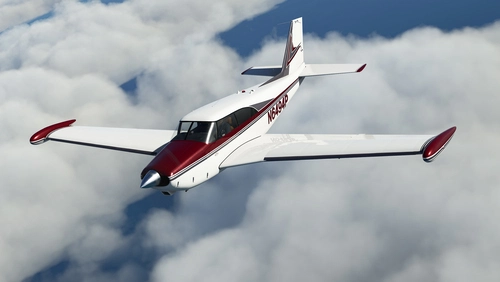
    A2A Piper PA-24 Comanche N6494P + Custom Interior and Registration

    A2A Piper PA-24 Comanche N6494P + Custom Interior and Registration

    A detailed repaint of the A2A Piper PA-24 Comanche featuring the N6494P registration. This 1959 aircraft, meticulously restored after 31 years, offers a custom interior and supports personalized registration. Enjoy the beauty of this historic aircraft with two versions included for your flying pleasure. Installation is simple - just drag and drop the folder into your MSFS Community folder.

    von TimHH

    5.0
    Flysimware Learjet 35A - N721EC

    Flysimware Learjet 35A - N721EC

    Repaint of the Flysimware Learjet 35A featuring N721EC, a 1980 Learjet 35A owned by East Coast Jets Inc. Installation is a breeze, just drag and drop the livery folder into your MSFS Community folder. Credits to Tim-HH for creating the livery using Adobe Substance 3D Painter and Adobe Photoshop.

    von TimHH
    4.9
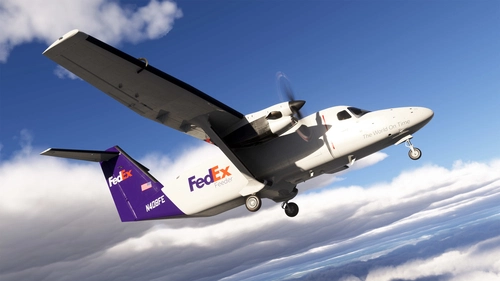
    Microsoft Cessna 408 SkyCourier - FedEx (N408FE)

    Microsoft Cessna 408 SkyCourier - FedEx (N408FE)

    This add-on features a detailed repaint of the Microsoft/Carenado Cessna 408 SkyCourier in the FedEx livery (N408FE). It represents the first production model delivered to FedEx in May 2022, with operational history under Mountain Air Cargo as the worlds first active operator. Compatible with Microsoft Flight Simulator 2024 Deluxe Edition, installation involves a simple drag-and-drop into the Community folder.

    von TimHH

    5.0
    Flysimware Learjet 35A - N421SV

    Flysimware Learjet 35A - N421SV

    Repaint your Flysimware Learjet 35A with this N421SV livery, a 1990 Learjet 35A. Simply drag and drop the folder into your Community folder for installation. Created by Tim-HH, this repaint is detailed with Adobe Substance 3D Painter and Photoshop.

    von TimHH

    5.0