
Beschreibung
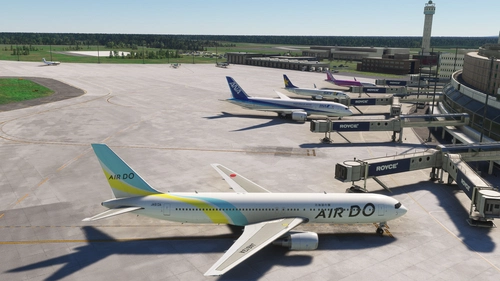
RJCC New Chitose Airport Addition
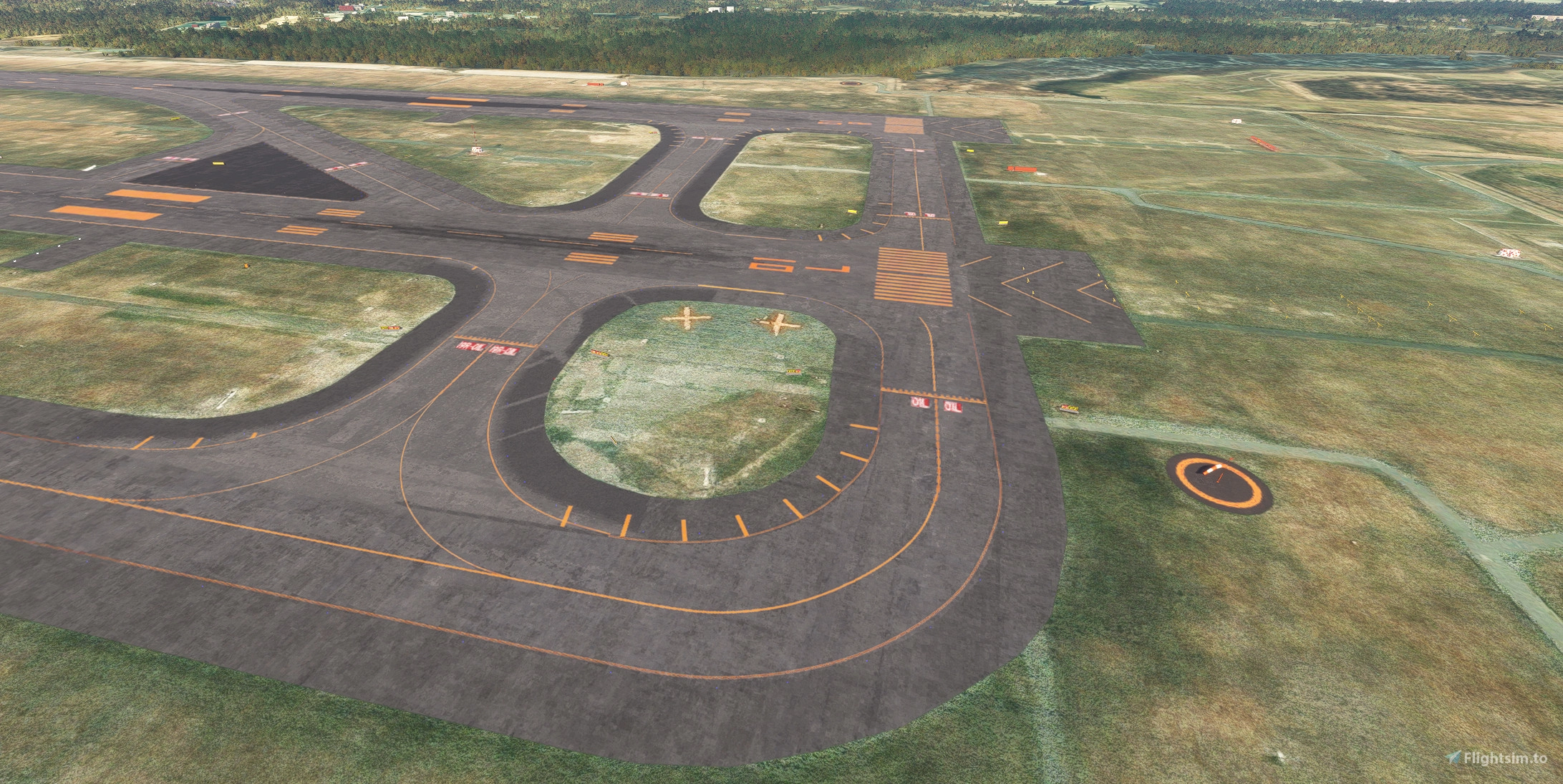
Adds A3 taxiway, B3 taxiway, A11 taxiway, B11 taxiway, G taxiway, and L5 taxiway to KAPI's RJCC airport.
Other apron markings and some objects have been changed and added.
Due to work reasons, the taxi paths have not been modified, so ATC does not recognize the new taxiways.
Some lines are not connected because the taxiways and lines were added using a forceful method.
The parking lot added to the cargo area does not have a taxi path connected, so GSX cannot be used.
The parking positions have shifted as a result of correcting the lines on the international apron.
The included RJCJ is almost stock.
How to use
Change the folder name or priority so that it is loaded after KAPI's RJCC airport scenery.
Each bgl file contains a separate set of changes.
Please disable any unnecessary files.
Abhängigkeiten
Location
RJCC - New Chitose Airport Addition
The RJCC New Chitose Airport Addition enhances the existing RJCC airport scenery by introducing several new taxiways, including A3, B3, A11, B11, G, and L5. It also updates apron markings and adds various objects, although taxi paths remain unchanged, which prevents ATC from recognizing the new taxiways. Users may encounter ILS height issues if using Navigraph, and adjustments to the folder name or priority may be necessary for optimal functionality. Note that some features, like the parking lot in the cargo area, do not have connected taxi paths for GSX use.


Nutzerbewertungen
6 Bewertungen
Versionsgeschichte
Corrected the misalignment between the runway and the line.
Ähnliche Addons
RJCC-NewChitoseAirport-JAPAN
🗾JAPAN-RJCC-NewChitoseAirport-Made by KAPI_Design.
von KAPI_
Dividing RJCC (New Chitose) and RJCJ (Chitose Air Base)
Enhance your MSFS experience with the Dividing RJCC and RJCJ add-on, which accurately separates the runways of New Chitose Airport and Chitose Air Base. This package includes added apron lights, taxiway G, and gate 69-71 for international arrivals. Make sure to check for compatibility with the RJCC improvement mod by TOSHICHAN310 for additional features. Simply drag and drop the files into your "Community" folder to enjoy this realistic airport division.
von berry
KAPI RJCC New Chitose AI Config Enhancement
Enhance AI operations at KAPI RJCC with this mod by AIG community. Experience increased aircraft spawning, opened gates, and updated airline coding. Optimize your AI traffic with added ground routes, accurate airline-specific coding, and more at New Chitose Airport. Download now for an improved airport experience.
von Ryanosaurus13
RJCC Sapporo New Chitose - FSLTL Static Aircraft (DominicDesignTeam)
This add-on features realistic static aircraft at RJCC Sapporo New Chitose airport, created by DominicDesignTeam, enhancing the visual ambiance of the airport. It uses FSLTL models as static scenery objects placed accurately at gates and ramps, requiring no performance impact or additional injectors. While designed for compatibility with DominicDesignTeams payware airport, it may not align correctly with other versions. The add-on includes clear installation instructions and configuration tips to avoid conflicts with MSFS traffic settings.
von ixvst01
Melden Sie sich an, um an der Diskussion teilzunehmen
AnmeldenKommentare(17)
5 months ago
8 months ago
8 months ago
Anyone elsewith this problem?
8 months ago
Is your mod compatibile with this one?
https://flightsim.to/file/100094/enhancement-pack-for-dominicdesignteam-new-chitose-rjcc-japan
10 months ago
about 1 year ago
I have a better solution to fix sunken 18L/R without tampering with Navigraph scenery package.
(I am using FS2020 version, but it should work for FS2024 as well)
(Reference: https://www.nmgsimulations.co.za/support/knowledge-base/how-to-reorder-scenery-in-microsoft-flight-simulator)
Please open General Options -> Experimental - >Package Reorder Tool.
Use the package reorder tool to make sure your order is something like this
-100 (Asobo packages)
-1 navigraph-navdata-base
0 (Addon Packages)
2 navigraph-navdata
The number doesn't really matter, as long as navigraph-navdata-base is above all addon scenery packages, and navigraph-navdata is below all addon scenery packages.
This should be your standard setting to prevent any 3rd party scenery/Navigraph package conflict.
Please let me know if this approach works.
about 1 year ago
10 months ago
If the original airport is named in my case Japan-RJCC-New Chitose how should I name your airport (two folders)? for example Japan-RJCC-New Chitose_airport and Japan-RJCC-NEw Chitose_enhancement?
Thanks
about 1 year ago
When I installed this mod in my environment, I ended up with duplicate windsocks. The mods are in the specified order.
Any possible reasons?
about 1 year ago
over 1 year ago
over 1 year ago
about 1 year ago
about 1 year ago
karuchie-san's scenery defines the runways with an MSL of 72-74ft, whereas Navigraph sets them to 89ft - this is a 16ft (4.9m) difference, which explains why you are seeing the runway sunken into the ground.
RJCJ has an ARP of 89ft (can see why Navigraph is doing this), but the north side of the airport is around 72ft (I can also see why karuchie-san is setting this number - to make the north-side RJCC aprons align with the runways).
The workaround is to remove (after backing up) ...\navigraph-navdata-base\scenery\fs-base\scenery\1002\APX85160.bgl (Do not remove the one in fs-base from Asobo official). This should resolve the issue. Remember to remove APX85160.bgl again if you update your Navigraph scenery.
I am no master of MSFS scenery craft and could be very wrong with my theory; but the workaround should work fine.
over 1 year ago
Thank you for always providing such wonderful scenery.
Regarding the north side of RJCC (Spot 0-10), there is interference between RJCJ and the area, and the PBB (Jetway) does not operate.
As a workaround for P3D, disabling the RJCJ airport itself will enable the RJCC PBB (Jetway) to function. It is likely that a similar fix would work in MSFS as well.
Could you release a version where RJCJ is completely removed or the airport area is significantly reduced?
over 1 year ago
Thanks
over 1 year ago