

Beschreibung
Features:
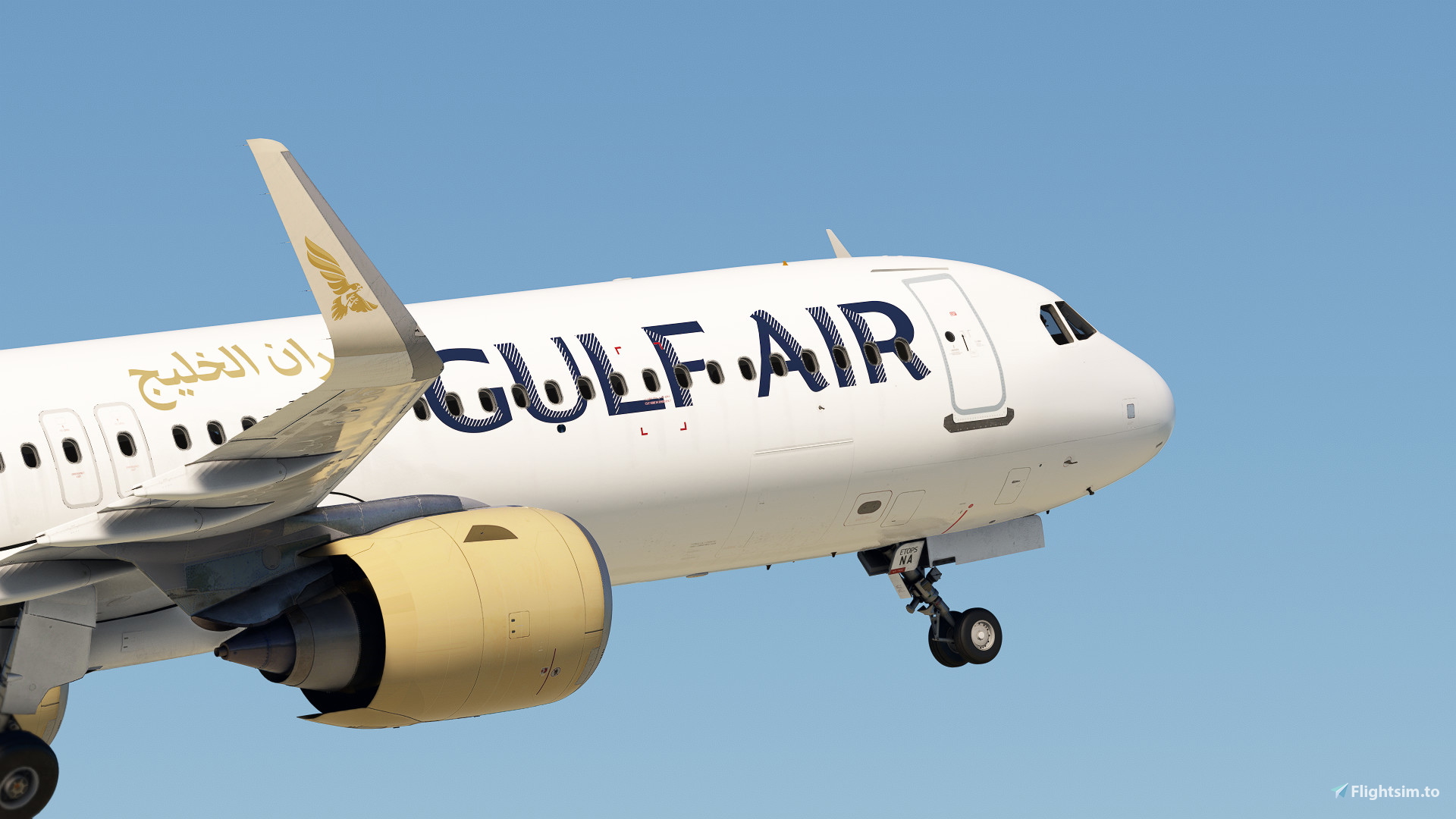
-Livery was made from real photos.
-8k/4k textures.
-Highly detailed rendition of Gulf Air livery on the A321neo.
-Falcon correct placement on the tail and body.
-Seat colors changed to match the real ones.
-Arabic writing on the exterior.
Installation :
1-Choose 4K or 8K.
2-Add the livery to Community\fsl-a32x-liveries\SimObjects\Airplanes.
3-Open FSLabs Control Center and wait until the loading is complete.
4-Enjoy.
Gulf Air A321neo A9C-NA (8K+4K) | Fslabs A321neo
This add-on provides a highly detailed Gulf Air livery for the A321neo in Microsoft Flight Simulator, available in both 8K and 4K textures. The livery is crafted from real photos, featuring authentic design elements such as the Falcon logo and appropriate seat colors. Additionally, the exterior includes Arabic writing. Installation instructions are included for ease of use.


Nutzerbewertungen
3 Bewertungen
Versionsgeschichte
1-Fixed max_num_pax to 180/24/78/78 to fix CG issue. 2-fixed engine colour.
Ähnliche Addons

[A32NX] | [8K] Gulf Air (A9C-TA) Very Detailed Clean/Dirty Version
Experience the detailed Gulf Air A9C-TA livery for your A32NX, available in clean or dirty versions, and even a clean version without the tail number. Choose your preferred style, download, unzip, and enjoy flying with this state-owned airline based in Bahrain. With 52 destinations in 28 countries, Gulf Air is known for its sponsorship of major events like the Bahrain Grand Prix. Install all variations simultaneously for added convenience.
von xRentnerx

Gulf Air | A9C-FE | HorizonSim 787-9 | 8K & 4K
Add a touch of luxury to your Microsoft Flight Simulator experience with the Gulf Air livery for the Horizonsim Mod Boeing 787-9. This add-on features high-quality 8K textures, custom rivet work, reworked engine animations, and multiple liveries to choose from. Please ensure you have the MSFS Premium Deluxe Version and the Horizonsim B789 Modification before installing.
von Comet133

Horizon Simulations 787-9 | Gulf Air
Experience the Gulf Air-themed repaint for the Horizon Simulations 787-9 in Microsoft Flight Simulator. Download this meticulously crafted livery by the JSWorks MSFS Repainters Group for a fresh look in the skies.
von JordxnE

Fenix A320 | Gulf Air Fleet Pack | 8K
Enhance your Fenix Simulations A320 experience with the Gulf Air Fleet Pack featuring 8K custom liveries including unique registrations like A9C-AD and A9C-AK. Detailed repaints matching real-life airframes, custom placards, and PBR effects for added realism. Install by dragging the folder into your MSFSCommunity directory and enjoy the meticulous craftsmanship of these liveries. Contact the author for support or contribute a donation to appreciate their dedication to creating high-quality repaints.
von ProfessorMadman
Melden Sie sich an, um an der Diskussion teilzunehmen
AnmeldenKommentare10
Most recent picture on 2026 you can see its been removed https://www.planespotters.net/photo/1878977/a9c-na-gulf-air-airbus-a321-253nx
max_num_pax=166/45/63/58
num_ACTs=3
model_type=A321-253NX
[Cabin]
Rows=38
FirstClassRows=4
FirstClassGap=40
RowsRemoved=5,6,7,13,34,35,36,37,38
RowGap.1=20
RowGap.2=20
RowGap.3=20
RowGap.14=5
RowGap.15=5
CabinStartOffset=30
SeatsRemoved=
The gaps in first class align with how falcon gold is installed on the LRs, and the gaps behind rows 14 and 15 conform with the exit rows that exist there in real life (exact placement may be off because this is my first time doing this). I honestly forgot why I set the rows to 38 when the last row on this aircraft is 33, but I'm pretty sure it had to do with aligning the rows properly. The gap between 4L/R and row 33 (when viewed on the EFB's W&B page) would be wear the lavatories and rear galley go.
I've also modified other config files just to get the engine type adjusted for the -253NX (Leap 1A33).
Let me know what you think.
One suggestion, in the flightsim.cfg file you need to ammend the following line:
max_num_pax=165/0/15/150 to the following:
max_num_pax=180/24/78/78
The high density version of the A21N that Gulf Air operates (the standard def holds 150 for GFA) holds 180 pax however this the cabin section splits not the class splits by having 0 in the first section which is in your flightsim.cfg that comes with the paint it really messes up the ZFWCG and doesn't allow you to ammend it so the aircraft is out of trim.