
Beschreibung
AVIANCA Fenix A320-CFM PACK #1 you have:
Fenix A320 CFM-WF AVIANCA N955AV|2021
Fenix A320 CFM-WF AVIANCA N567AV|2011 Taca heritage
Fenix A320 CFM-WF AVIANCA N416AV|2010 Miami Dolphins
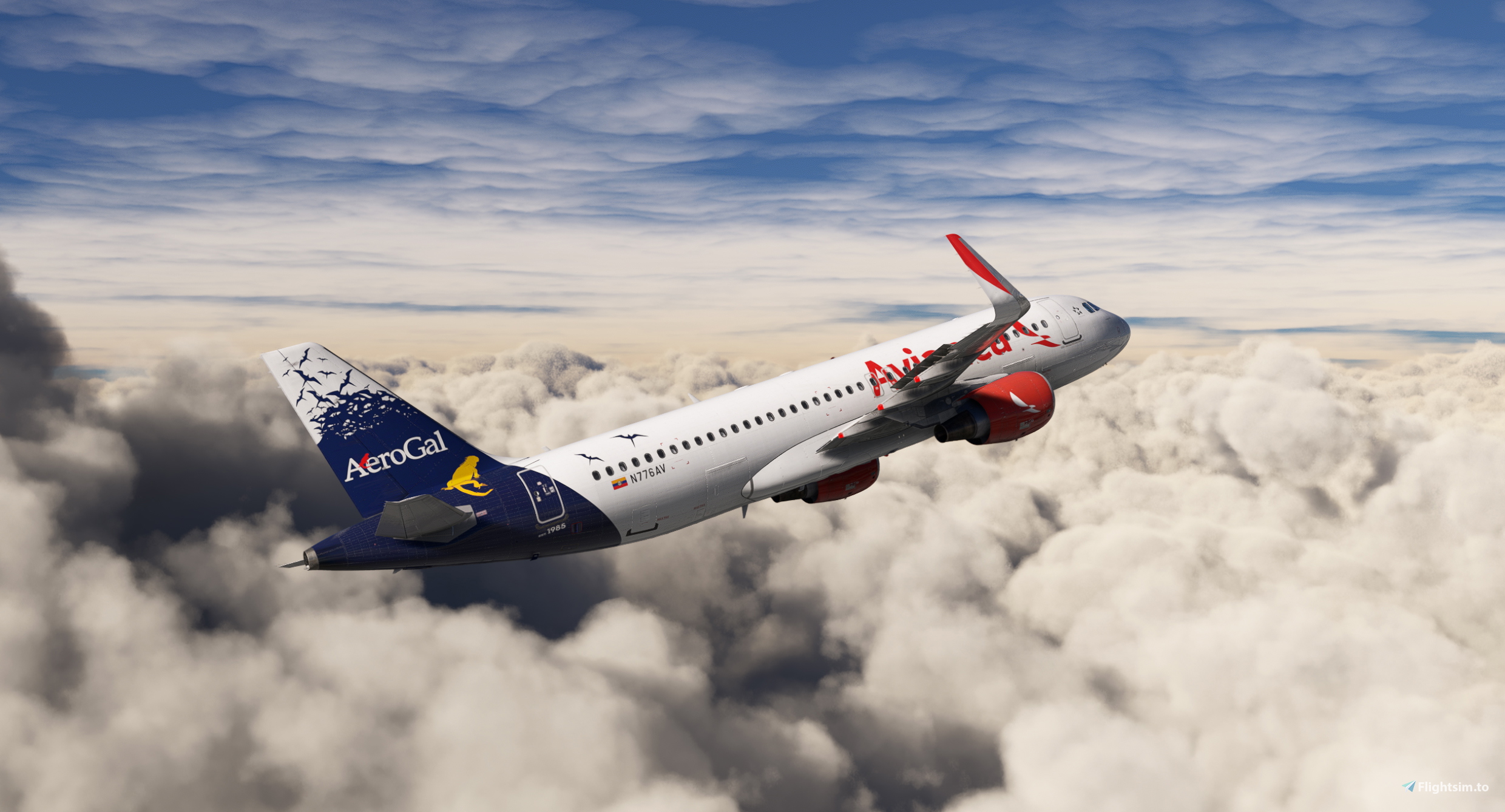
Fenix A320 CFM-SL AVIANCA N776AV|2023 Aerogal heritage
Features:
Each livery is fully handcrafted to details from fuselage to cabin, including logos, stickers and Spanish labels, cabin lighting, FAP's, seat cards. The cockpit has custom made Reg/Selcal tag and EFB's
As my usual preference for "weathered" planes, you will find that each fuselage comprised in Pack 1# boasts a fully handcrafted custom weather effect on tail, cockpit/passenger windows, doors and cargo doors.
Please note:
Distribution of this content is prohibited prior authorization from the author. elSÍ
To fly these liveries, please unzip and move the content into your Community folder
Best, elSÍ
Avianca pack #1 for Fenix A320 CFM
This add-on features a pack of four meticulously crafted Avianca liveries for the Fenix A320 CFM/SL. Included in this pack are the new 2021 livery (N955AV), the Taca heritage livery (N567AV), the Miami Dolphins heritage livery (N416AV), and the Aerogal heritage livery (N776AV) from 2023. Each livery is designed with detailed elements such as cabin lighting, custom logos, and unique weather effects on the fuselage. The add-on aims to provide an authentic representation of Aviancas aircraft for simulation enthusiasts.


Nutzerbewertungen
5 Bewertungen
Versionsgeschichte
- Corrected wrong text on wings display on N955AV (apologies)
Ähnliche Addons
Avianca pack #3 for Fenix A320 CFM
This add-on features a collection of four distinct Avianca liveries for the Fenix A320 CFM, part of a three-pack series. Included liveries are the Rainbow Pride livery (N724AV, 2022), the 100 Years Anniversary livery (N284AV, 2010), the Lacsa heritage livery (N821AV, 2011), and the Surf City livery (N686TA, 2013). Each livery is meticulously handcrafted with detailed textures, custom weather effects, and authentic cabin elements, enhancing the flight simulation experience.
von elSI

Avianca pack #2 for Fenix A320 CFM
This add-on features a collection of three Avianca liveries for the Fenix A320 CFM, part of a larger pack of eleven. Included in this pack are the Star Alliance livery, Aviateca heritage livery, and a former livery scheme, each meticulously handcrafted. The designs encompass detailed elements such as fuselage artwork, cabin features, and custom weathering effects to enhance realism. Installation requires unzipping the files into the Community folder for use.
von elSI
ACES Colombia for Fenix Simulations A320 IAE-WF
The ACES Colombia livery for the Fenix Simulation A320 features high-resolution 8k textures for both fuselage and cabin. This add-on includes meticulously handcrafted decals, lettering, and logos, alongside custom weather effects for various surfaces. The interior cabin and cockpit are also detailed with realistic elements, enhancing the overall authenticity of the aircraft experience.
von elSI
ACES Colombia for Fenix Simulation A320v2 IAE engines (8k fuselage/cabin textures)
ACES Colombia adds a detailed and custom 8k fuselage and cabin texture set for the Fenix Simulation A320v2 with IAE engines. This package features handcrafted placards, logos, and weather effects, enhancing both the exterior and interior elements of the aircraft. The interior details include meticulously designed surfaces, signage, and a unique EFB setup for an immersive experience. Ideal for those looking to simulate the Colombian airline aesthetic.
von elSI
Melden Sie sich an, um an der Diskussion teilzunehmen
AnmeldenKommentare30
Glad to hear your issue has been resolved.
Thank you so much for your kind words and of course for your generous 5 stars rating to my craft.
Best, elSI
It sounds like the same issue you are experiencing with Viva livery.
The issue is with "layout.json" file.
Pink textures occur when the "Layout.son" files goes missing from the livery folder during installation or...it gets corrupted.
-Run "layout.json" file with MSFSLayoutGenerator.exe, to recompile it.
Best, elSI
The "Avianca" logos reflect how the livery looked like at the time of delivery to the carrier.
Avianca changed "A" to "a" at later stage.
Thank you for downloading my artwork.
Best, elsI
Thank you for your appreciation to my craft and for your suggestion. Will follow your advise for my next publication.
Best, elSI
and Thank You for your kind 5 stars rating.
You need to be much more specific in what you are saying because I have no clue of what your issue is.
Without precise details, will be impossible to offer help.
Best, elSI
It sounds like you might have "double" community folders, both in MS20 and MS24, or incorrect sim installations, hence why you cannot see the liveries.
MS 20 and 24 Checks:
1- If you have a standard default installation (either Steam or Microsoft store), verify that you DO NOT have any other "community" folder you might have created using the "marketplace-my library page inside the sim".
If you do have a "duplicate Community folder", I would suggest deleting the one inside the default directory and, using "Marketplace-my library page inside the sim" point that to your "good" community folder.
2- Make sure you correctly unzip each livery folder of Avianca Pack#1 and place them inside your "good community folder".
Make sure you DO NOT place the livery folders inside "fenix-A320 liveries" otherwise the Sim will NOT read them.
3- I am sure you are using Windows 11 (64bit) because this version is able to read "long string" names for directories (Window 11 32bit it is NOT)
4- Make sure you are using official MSFS24 and Fenix Simulations copies.
5- Pink squared textures are the response of corrupted or badly compiled "json" files.
As good practice, run "MSFSLayoutGenerator.exe" on each of your "layout.json" file of your liveries. (if you have never used this .exe app, get it for free on this website and follow the instruction of the creator)
Running MSFSLayout Generator is to ensure the livery's json file is properly compiled after you have downloaded it (in case your downloads get somehow corrupted)
Let me know how you are getting on, after you have checked the above steps.
Best, elSI
Thank you for spotting such "lousy" error on my part. Apologies
The error has just been rectified, updated the pack and uploaded already.
N955AV for MS24 now displays the "correct" wing decals. (Instead of the selcal number, lol)
Thank you for your star rating, please kindly re-download the Avianca pack #1
Best, elSI
I have just checked N955AV for both MS20 and MS24.
They both read correctly inside "livery.cfg" of each version.
I don't know what you mean then.
best, elSI
Hope you can fixed n955av, it looks like it has some bugs on the livery.
Could you please be more specific about N955AV ?
Best, elSI