
Beschreibung
OVERVIEW
========
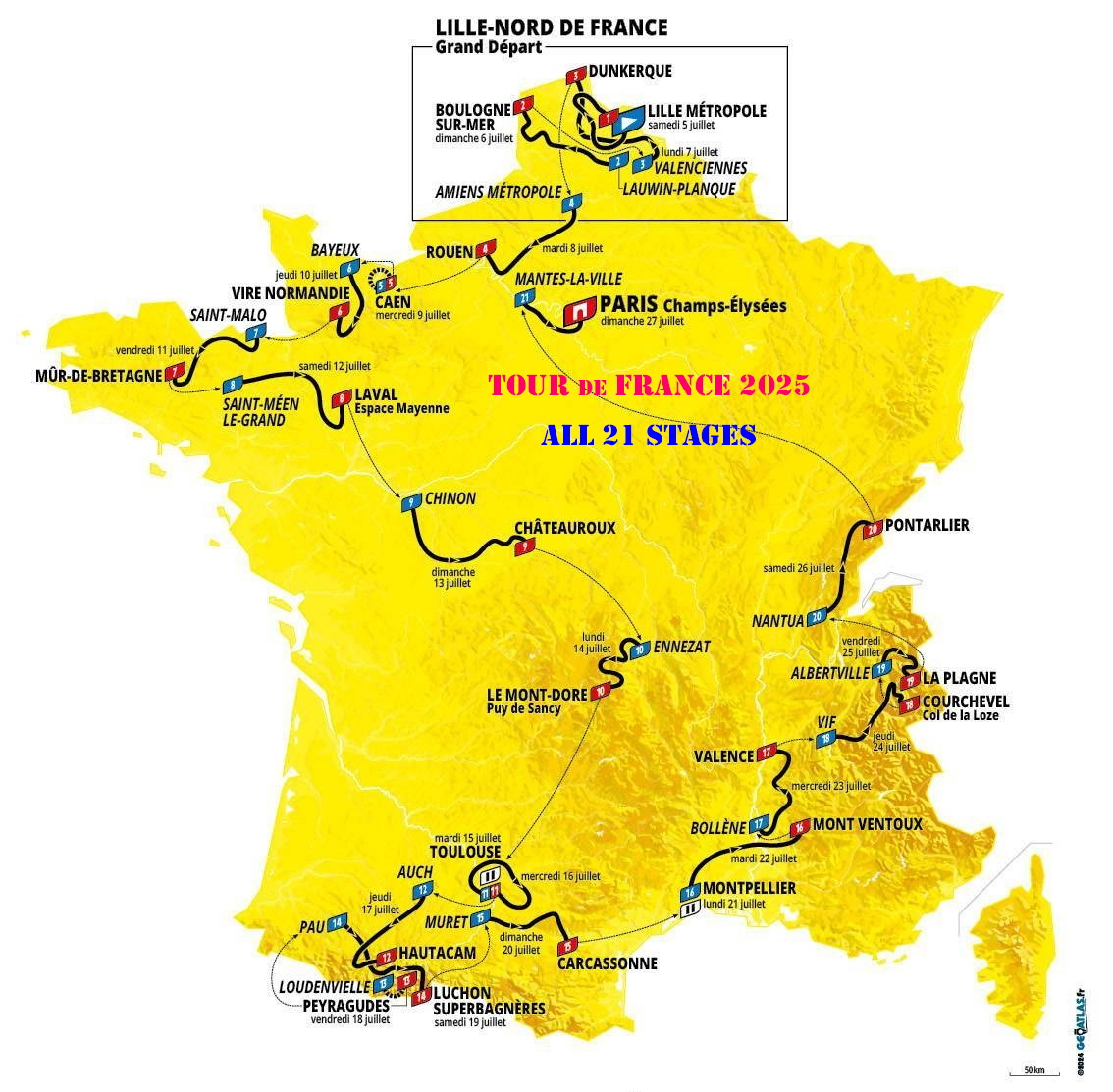
These Missions give you the opportunity to fly over the course of the Tour de France 2025,
and discover the country they will cross.
Tour de France 2025 provides:
----------------------------------------
- All 21 Stages are covered.
- Community Packages available for MSFS2020 and MSFS2024.
- 21 Legs (stages) Flight of the tour, visiting starting/Finish line.
- Bonus IFR Missions to get to and return from the Tour.
- Live Weather for the day of the Stage.
- Navlog In Game audio instructions will guide you through the flightplan, and point you to the Bike Route.
- Connecting to Little NavMap and loading the GPS Bike Route, will show your relative position while flying.
- The choice of four aircrafts for each stage.
- Icon A5.
- Cabri G2.
- Cessna 172 G1000.
- Joby.
- Possible to change weather conditions and Time.
- Flight Plan pre-loaded in the GPS.
- The Destination airport, from the Finish line of a Stage is the Departure for the Next Stage.
TdF-2025 Documentation:
----------------------------------
- Detailed VFR/IFR Flight Plan.
- Detailed Bike Route.
- Bike Route GPX files, ready to be loaded into the Little Navmap application.
- Airports Diagram and Information.
- VFR Map for each airports.
- Visual Approach Chart.
- Link to SkyVector and SIA (France) site.
- Links to Tour de France site.
- FlightBook for each stage.
TdF-2025 Packages Files:
----------------------------------
- Versions available for both MSFS2020 and MSFS2024.
- Ready to be copied to the Community Folder.
- Multi-Aircrafts support.
- Reward Screen displayed at completion.
- Flight plan is provided and loaded.
- In Game Audio instruction to help you navigate.
- Departure and Destination Airport are set.
- Weather conditions are set (Live).
- Date and Time are set.
===============================================================================
INSTALLATION AND SUPPORT
========================
TdF-2025 Distribution
-----------------------------
- TdF-2025_W0_ReadMe_ChangeLog_v1-2-0.zip: contains the ReadMe and changeLog files.
- TdF-2025_W1_Documentation_v1-2-0.zip: contains all the documentation. Must be installed.
- TdF-2025_W2_MSFS2020_Community_v1-2-0.zip: MSFS2020 only, Discovery flights.
- TdF-2025_W3_MSFS2024_Community_v1-2-0.zip MSFS2024 only, Discovery flights.
TdF-2025 Installation
----------------------------
1. TdF-2025 ReadMe & ChangeLog
- Unzip TdF-2025_W0_ReadMe_ChangeLog_v1-2-0.zip into a directory (folder) other than the Community folder.
- Read-Me.txt: Provide installation instruction and an overview of the package .
- Change-Log.txt: Provide a cumulative log of the changes of this package.
- Copyright.txt: Copyright Notice.
2. TdF-2025 Documentation
- Unzip TdF-2025_W1_Documentation_v1-2-0.zip: into a directory (folder) other than the Community folder.
- Open file: "...\TdF-2025_W1_Documentation_v1-2-0\TdF-2025_Doc\Read-Me_TdF-2025.htm".
- A table, under the Flights Stages Tab, provides access to the documentation for each Mission.
- Setup & Flying Tab provide installation ansd settings the environment for flying the Missions.
3. TdF-2025 MSFS2020 Community (only MSFS2020)
- Unzip TdF-2025_W2_MSFS2020_Community_v1-2-0.zip: into a directory (folder) other than the Community folder.
- Pre-Req: TdF-2025 Documentation Installation.
- Copy/Replace the CONTENT of "...\TdF-2025_W2_MSFS2020_Community_v1-2-0" into your MSFS2020 Community Folder.
4. TdF-2025 MSFS2024 Community (only MSFS2024)
- Unzip TdF-2025_W2_MSFS2024_Community_v1-2-0.zip: into a directory (folder) other than the Community folder.
- Pre-Req: TdF-2025 Documentation Installation.
- Copy/Replace the CONTENT of "...\TdF-2025_W2_MSFS2020_Community_v1-2-0" into your MSFS2024 Community Folder.
Note: Aircrafts name are differents in MSFS2020 and MSFS2024. You need to use the Community package for your environment.
If you have both you install each in its own community folder
==========================================================================================
TdF-2025 - Flying the Missions
-----------------------------------------
MSFS2024 Note: Bushtrip are not currently supported and some features, like the Navlog are missing.
MSFS Procedure:
1. Select Activities, from the MSFS main menu.
2. Select Custom Content.
3. From the "FSXRWT Bushtrip: Tour de France 2025", Select the stage and aircraft you want to Fly.
4. Hit "FLY".
- Read the Event description.
- Each Mission start and Finish at a nearby airport from the Start and Finish Line.
- Detailed step by step scenario of the mission is presented in the NavLog.
- In Game Marker are available to point you to the route.
- Missions' Documentation is accessible from the Flights Stages Tab
5. Select Ready to Fly.
6. The Navlog should open automatically. If not already visible, open it.
7. Use Little Navmap to follow your aircraft, relative to the Bike Route on the Map.
8. Approaching Waypoint, Audio instruction will guide you in detecting the Bike Route.
9. Have a good flight!
Little NavMap Procedure:
1. Start Little NavMap.
2. Select View/Show User Aircraft Trail.
3. Select Tools/Connect to Flight Simulator .../MSFS/Connect automatically .
4. Select File/GPS Exchange Format(gpx)/Load Aircraft Trail from GPX ... .
5. Select ""...\TdF-2025_Doc\GPX\stage-n-route.gpx", where n is the stage number.
6. When you start flying you will see the Bike Route in Green on the map
TdF-2025 Support and User,s Feedback
------------------------------------
- "FS-RWT Mess" Discord Server (send me an Email to get an invitation).
- Email: fsx.rwt@gmail.com.
I would like to thank the developer of the BushTripInjector tool, alias BuffyGC, for his support.
All the TdF-2025 Missions were produced using his program and the LittleNavMap tool.
Copyright 2025 by Gilbert Laprise (FsxRwt) - fsx.rwt@gmail.com
===========================================================================================
Kommentare(8)
Melden Sie sich an, um an der Diskussion teilzunehmen
Anmelden11 months ago
I just went through you blog (link in your post) about your experience flying the TdF-2025 Stages. It is a great account of your flying with superb pictures.
I really think that other flying users would benefit from reading it before flying each stage. It brings useful info about each stage, that are missing from the documentation (I did not know enough about French geography to be pertinent with additional info).
I am glad you were able to use the flight plan and use your aircraft of choice in Free flight. Another way is to load your aircraft of choice (MSFS2020 only) in developer mode. Bui you are still then under the MSFS Bushtrip constaint.
I am planning to make a TdF-2026, if you are interested, we could really benefit from your input about the region we fly over in each stage. I could send you the flight plan in advance. Just send me an email (fsx.rwt@gmail.com) if you are interested. we could communicate in french.
11 months ago
I can't add much background colour on a Twitter-like platform such as BSky, and some of what I add I have picked up from the TV coverage or podcasts such as "Never Strays Far" and "The Cycling Podcast" as well as my own French knowledge, and the race Road Book, released as an app a month or two before the race gives more detail about the course, route and start/arrival towns- see https://apps.apple.com/lv/app/tdf-espace-suiveurs/id6503944573 . Whether I can add any more than that, I doubt, but once the stage routes are published, I might be able to suggest a few locations near the route that the helicopters might visit.
11 months ago
------------------------------------
There was a problem in some of the stages where the Waypoint InGame Marker were difficult to see while flying a low altitude. The default cruising altitude, use to display the Marker was too high.
All stages have been modify with a custom cruising altitude based on the higher altitude of the stages. This should solve the majority of the problems. However some stages where the lower an higher altitude of the stage are very great, you might still have to fly higher to see around mountain.
Unfortunately Waypoint InGame Marker are not displayed in MSFS2024, so you will have to use the EFB or the GPS for navigation aids.
12 months ago
TdF-2025_W1_Documentation_v1-0-0_MP5tv klasörü içindeki .gpx dosyalarını .pln formatına dönüştürerek Dünya Haritası içerisinde bunu direk uygulamak istiyorum. Ama bir türlü yapamadım. Bana yardımcı olur musun, anydesk ya da teamwiever ne istersen.
12 months ago
Her neyse, bir uçak kullandığınızda yoldaki tüm kıvrımları takip edemezsiniz, bu nedenle yüklenen uçuş planı 1 deniz milinden az olmayan segmentlere sahip olmaya çalışır.
Uçuşların tadını çıkarmanızı umarım.
===========================================
English Translatiom - Question
----------------------------
Hello, I will try to express it in my own language since my French and English are not sufficient. I hope you can understand this through translation.
I want to convert the .gpx files in the TdF-2025_W1_Documentation_v1-0-0_MP5tv folder to .pln format and apply it directly in the World Map. But I couldn't do it. Can you help me, anydesk or teamwiever, whatever you want.
English Translatiom - Answer
--------------------------
Unfortunately I have not find a way to do it either. I manually created a pln file based on the gpx file, and it is automatically loaded when you start the Mission.
Anyway when you use an aircraft you can't follow all the twist in the road, so the flight plan loaded try to have segment that are not less than 1 nautical mile.
Hope you enjoy the flights.
about 1 year ago
about 1 year ago
MSFS2024
--------
It is not currently possible tu use the developer mode, with Bushtrip, to load another aircraft.
You will have to patch the FLT file of the stage flight in your Community Folder.
For example on my system to use the H125 helicopter in Stage-01, instead of the Cabri helicopter:
1. Edit the following file:
C:\MSFS2024UserLocalCache\Packages\Community\fsxrwt-bushtrip-tourfrance2025stg01\Missions\FsxRwt\BushTrip\fsxrwt-bushtrip-tourfrance2025stg01\fsxrwt-bushtrip-tourfrance2025stg01-L01.FLT
2. Search for the following entry
[Sim.0]
Sim=Cabri G2 Passengers
Livery=OFFICIAL_STATIC_01
3. Replace it with the following:
[Sim.0]
Sim=H125 Passengers
Livery=FLIGHTSEEING_STATIC_05
4. Save it.
5. start/restart MSFS2024 and enjoy your flight.
=======================================================================
MSFS2020
--------
1. Start a Stage Mission
2. Select Options/General/General Options/Developer Mode/On
3. Select Tools/Aircraft Selector
4. Select your favorite aircraft
6. Load
Enjoy tour flight
TdF-2025: Tour de France 2025 (FsxRwt)
Experience the Tour de France 2025 through a series of flight missions that cover all 21 stages of the iconic cycling event. This add-on allows users to explore the French landscapes while flying selected aircraft, complete with live weather and guided navigation. Additional features include comprehensive documentation, flight plans, and support for MSFS2020 and MSFS2024. Enjoy a unique perspective on the Tour as you follow the bike route for each stage and complete bonus IFR missions.

Nutzerbewertungen
1 Bewertungen
More Information
Versionsgeschichte
Ähnliche Addons
TdF-2024 : Tour de France 2024 (FsxRwt)
Experience the thrill of flying over the course of the Tour de France 2024 with this add-on, covering all 21 stages with live weather and detailed navigation logs. Choose from three different aircraft for each stage and immerse yourself in the world of this iconic cycling event. Future upgrades are planned to enhance your virtual Tour de France experience.
von fsx_rwt
Tour de France 2023 (FsxRwt)
Each bushtrip represent a leg or a day in the Tour de France, so you might want to follow the sequence. For each Leg or day, you have the choice of flying either the Cessna 175 G1000 or the Cabri G2. To fly another aircraft you will have to load it under the developer mode.
von fsx_rwt
Lindbergh - Spirit of St-Louis (FsxRwt)
In this flight you follow the VFR flight plan created and used by Charles Lindbergh in 1927, for the first non-stop solo flight over the Atlantic between New-York and Paris. Listen to the Log entries made by Lindbergh for every hour of the flight. Reference documentation is available with link to YouTube video about the journey.
von fsx_rwt
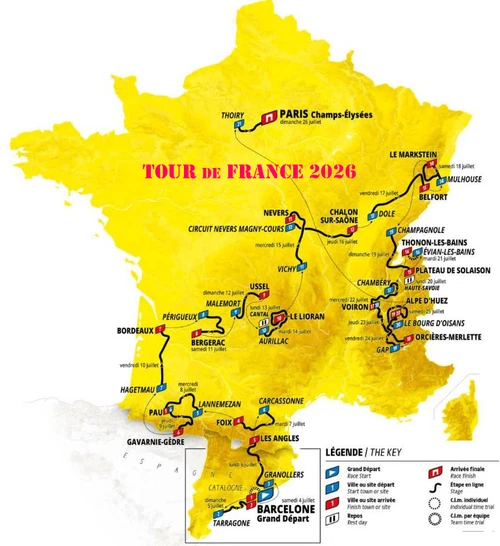
TdF-2026: Tour de France 2026 (FsxRwt)
This add-on features a series of missions covering all 21 stages of the 2026 Tour de France, allowing users to fly over the race route and explore the regions traversed. Each stage offers selectable aircraft, live weather, and in-game navigation tools such as audio instructions and bike route flags. The package includes detailed flight plans, documentation, and Little Navmap integration. Versions are provided for both MSFS2020 and MSFS2024 with community package support.
von fsx_rwt
11 months ago