
Flightsim.to
    Stream Deck+ profile to control MSFS 2020/2024 Garmin G1000 - Image 2

    Beschreibung

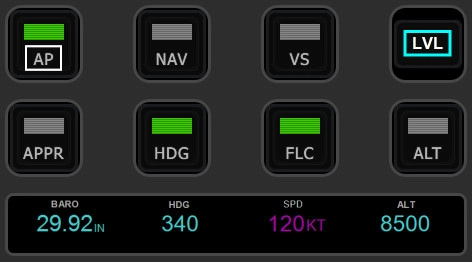
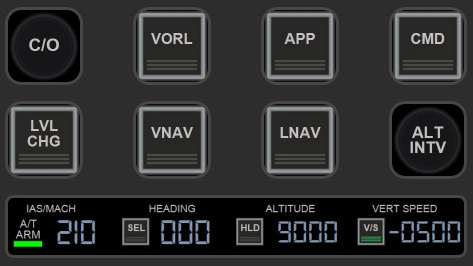
    This profile includes three pages to control Barometer & Autopilot and Garmin G1000 PFD & MFD Screen Controls. This profile works for all the planes with Garmin G1000 and also in MSFS 2020 and 2024 versions. NOTE - Not all G1000 versions have all the functionalities available (e.g. LVL button)

    Installation & Requirements
    Stream Deck+ and PilotsDeck plugin are required. PilotsDeck plugin can be installed from https://github.com/Fragtality/PilotsDeck

    If PilotsDeck package installation does not include MobiFlight WASM and FSUIPC7 (as it should), please install them from:
    https://github.com/MobiFlight/MobiFlight-WASM-Module
    https://www.fsuipc.com/

    Import included profile Garmin G1000 into Stream Deck app (e.g. by clicking the file). Page 3 for MFD controls is using Home icon, which is included in the ZIP. Please copy the file into Pilot's Deck folder: Users\YOUR_USER_NAME\AppData\Roaming\Elgato\StreamDeck\Plugins\com.extension.pilotsdeck.sdPlugin\Images

    Kommentare(40)

    Melden Sie sich an, um an der Diskussion teilzunehmen

    Anmelden
    a

    18 days ago

    This is the first comment I'm leaving on site. Very well done. Works perfectly with Cirrus SR22T. Only the NAV button doesn't work and show a yellow triangle.
    Can I send some tips to you?
    a

    18 days ago

    Never mind. I found and bought you a coffee. Didn't know it was an option 😊
    a
    aimoiiAuthor

    18 days ago

    Thank you so much for the support, and especially to report the button issue. It seems there has been some changes and Cirrus SR22T does not use the same control event anymore as previously. I need to check the whole profile and all G1000 planes to see what to update. :)
    a

    18 days ago

    I totally don't understand how does this thing works, but is it possible to add a button on one of the 2 empty fields somehow? Fuel switch button, as I'm annoyed every time look down and switch the fuel selector knob :)
    And btw NAV button suddenly started working o.O
    Z

    2 months ago

    This is fantastic and I've got every function up and running except for the knob to increase/decrease the target V/S. FLC works great to set the target speed in kts, but changing to V/S doesn't allow for the knob to increase/decrease fpm climb/descent. What am I missing?
    Z

    2 months ago

    Actually I figured out how to fix this on my own - definitely a learning curve as this is my first exposure to variables in the sim. What I'm trying to figure out now is creating a button just like AP but for the FD.
    a
    aimoiiAuthor

    2 months ago

    Happy to hear you managed to get all working! :) If you haven't yet followed my guide for building and customizing these profiles, check it out from here https://www.youtube.com/watch?v=3cqkQFJGxk8&list=PL_j2bl-uw9xFdxFwlzT4QosIALjObRVEk&index=2
    l

    3 months ago

    It's a very good profile showing a very new and effective way to interact with G1000 in game. Really appreciate it! I am even thinking buying another stream deck to avoid switching between pages too often , ha ha.
    a
    aimoiiAuthor

    3 months ago

    Happy to hear! :) And trust me, I know that feeling of having more Stream Decks... :D
    M

    3 months ago

    Just sent you a coffee, love this profile. If I might ask a question, is there any way to swap the LVL or ALT buttons on AP for VNAV?
    a
    aimoiiAuthor

    3 months ago

    Thank you so much for the feedback :) VNAV button is included in my next update for this profile, just trying to decide what I would include on the update, but releasing it reasonable soon.

    The command/variable would be B-variable B:AUTOPILOT_VNAV_MODE, if you would like to create a new button or modify any existing one before I release the new version.
    W

    4 months ago

    Still can't find and Install/Download button anywhere. Is there another site I could download from?
    a
    aimoiiAuthor

    4 months ago

    At the moment this is only shared here. I noticed that the download button might be also located bottom of the page depending on the browser zoom level. Also, it is possible that there is something glitching on the browser you are using, check also with different browser?
    W

    4 months ago

    There is no Download button for this profile! Am I missing something here?
    a
    aimoiiAuthor

    4 months ago

    Hmm, it should be in the same place top right like with other profiles as well. If you have already downloaded it before, it is showing green and 'Already Downloaded'
    b

    5 months ago

    Not getting any green indicator lights when pressing autopilot buttons. Numbers on touchscreen are not changing when turning knobs. Heading and altitude stuck on zero. I also reported issues with the Vision Jet profile.
    a
    aimoiiAuthor

    5 months ago

    Try to check FSUIPC7 installation and that it is running properly, commented more details for your previous post.
    C

    5 months ago

    Fantastic addon this, huge qualtiy of life versus manually typing origin/destination with the mouse.
    This makes it way easier to navigate the screen menus and all, thank you =)
    a
    aimoiiAuthor

    5 months ago

    So happy to hear my effort to build these helps fellow pilots :)
    MSFS 2020MSFS 2024

    Stream Deck+ profile to control MSFS 2020/2024 Garmin G1000

    This Stream Deck+ profile provides a comprehensive control system for the Garmin G1000 in Microsoft Flight Simulator 2020 and 2024, featuring three pages dedicated to Barometer, Autopilot, and Garmin G1000 PFD/MFD controls. It is compatible with all aircraft equipped with the Garmin G1000, although some functionalities may vary based on specific G1000 versions. To utilize this profile, users need a Stream Deck+, the PilotsDeck plugin, and associated modules such as MobiFlight WASM and FSUIPC7 for full functionality.


    Downloads2K
    Version1.0
    Dateigröße35.10 KB
    VeröffentlichtVor 1 Jahr
    AktualisiertVor 1 Jahr

    Nutzerbewertungen

    5.0

    7 Bewertungen

    5
    100%
    4
    0%
    3
    0%
    2
    0%
    1
    0%

    More Information

    Simulator
    MSFS2020/24
    KategorieMiscellaneous

    Versionsgeschichte

    Keine Versionsgeschichte verfügbar.

    Ähnliche Addons
    MSFS 2020/2024 - A320 Neo  V2 Stream Deck+ Profile

    MSFS 2020/2024 - A320 Neo V2 Stream Deck+ Profile

    This add-on provides a Stream Deck+ profile specifically designed for controlling the A320 Neo V2 in MSFS 2024. It features three pages that enable users to manage crucial aircraft functions such as Navigation Screen and Radar, Barometer settings, Autopilot, Landing Gear, and Brakes. The installation requires the Stream Deck+ and the PilotsDeck plugin, along with additional components like MobiFlight WASM and FSUIPC7 for full functionality. Users should also install the Digital-7 font for an optimized visual experience.

    von aimoii
    5.0
    MSFS 2020/2024 - Cessna Citation Longitude Stream Deck+ Profile

    MSFS 2020/2024 - Cessna Citation Longitude Stream Deck+ Profile

    This add-on provides a Stream Deck+ profile designed specifically for controlling the Cessna Citation Longitude in Microsoft Flight Simulator 2024. It features two pages for easy access to various functions, including barometer settings, autopilot controls, and MFD map zoom. Users will need the Stream Deck+ hardware and the PilotsDeck plugin to utilize this profile. Additional components such as MobiFlight WASM and FSUIPC7 may also be required for full functionality.

    von aimoii
    4.8
    Stream Deck+ profile to control Cirrus Vision Jet G2 (MSFS 2024)

    Stream Deck+ profile to control Cirrus Vision Jet G2 (MSFS 2024)

    This add-on provides a Stream Deck+ profile specifically designed for the Cirrus Vision Jet G2 in Microsoft Flight Simulator 2024. It features two pages that allow users to control essential functions such as Barometer settings, Autopilot, and Garmin PFD & MFD screen controls. Users will need the Stream Deck+ and the PilotsDeck plugin to utilize this profile effectively. Installation of additional components, including MobiFlight WASM and FSUIPC7, may also be required for full functionality.

    von aimoii
    5.0
    Stream Deck+ profile to control WBSim Cessna 152 in MSFS 2020/2024

    Stream Deck+ profile to control WBSim Cessna 152 in MSFS 2020/2024

    This add-on provides a Stream Deck+ profile specifically designed for controlling the WBSim Cessna 152 in Microsoft Flight Simulator 2020/2024. It features three customizable pages that allow users to operate the radio, navigation, and KAP 140 autopilot systems. The required PilotsDeck plugin and additional software installations are outlined for proper functionality. The profile also includes instructions for importing into the Stream Deck app.

    von aimoii

    0.0