
Beschreibung
Detailed Description
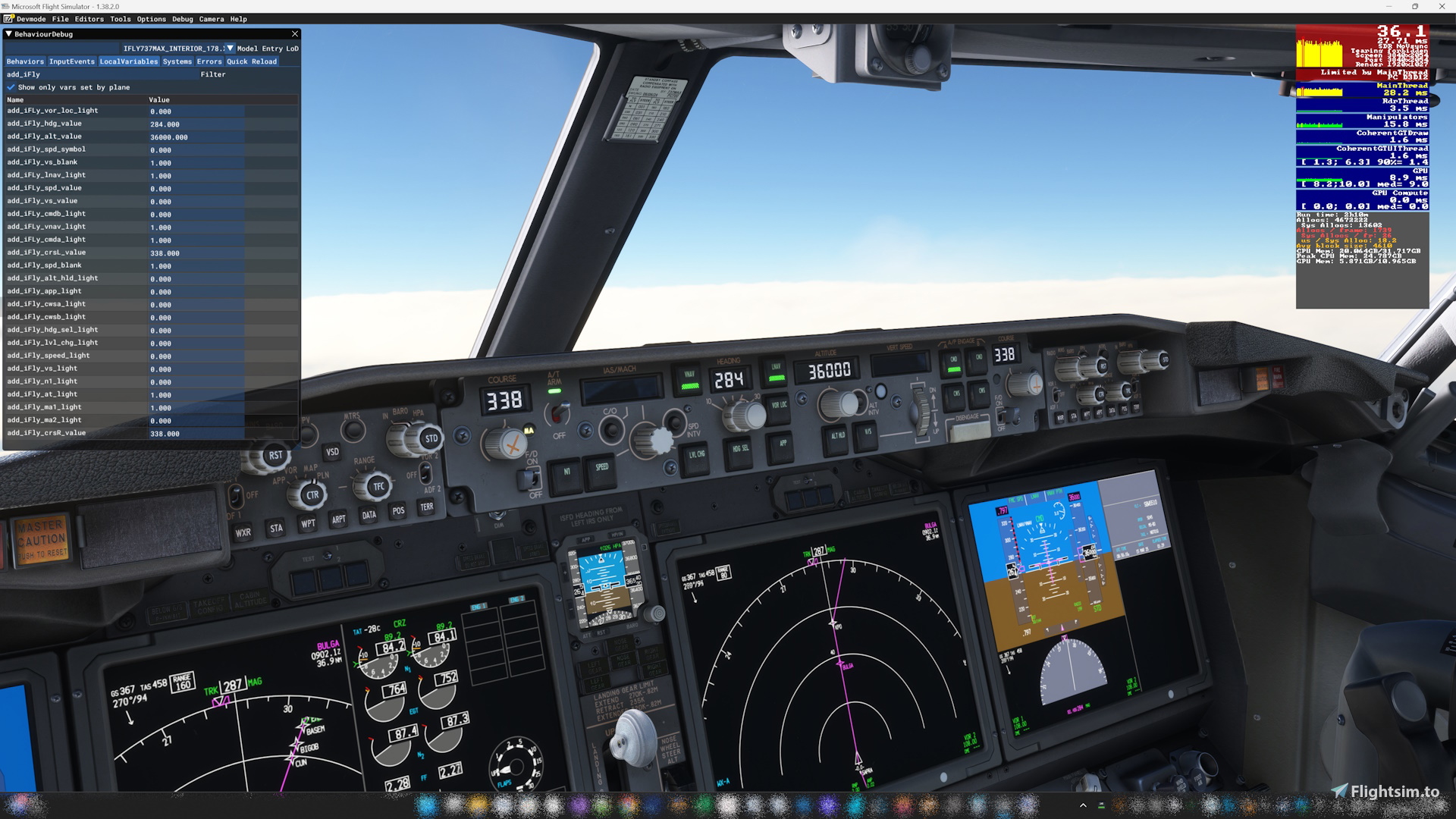
This apprication outputs the MCP information of the iFly 737 MAX8 as Read-only Lvar in real-time within Microsoft Flight Simulator. This allows the MCP status of the iFly 737 MAX8 to be integrated with other applications and systems, providing a more intuitive and efficient flight simulation experience.
I made it based on the SDK published by the iFly developer team.
Main Features
Outputs each value of the iFly 737 MAX8 MCP, button light status, and FMC light status to Microsoft Flight Simulator as read-only Lvars. Also provides writable Lvars for bank angle control. Refer to the readme for the names of the added Lvars.
Makes MCP settings available instantly to other applications during flight.
Supports complex flight operations by integrating with other devices or software.
Fully synced with Microsoft Flight Simulator, reflecting the MCP status in realtime.
Requirement
Microsoft Visual C++ Redistributable for Visual Studio 2022
Add Lvar for iFly 737 Max8
This add-on provides a read-only Lvar output for the MCP information of the iFly 737 MAX8 within Microsoft Flight Simulator 2020. It enables real-time integration of MCP status with other applications, enhancing the flight simulation experience. The add-on is designed to support complex flight operations by allowing instant access to MCP settings during flight. Compatibility with Microsoft Visual C++ Redistributable for Visual Studio 2022 is required.


Nutzerbewertungen
6 Bewertungen
Versionsgeschichte
Fixed “add_iFly_std_status” to function properly.
Melden Sie sich an, um an der Diskussion teilzunehmen
AnmeldenKommentare(23)
2 months ago
I'm building a hardware profile using AxisAndOhs and everything on the MCP is perfect. However, I noticed we still don't have writable LVars to control the BATTERY and the APU START switch on the overhead panel.
I saw another user requested overhead multi-position switches a few months ago. Are there any plans to add the Battery (ON/OFF) and APU (OFF/ON/START) inputs in a future update? It would make this tool the absolute ultimate bridge for the iFly MAX! Thanks again for your hard work!
6 months ago
6 months ago
3 months ago
9 months ago
9 months ago
I think it would be a good idea to download a MobiFlight profile from flightsim.to, look at its contents, and use it as a reference.
10 months ago
I will have to live without it.
10 months ago
about 1 year ago
Edit: The author has fixed the issue with v0.9.1. Thank you for the prompt fix!
about 1 year ago
about 1 year ago
about 1 year ago
We have confirmed that the application works correctly with MSFS2020 and 2024.
Are you using the winwing device with SimAppPro? We are not familiar with SimAppPro, so we cannot answer your question, but if you are using mobiflight, we may be able to help you.
Thank you.
about 1 year ago
I am using it with mobiflight yeah. Sim app pro won't actually work with the iFly max in FS24. It does function and all inputs are read. In my case, the heading course will just read 000, even though it will change the in game values.
over 1 year ago
over 1 year ago
over 1 year ago
I will respond assuming that you are referring to add_iFly_bank_value.
This lvar reads the numerical value assigned to add_iFly_bank_value and sends KEY_COMMAND_AUTOMATICFLIGHT_BANK_ANGLE_SET to iFly.
I haven't tried it yet in MSFS 2024, so I will check it out next weekend. Please wait a little longer.
over 1 year ago
over 1 year ago
Thank you.
over 1 year ago