

Beschreibung
Pop Out Panels in MSFS
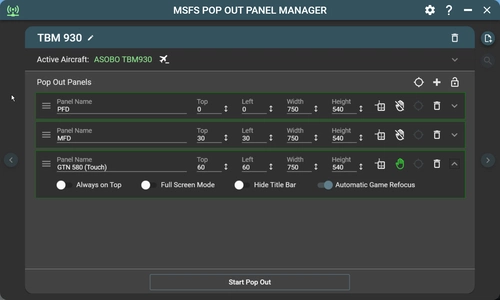
MSFS Pop Out Panel Manager is an application for MSFS 2024 which helps pop out, save and position pop out panels to be used by utilities such as Sim Innovations Air Manager or to place pop out panels onto your screen or another monitor at predetermined locations automatically. In MSFS, by holding RIGHT ALT + LEFT CLICKING some instrumentation panels, these panels will pop out as floating windows that can be moved to a different screen location or different monitor. But this needs to be done every time you start a new flight.
How to Pop Out
Video showing how to create a new aircraft profile using the new panel selection method
Video showing how to update existing aircraft profile to use the new panel selection method
In addition, a new floating panel feature which allows you to show and hide pop out panel with customizable keyboard binding has also been added.
Video showing how to manage floating panel
Touch Enabled Panel
Currently, MSFS lacks touch capability for pop out panels which are being used on touch screen or on tablet. If you're using pop out panel such as GTN750, KingAir PFD/MFD, or other in game touch screen capable panel (panels that can be operated with a mouse), or built-in panels such as ATC, checklist, you can add touch capability to these panels.
Application Features
- Display resolution independent. Supports 1080p/1440p/4k display and ultrawide displays.
- Support multiple user defined aircraft profiles to save panel locations to be recalled later.
- Intuitive user interface to defined location of panels to be popped out.
- Added automatic game refocus capability when using pop out. (MSFS bug where flight control is disabled when mouse is on the pop out)
- Enable touch support for pop outs on touch capable display (direct connected monitor or on tablet using tool such as SpaceDesk).
- Auto Pop Out feature. The application will detect active aircraft and activate the corresponding profile when starting a new flight session.
- Fine-grain control in positioning of panels down to pixel level.
- Panels can be configured to appear always on top, with title bar hidden, or stretch to full screen mode.
- Auto disable Track IR when pop out starts.
- Auto activate Active Pause when pop out starts.
- User-friendly features such as application always on top, auto start, minimized to tray with keyboard shortcuts.
- Auto update feature. Application can auto-update itself when new version becomes available.
- A virtual NumPad feature for touch panel screen.
- Floating panel option to show/hide pop out panel as needed.
How to Install
Just unzip the package to a folder of your choice on your computer and run "MSFS Pop Out Panel Manager 2024.exe". This application uses x64 version of SimConnect and you maybe require to install Microsoft VC++ 2015-2022 redistributable x64 on your computer.
Forum Discussion
Please follow forum thread at Flightsimulator.com for ongoing discussion regarding this project. Also please feel free to suggest or recommend features or fixes that will make this tool even better!
Reporting Issue
If you have any issue regarding this tool, please report it in my GitHub page with information for troubleshooting such as screenshots and attach the error.log in the installation folder.
https://github.com/hawkeye-stan/msfs-2024-popout-panel-manager/issues
Donation
If you like this tool and would like to support the development, please consider donating via PayPal by clicking here.
MSFS Pop Out Panel Manager 2024
The MSFS Pop Out Panel Manager 2024 is a utility designed for Microsoft Flight Simulator 2024, allowing users to efficiently pop out, save, and position instrument panels on their screens. Key features include support for creating aircraft profiles, configuring panel settings, and enabling touch functionality on compatible displays. The application also introduces simple auto pop-out capabilities, although some functionalities from the previous version may not yet be operational in this beta release.


Unterstützer
Nutzerbewertungen
72 Bewertungen
Versionsgeschichte
* Updated - Support ChasePlane API v2.
In Sammlungen enthalten(1)


Ähnliche Addons
MSFS Pop Out Panel Manager
MSFS Pop Out Panel Manager (with Touch Support) is an application for MSFS 2020 which helps pop out, save and position pop out panels onto your screen or another monitor at predetermined locations automatically. It can be used in conjunction with tool such as Sim Innovations Air Manager to simplify pop out placements.
von Hawkeyesk
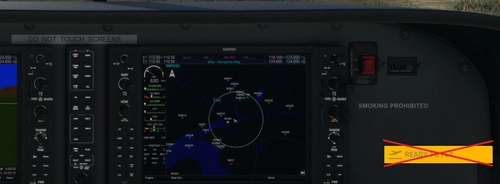
Ready to Fly Button Skipper
Avoid the hassle of clicking the "Ready to Fly" button at the start of each flight with the Ready to Fly Button Skipper add-on. By simply adding a few lines of code, this tweak allows you to skip the button and jump straight into your missions. Customize the time delay for skipping the button by editing the MissionStartup.html file. Make your flight sim experience more seamless and efficient with this convenient mod.
von hawkeyesk
Melden Sie sich an, um an der Diskussion teilzunehmen
AnmeldenKommentare(460)
about 4 hours ago
2 days ago
4 days ago
The only strange i had to managed, was the bigger resolution i had to enter, more than monitor's resolution
I have a monitor 1920 x 720 at 100% scaled, but for full high, i had to enter a few more pixles than 720
6 days ago
12 days ago
11 days ago
14 days ago
Dieser Kommentar wurde gelöscht
18 days ago
24 days ago
26 days ago
29 days ago
28 days ago
29 days ago
about 1 month ago
about 1 month ago
about 1 month ago
about 1 month ago
about 1 month ago
4 days ago