
Flightsim.to
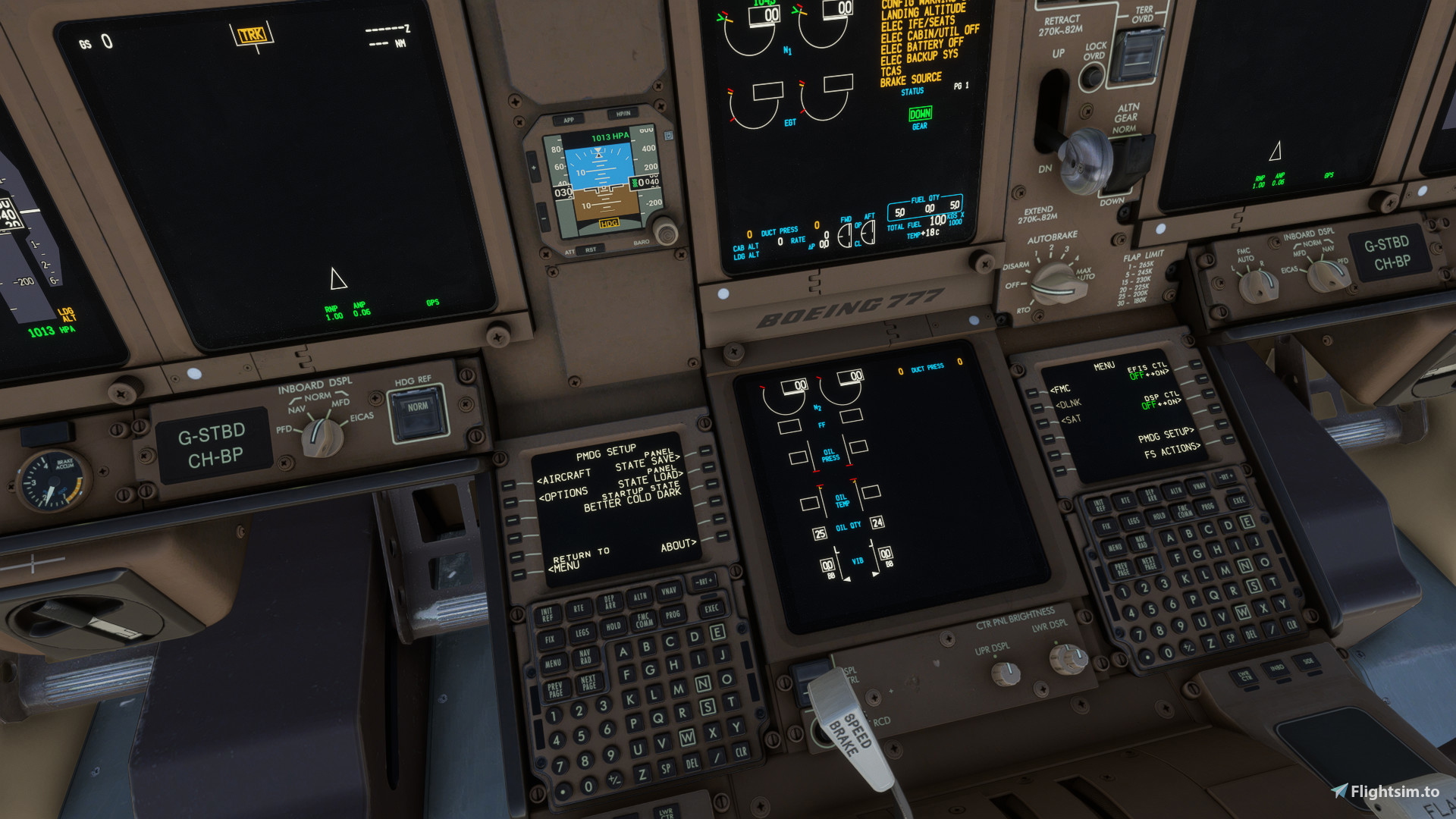
    Better Cold and Dark for the PMDG 777-300er - Image 1

    Beschreibung

    Description:

    I found the PMDG 777-300er has too many switches already in the right place for the flight. However, I like flicking buttons so I have changed the startup state so that we pilots can click a few more buttons. I have tried to make it according to checklists to make it as realistic as possible. If you have any suggestions please let me know! 

    P.S. Regarding the lights please make sure you turn up the master brightness first which is on the overhead on the lighting panel. This will then allow you to have a base lighting value which you can then alter using the respective knobs for different areas.


    How to install:

    1. Download the file

    2. Unzip the folder

    3. Find the panel state folder for the PMDG 777-300er:

    Microsoft store version

    C:\Users\(username)\AppData\Local\Packages\Microsoft.FlightSimulator_8wekyb3d8bbwe\LocalState\packages\pmdg-aircraft-77w\work\PanelState

    Steam Version

    C:\Users\(username)\AppData\Roaming\Microsoft Flight Simulator\Packages\pmdg-aircraft-77w\work\PanelState

    4. Copy the .FMC and .SAV files into the folder

    5. Load up Microsoft Flight Simulator and into the 777

    To load the panel state

    - Go to the FMS (you may need to turn on the ground power) and select PMDG setup

    -  Select panel state load and click on 'Better Cold Dark' and execute

    To load into this panel state by default

    - Go to the FMS (you may need to turn on the ground power) and select PMDG setup

    - Select startup state and click on 'Better Cold Dark' and execute


    What does it change:

    - Parking Brake SET

    - APU GEN OFF

    - Backup GENS OFF

    - No Smoking sign OFF

    - Anti-Ice OFF

    - Packs OFF

    - APU / Engine Bleed Air OFF

    - Transponder OFF

    - squawk 2000

    - Thrust ASYM COMP OFF

    - Pressure setting HPA

    - Altitude increment 1000 feet

    - Generators OFF

    - Nav light OFF

    - Recirc fans OFF

    Kommentare(32)

    Melden Sie sich an, um an der Diskussion teilzunehmen

    Anmelden
    P

    about 1 month ago

    can you make 2024 version pls
    f

    about 1 year ago

    Hi there, are you going to bring this great enhancement to the -200ER and -F as well?
    B

    over 1 year ago

    Is there any tutorial about when I should turn ON all these things which are turned off in this panel state? I understand that most of the buttons are "turning them ON" and nothing is going to happen, but for example the apu bleed, packs, recirc fans, backup gens? Thanks.
    G

    over 1 year ago

    Can you make a 777f version? Would be much appreciated.
    c

    over 1 year ago

    For some reason the wheels glow a slight orange showing pixelated orange specks on the wheels. This is due to overheating which could be because of the glitch where the plane is on for a split second and then reverts to this cold and dark. This happens all when the plane spawns in. Please fix or this would be a 5 star.
    V

    almost 2 years ago

    Does this work with the latest version 2.0.41 coz everytime I select this option, the plane loads then coz into cold dark again. Or is that what is should do?
    j

    almost 2 years ago

    Thanks for your work on this. I use InHg and was wondering if you'd be willing to support creating an inHg file for future releases in addition to the HPA version (since that's default in U.S.). I found the settings and was able to change it for myself but I'll 1have to remember to go in and update that for any future releases. I also was initially confused by the master brightness and thought it was a bug at first, so would recommend adding a note in the description to reduce confusion. Thanks again!
    S
    SylentPGAuthor

    almost 2 years ago

    Hello, thank you for the feedback 100% I will make a InHG
    version when I’m next online. I will also change the description I have had a few issues regarding master brightness - I may change it to making each individual panel light dark instead of the master brightness for ease!
    S
    SylentPGAuthor

    almost 2 years ago

    Hiya, I have made one compatible with INhg however I don't see a way to add a secondary file. I have no idea why you would know as the consumer but if you do know how to upload 2 downloads here that would be great!


    B

    almost 2 years ago

    Hi, I tried using this panel state with GSX and for whatever reason, if I have this Panel state set as default and load the 777 tutorial flight, GSX menu just says Loading please wait and spins forever. If I switch the load state to COLDandDARK or ColdandDarkGPU, GSX does not appear to have issues. Any ideas on what would cause that?
    S
    SylentPGAuthor

    almost 2 years ago

    Hmm, this is interesting. I use GSX and have no had any issues what so ever, maybe try restarting the coutal. I will try and replicate this issue when I'm next on the sim - can you confirm what you mean about the tutorial flight?
    B

    almost 2 years ago

    Hi. Yes, from chapter 4 of the tutorial (https://777.pmdg.com/tutorial-flight/#/lessons/bpczZU1WNaE4llriB8j8X2mj_24jDNkB), when you load the following: "Load the Haneda Tutorial Start flight file using the standard MSFS Flight load options from the \Community\pmdg-aircraft-77w\Config\Flights folder". Once I load that and try and start from the Better cold and dark, GSX just spins and spins. If I load with cold and dark gpu, it has no issues. I have read that there are a lot of issues with the 777 and GSX as all of the updates have not yet trickled out. But I have no idea what is happening with this load state vs the other one.
    S
    SylentPGAuthor

    almost 2 years ago

    Okay thank you for the feedback that does seem weird. I’ll have a look at your specific situation when I am next on the sim, hopefully within the next 24 hours. As I say in been using GSX on normal flights with the 777 just fine so definitely a weird one. Hopefully I can solve this issue and get back to you :)
    D

    almost 2 years ago

    I love this tweak so much.
    Can you recommend a checklist that works well with this tweak?
    S
    SylentPGAuthor

    almost 2 years ago

    Thank you very much! The best checklist I have found is British Avgeek's:
    https://flightsim.to/file/76566/osprey-airways-pmdg-777-series-checklist
    MSFS 2020MSFS 2024

    Better Cold and Dark for the PMDG 777-300er

    Enhance your PMDG 777-300er experience with this mod that adjusts the startup state to allow for more button-clicking simulation. Through realistic checklist-inspired changes, from parking brake settings to lighting adjustments, immerse yourself in a detailed cold and dark cockpit environment for a more authentic flight experience. Follow simple installation instructions and share feedback for further improvements within the community.
    Downloads3K
    Version1.3
    Dateigröße13.99 KB
    VeröffentlichtVor 1 Jahr
    AktualisiertVor 1 Jahr

    Nutzerbewertungen

    4.8

    5 Bewertungen

    5
    80%
    4
    20%
    3
    0%
    2
    0%
    1
    0%

    More Information

    Simulator
    MSFS2020
    KategorieUtilities
    Sub-CategoryTweaks
    Zugehörigkeit
    PMDG Boeing 777-300ER

    Versionsgeschichte

    Fixed issues with doors being opened Pannel brightness off on startup