
Beschreibung
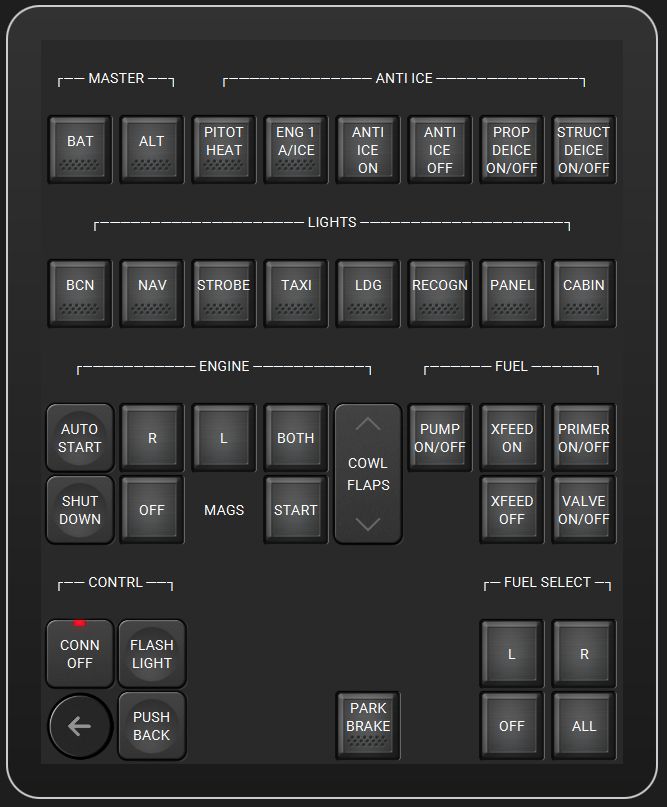
A first attempt at making a Touch Portal page. This one is for single piston engine aircraft. This page contains mostly all electrical switches that are currently available in the MSFS Touch Portal plug-in.
Requirements:
- Licensed Touch Portal app on your mobil device (Touch Portal Pro)
- The Touch Portal software on your PC: https://www.touch-portal.com/
- The MSFS Touch Portal plug-in: https://github.com/Touch-Portal-MSFS/MSFSTouchPortalPlugin
(Note: the provided page is optimized for an 8" iPad, but it can easily be changed / adapted.)
Please feel free to change / adapt / redistribute!
Enjoy!
Credits:
- https://www.touch-portal.com/assetsdb/show-all.php?cat=i
- https://github.com/HiDTH/FltSim-msfs2020-Control
Touch Portal Page "Piston Single"
Create a Touch Portal page designed for single piston engine aircraft, featuring a variety of electrical switches available in the MSFS Touch Portal plugin. Requires licensed Touch Portal app on mobile device and specific software installations on PC. Easily adaptable for various devices and open for customization. Enjoy the convenience and functionality this add-on brings to your flight simulation experience.


Nutzerbewertungen
3 Bewertungen
Versionsgeschichte
Keine Versionsgeschichte verfügbar.
Melden Sie sich an, um an der Diskussion teilzunehmen
AnmeldenKommentare(22)
over 4 years ago
Updated plugin URL/repository: https://github.com/mpaperno/MSFSTouchPortalPlugin
Now with many more features and newly-added WASM module integration for almost unlimited potential.
Cheers!
-Max
almost 5 years ago
Hi, I have some troubles with the MSFS plug in... it shoes "connected" but the buttons do not work. Buttons with direct control (e.g. Ctrl+E) do work. Any suggestions? Thanks
about 5 years ago
Hi,
I am using your Touch Portal MSFS page and is a very good page for mono propeller aircraft.
All is working fine, except "Push back " (my Fs2020 does not accept keyboard actions, I don't know why) and a normal start from Battery, Both, pump (fuel open) and Start : on the dashboard, the key turn but doesnot stay enough time to start the engine : is there another action to do ?
The automatic start works fine : what is missing in the manual start ?
Thanks in your answer.
about 5 years ago
Is there anything available for the DAHER TBM930? If not, will you be able to consider it?
about 5 years ago
Not at this point in time. But try it yourself. It really isn't that complicated, as long as the function is available in the Touch Portal MSFS Plugin. It might be a good idea to look at the plugin doc on GitHub (link is above in the description).
about 5 years ago
thx
over 5 years ago
over 5 years ago
Titles are just wide buttons without any function / background. The lines are drawn using ASCII characters.
over 5 years ago
Thanks
over 5 years ago
over 5 years ago
This is a very good idea and when it works it is brilliant, but more often than not Simconnect drops out and nothing works. I have been scouring google to try to find some answers with no luck. What is your experience with dropouts? Is this stable for you or do you know of any reason this might happen?
EDIT: I have got to update this. Using the current version of the MSFS TouchPortal Plugin (0.5.3.0) I have had no problems. It has been very stable and I have expanded my use of this to customise pages for each aircraft I fly. Thank you for getting me started.
over 5 years ago
over 5 years ago