
Beschreibung
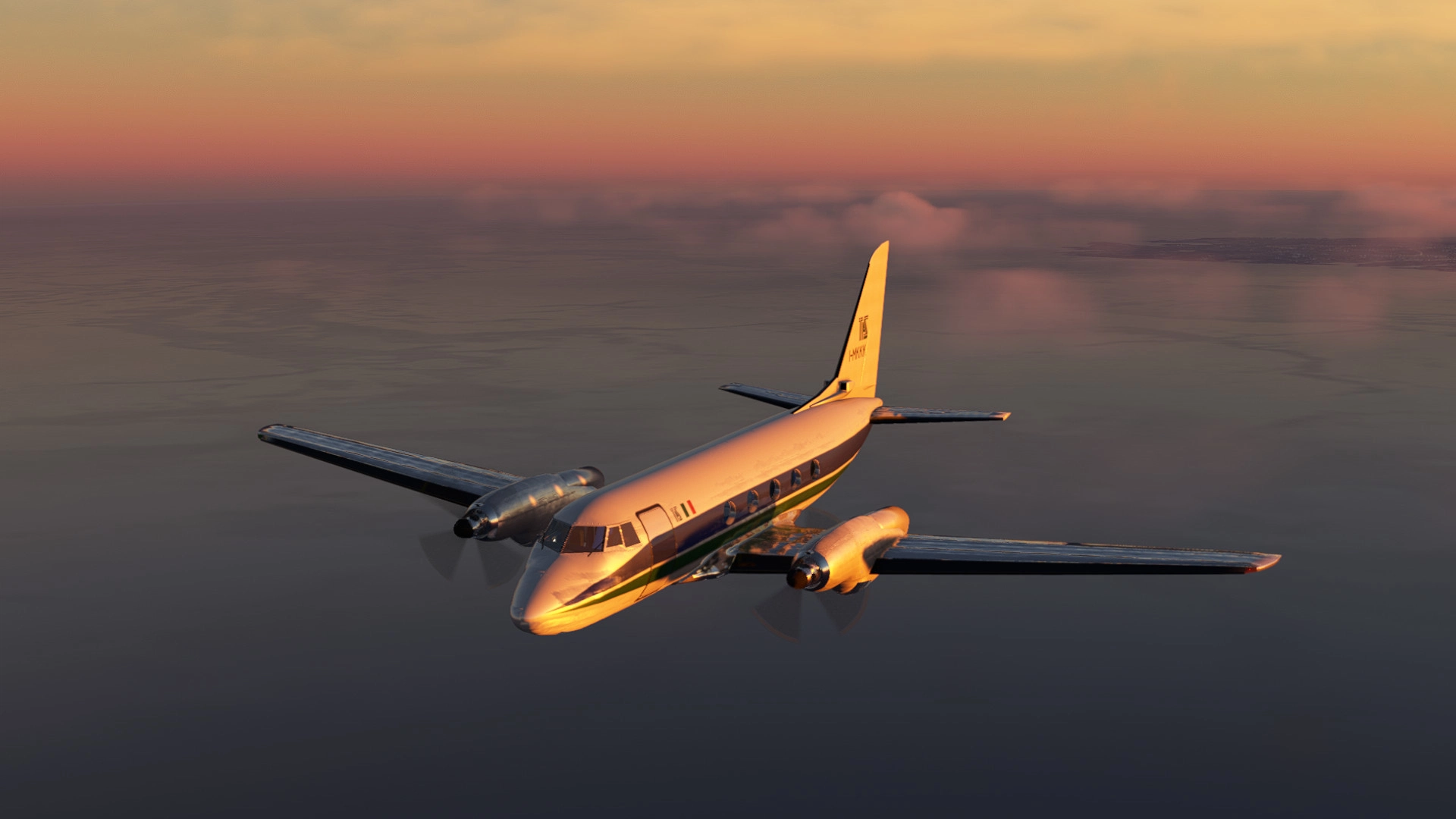
Attached is my interpretation of the Grumman G-159 Gulfstream I (Private Charter configuration). Would you believe it, this bird first flew in 1958, and also apparently was one of the first, if not the first, aircraft to have an Auxiliary Power Unit installed! The aircraft is a turboprop, medium-sized commuter/private aircraft, used by quite a large number of airline operators too, including American Eagle (who operated the stretched 37-passenger G-159C variant) and British Airways. NASA and Walt Disney himself owned a G-159, so it really was rather popular back in the 70s and 80s, despite being somewhat obscure nowadays. Today, it's evermore rare to spot a G-159, but they're still, somehow, flying about, some of them freighters and others charter.
It hasn't been easy: this is my first ever project for Microsoft Flight Simulator! I have had to overcome the struggle of learning many new things, as well as dealing with moments where I felt as though I had hit a roadblock. The aircraft, as of present, is at a point which I am more or less content with, and I feel happy to move onto a new project and take the masses of knowledge I have learnt from this first project of mine and apply it.
I'd like to thank:
- "sal1800" for his advice and tips, as well as for supplying his C170 .blend file to the Community - was key in my learning process.
- "Sbeuh", the developer at Sky4Sim for his fantastic work on an EFB for MSFS*
- "EzRyder" for his guidance and his phenomenal aircraft development tutorial series - if you need to get started, follow this man's channel on YouTube!
- Jonx for supplying the community with parts of code for use and learning - helped me a lot in getting to grips with the coding aspect.
- Those who have supported me along this journey
* // Prerequisite: For the EFBs to work, download the Sky4Sim application on this website! https://sky4sim.com/sky4sim-pad-free/
Credits for textures:
Sketchup Textures for interior components, such as pillows, carpets, the rug, wood, the walling & marble.
ADF/NAVCOM stack textures based on IRL images uploaded online
Now, for the main features which I have been able to implement in my model:
- Cockpit and cabin lighting knobs and switches (the ones for instruments are located underneath the Captain's EFB)
- Electrical system
- Functioning de-icing system
- Working annunciators
- Ignition system
- Functioning APU system (no sounds for this as of yet)
- Opening cabin door - for this you have to flick the AIR STAIR SW on the left circuit breaker panel.
- Functioning NAVCOM1 & NAVCOM2 system
- Functioning ADF panel & RMI
- Functioning XPNDR
- An "Aera" GPS
- A digital HSI
- Sky4Sim EFB integrated - in order for it to display, please download the application from the link above!*
- Autopilot system - (VS wheel inop it seems unfortunately, I advise using it simply for ALT hold, but NAVLOC works fine)
- A modelled & furnished cabin
- Elevator trim indicator on the main panel
- A checklist in the cockpit (look down at the left-side of the pedestal and click on the paper)
- Some liveries: TAS Airways, American Eagle (Trainer Aircraft), Bonjovi & a simple White livery
Current outstanding bugs/issues:
Autopilot system is a bit buggy/rudimentary - I recommend only using it for ALT hold and NAVLOC
Flight Directors not functioning properly as of yet
I'm not sure if I'll continue to update this model in particular, but consider this a taster for you to try out and relax to :)
Signing off,
Gallosko.
PERMISSIONS FOR CONTENT RE-USE
I'm happy for people to make what they will of my project, I'm happy to even include the .blend file of this in the future if there's any demand, and I encourage livery making. What I do not encourage is anyone profiting off of anything related to this particular model - if anyone uses any of my assets/textures in a project of theirs and intends to sell it, I will not be happy about it. However, if anyone would like to use any of the textures I made for a freeware project, that's absolutely fine :) (but do remember to give credit if so).
INSTALLATION
Drag and drop into the Community folder
Grumman G-159 Gulfstream I
Experience the classic Grumman G-159 Gulfstream I in Microsoft Flight Simulator with this detailed add-on. Featuring a turboprop, medium-sized commuter/private aircraft with historical significance and unique features such as a functioning APU system and cockpit lighting, this project is a labor of love for its creator, Gallosko. Explore the rare and iconic G-159 with curated liveries and interior details, providing a nostalgic flight experience.


Nutzerbewertungen
25 Bewertungen
Versionsgeschichte
- CoPilot RADALT Gauge and Clock animated - VOLT AC gauge on overhead animated *Apologies for the flurry of updates, just some fixes I wanted to do as quickly as possible to improve your experience with the new update!



Melden Sie sich an, um an der Diskussion teilzunehmen
AnmeldenKommentare(122)
about 1 month ago
2 months ago
Ai Autofly: 3* (requires manual takeoff and landing, flies alright inflight)
Textures: 4* (not perfect, but they're great!)
Usefulness in fleet: 2*
7 months ago
I just downloaded and installed your Grumman G159 Gulfstream on MSFS2020.
Really beautiful and intriguing, I immediately tried flying it and, without any knowledge of this aircraft, I at once landed nicely in Dublin.
Now, however, I'd like to deepen my knowledge, starting from the so-called Cold & Dark position and planning a flight.
I saw that on the side of the seat you can pull up a card with a sort of checklist. The problem is that the cockpit is very complex, with so many instruments, levers, buttons, switches, etc., so it's not easy to understand where the various functions are.
A cockpit map with the various instruments labeled would be useful.
In particular, I see that the aircraft has three displays, which are initially off. I've identified them as a pair of navigation displays (HSI?), and the one in the center should be - I assume - a sort of Primary Flight Display.
I can't turn them on, and this prevents me from setting the radio frequencies and setting up an IFR flight.
How do I do this?
Is there a video tutorial?
Thanks for your attention and congratulations on your work!
about 1 month ago
with that program all screens should be working
12 months ago
about 1 year ago
about 1 year ago
over 1 year ago
about 1 year ago
over 1 year ago
over 1 year ago
about 2 years ago
about 2 years ago
about 2 years ago
over 2 years ago
about 2 years ago
over 2 years ago
Any news about that ?
" I'll check the HSI issue, too many people are reporting it for this to be a simple single-user thing - I'll keep you posted"
I am also experiencing the issue with the version downloaded today, it will be so great if that worked :)
If it can help :
AC MAIN BUS warning remain, tried all the switch for make sure power is on , no luck.
Ctrl E for start the plaine leave it with the same warning and HSI off.
over 2 years ago
over 2 years ago
over 2 years ago