
![nszhang1's True-to-Life ReShade Profile + REX Atmos [NEW 2024 PRESET] - Image 2](https://cdn.flightsim.to/images/28/20260418_175200_cf3c312a1da4bb31_nszhang1-s-true-to-life-reshade-profile.jpg)
Beschreibung
NO DLSS5 WAS USED IN THE SHOWCASE SCREENSHOTS
VIDEOS
Demo video v8.0 (MSFS 2024):
Demo video v1.0 (MSFS 2024): https://youtu.be/qKJxmX9Tx-E
Demo video v5.0 (MSFS 2024): https://youtu.be/dd6CouayxS4
Demo video v1.3 (MSFS2020): https://youtu.be/v5Je2EZzSOU
INTRO
Hi! My name is Nick, a Houston-based flight sim enthusiast and photographer. Since I moved over from P3D in 2023, I've always noticed the colors and lighting inherent to MSFS have left a lot to be desired. After years of tinkering with ReShade, Atmos, NVIDIA filters, and other visual modifications, I present my "True-to-Life ReShade" and Atmos profiles.
FEATURES
Color grading adjustments to warmth and saturation - targets overly-warm and oversaturation of native MSFS20/24 appearance
Lighting adjustments introducing S-curve and flattened black/white points - targets (subjective) overexposure and lighting imbalance of MSFS20/24
Adaptive sharpening - targets softness of native MSFS20/24 visuals
Changes to atmospheric haze, depth, and light scattering - targets oversaturated and unrealistic visibility of native graphics
Cloud lighting adjustments that increase cloud coverage effect on ground lighting - targets minimal effect of cloud coverage on scene lighting in default MSFS20/24
Added bloom in dark environments - encourages user to adjust cockpit display brightness for maximum display readability (WIP - can cause external environment overexposure in very dark environments)
And much more!
REQUIREMENTS
1. RESHADE FX
To use this preset, you need the following ReShade fx--all of which are included in the base ReShade installer with full addon support. Please find a YouTube video to help you install--please don't comment asking for help with ReShade installation.
- qUINT's lightroom.fx - qUINT fx package, included in installer
- qUINT's bloom.fx - qUINT fx package, included in installer
- PD80_03_Color_Space_Curves.fx - PD80 fx package, included in installer
- PD80_04_ColorBalance.fx - PD80 fx package, included in installer
- AdaptiveSharpen.fx - Legacy fx package, included in installer
- [OBSOLETE - v6.1 & before] LUMAsharpen.fx
2. REX ATMOS CORE
The MSFS2024 version of the ReShade preset highly encourages REX Atmos to reach its full potential. These profiles can be found by searching "nszhang1" in the weather, atmos, and enviro categories in REX Atmos CORE.
- Weather: nszhang1_weather_v[version]
- Atmosphere: nszhang1_atmosphere_v[version]
- Environment: nszhang1_environment_v[version]
Despite all this, I believe the ReShade profile alone still improves the simulator's default appearance, so REX Atmos is not strictly required. segue-50.
MISCELLANEOUS
My EV is set to 0.
HDR off.
A monitor capable of 10-bit RGB is recommended.
--
Let me know what you think! Add me on Volanta @nszhang1 for more screenshots or on insta @marketsalad1 for my photography!
Have fun, drink water, remember to see your primary care physician,
Nick
nszhang1's True-to-Life ReShade Profile + REX Atmos [NEW 2024 PRESET]
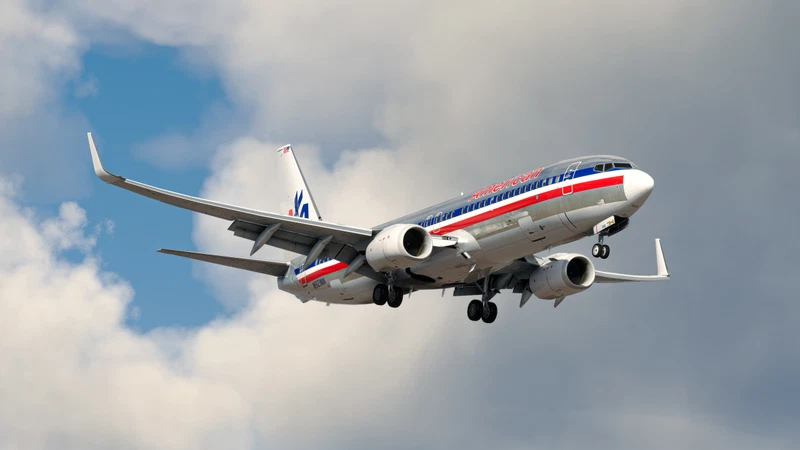
Use with my REX Atmos preset! nszhang1's ReShade and Atmos presets for Microsoft Flight Simulator 2020 and 2024, which highly improve colors, lighting, weather, atmosphere, and environment appearance.
Nutzerbewertungen
21 Bewertungen
Versionsgeschichte
[MINOR UPDATE] -further improvements to v8 after a few flights. better white balance, better overall lighting -tuning to atmos overall scene lighting

Melden Sie sich an, um an der Diskussion teilzunehmen
AnmeldenKommentare(136)
about 16 hours ago
Pictures provided are some of the best ones I've taken through these past months
about 1 hour ago
1 day ago
about 20 hours ago
2 days ago
2 days ago
10 days ago
10 days ago
12 days ago
12 days ago
12 days ago
19 days ago
19 days ago
19 days ago
19 days ago
19 days ago
19 days ago
19 days ago
21 days ago
21 days ago