
Beschreibung
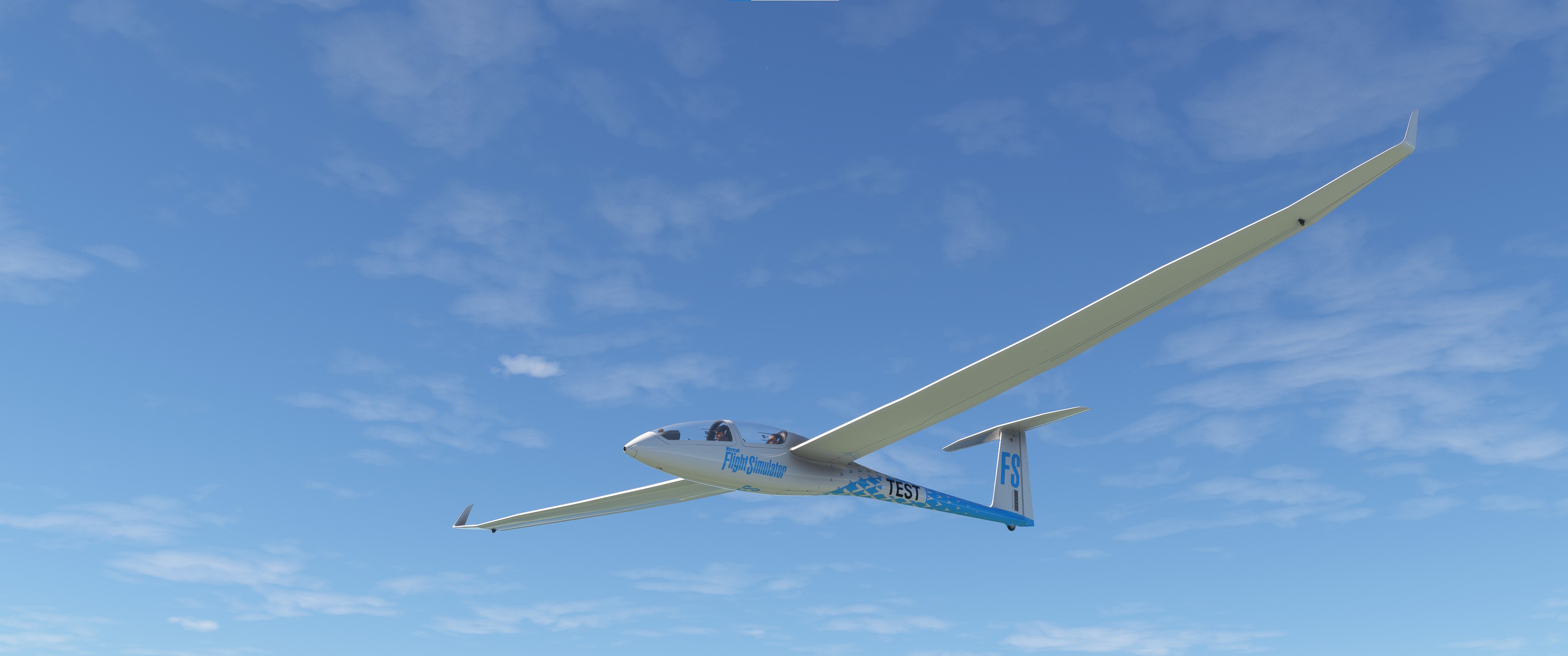
This is a modification to the MSFS 2020 default Asobo DG1001e Neo aircraft. This mod is primarily aimed at improving the overall flight dynamics of this aircraft, providing a more realistic flying experience that is much closer to the actual aircraft. Several changes have been made to the flight model which are detailed in the Change Log file included under the Documentation folder.
This mod is easily installed by simply unzipping the download file and copying the mge-asobo-aircraft-dg1001-e folder to the MSFS Community folder. It will then replace the existing default aircraft in the MSFS aircraft selection screen, and will continue to utilize all existing aircraft Liveries. To uninstall the mod and return to using the MSFS default aircraft, simply remove it from the Community folder.
I also highly recommend downloading this excellent set of Soaring Weather presets from the Sim Soaring Club... Using these weather presets will make flying this aircraft much more realistic and enjoyable.
Microsoft Flight Simulator © Microsoft Corporation. Asobo DG1001e Neo Realism Mod has been created under Microsoft's "Game Content Usage Rules" using assets from Microsoft Flight Simulator, and it is not endorsed by or affiliated with Microsoft.
Kommentare(22)
Melden Sie sich an, um an der Diskussion teilzunehmen
Anmeldenabout 2 years ago
https://flightsim.to/file/41476/asobo-diamond-da40ng-realism-mod
over 2 years ago
over 2 years ago
over 2 years ago
over 2 years ago
over 2 years ago
This glider can easily cruise at 150 km/h or more with a sink rate below 1 m/sec., which makes it an excellent choice for cross-country soaring.
over 2 years ago
It used to be openable but now it is not. There is no click spot on the open canopy lever now as it used to be. This mod does not affect this, with it On or Off canopy is now shut like the LS8 one that was unopenable since the beginning .
over 2 years ago
over 2 years ago
over 2 years ago
over 2 years ago
over 2 years ago
over 2 years ago
1) Before starting the takeoff roll, apply and hold full UP elevator, and about 1/2 UPWIND ailerons. As your speed increases during the takeoff roll, reduce the upwind ailerons to keep the wings level.
2) Immediately after liftoff, return the elevator to neutral and fly just above the runway until the tow plane also lifts off.
3) During the takeoff roll, leave the rudder at neutral and hold UP elevator to keep the tailwheel firmly on the ground to maintain the runway centerline until liftoff. After liftoff, DO NOT apply rudder to maintain the runway centerline heading since this would result in a sideslip, which gliders don't like to do. Instead, just leave the rudder at neutral and allow the aircraft to naturally assume the correct crabbed attitude to maintain a course down the runway centerline behind the tow plane, which should also have a similar crabbed attitude at this point.
4) After you are clear of the runway, slowly drift sideways until you are directly behind the tow plane as in a normal Aerotow launch. The tow plane will then be responsible for maintaining the correct crabbed heading for both aircraft to counter the crosswind for the remainder of the takeoff.
5) This maneuver will take a lot of practice to do well... You won't get it right the first time!
over 2 years ago
1) After touchdown, immediately retract the spoilers to keep your speed above 50 - 60 Km/h during the landing roll.
2) Release the back pressure on the stick to allow the tailwheel to rise up off of the runway. Apply down elevator if needed to keep the tailwheel off of the runway as your speed slowly drops.
3) Steer with the rudder and keep the wings level by applying opposite ailerons.
over 2 years ago
over 2 years ago
Here are the key things to know...
1) It will not start on the ground... you must be in the air to use it.
2) Turn on the FCU first, then raise the engine power switch cover and flip the power switch on.
3) You can set the throttle with either the knob on the FCU, or with your joystick throttle lever.
over 2 years ago
over 2 years ago
over 2 years ago
Asobo DG1001e Neo Realism Mod
Enhance the flight dynamics of the default Asobo DG1001e Neo aircraft in MSFS 2020 with this modification. Experience a more realistic flying journey closer to the actual aircraft, thanks to detailed changes in the flight model. Simply unzip, copy, and enjoy the improved realism by installing this mod effortlessly. Additionally, consider pairing it with the Soaring Weather presets for an even more immersive soaring experience.

Nutzerbewertungen
1 Bewertungen
More Information
Versionsgeschichte
Version 1.5.5 ⦁ Wing Root Chord has been increased slightly to increase the flight model wing taper ratio, and more closely match the actual wing shape. ⦁ The Wing Dihedral angle has been increased slightly to improve roll stability, and more closely match the actual effective wing dihedral angle. ⦁ The Wing Twist has been decreased to reduce overbanking during a turn, and more closely match the actual effective twist considering the highly tapered wing tips. ⦁ The leading-edge Wing Sweep has been decreased slightly to more closely match the actual aircraft. ⦁ The Elevator Lift Coefficient has been decreased back to the original default value to improve pitch stability. ⦁ The Rudder Lift Coefficient has been increased slightly to improve yaw stability and reduce oscillations. ⦁ The aileron Adverse Yaw has been decreased slightly to more closely match the actual aircraft performance. ⦁ The airfoil Center of Lift has been moved slightly aft to improve pitch stability in a thermal. ⦁ The Cruise Lift Scaler has been decreased back to the original default value to improve pitch stability and reduce ballooning. ⦁ A full PDF copy of the actual LX90xx GPS/Variometer User Manual is now included under the Documentation folder.
Ähnliche Addons
Asobo C172SP AS1000 Realism Mod
Enhance the flight dynamics of the Asobo C172SP AS1000 aircraft with this mod, which also includes the FLOATS and SKIS variant. This modification aims to provide a more realistic flying experience by adjusting engine and flight model parameters, weight, and balance. Detailed documentation and real-world training guides are included for easy installation and compatibility with other mods.
von MGouge425
Asobo Baron G58 Realism Mod
Enhance the realism of the Asobo Baron G58 in MSFS 2020 with this mod. Improvements to the flight model provide a more authentic flying experience, closely matching the performance of the actual aircraft. Easily install the mod by copying the folder to the Community folder, and enjoy the detailed changes listed in the documentation. Note: Only compatible with MSFS Deluxe Edition and Premium Deluxe Edition.
von MGouge425
Asobo B747-8i Realism Mod
Enhance your Boeing 747-8i experience with this realism mod for the MSFS 2020 default aircraft. This modification focuses on improving the flight model to closely match the actual aircrafts performance. Detailed changes can be found in the included documentation, addressing bugs like the landing gear failure. Easily installed by transferring files to the Community folder, this mod aims to provide a more authentic flying experience.
von MGouge425

Asobo Icon A5 Realism Mod
Enhance your flying experience with the Asobo Icon A5 Realism Mod for MSFS 2020. This mod focuses on adjusting the flight model and performance of the default Icon A5 to align it more closely with the real aircraft. From improved flight parameters to enhanced weight and balance, this mod offers a more authentic and satisfying flight experience. Easily install this mod to enjoy a more realistic flying experience with the iconic and versatile Asobo Icon A5 aircraft in Microsoft Flight Simulator.
von MGouge425
almost 2 years ago