
Flightsim.to
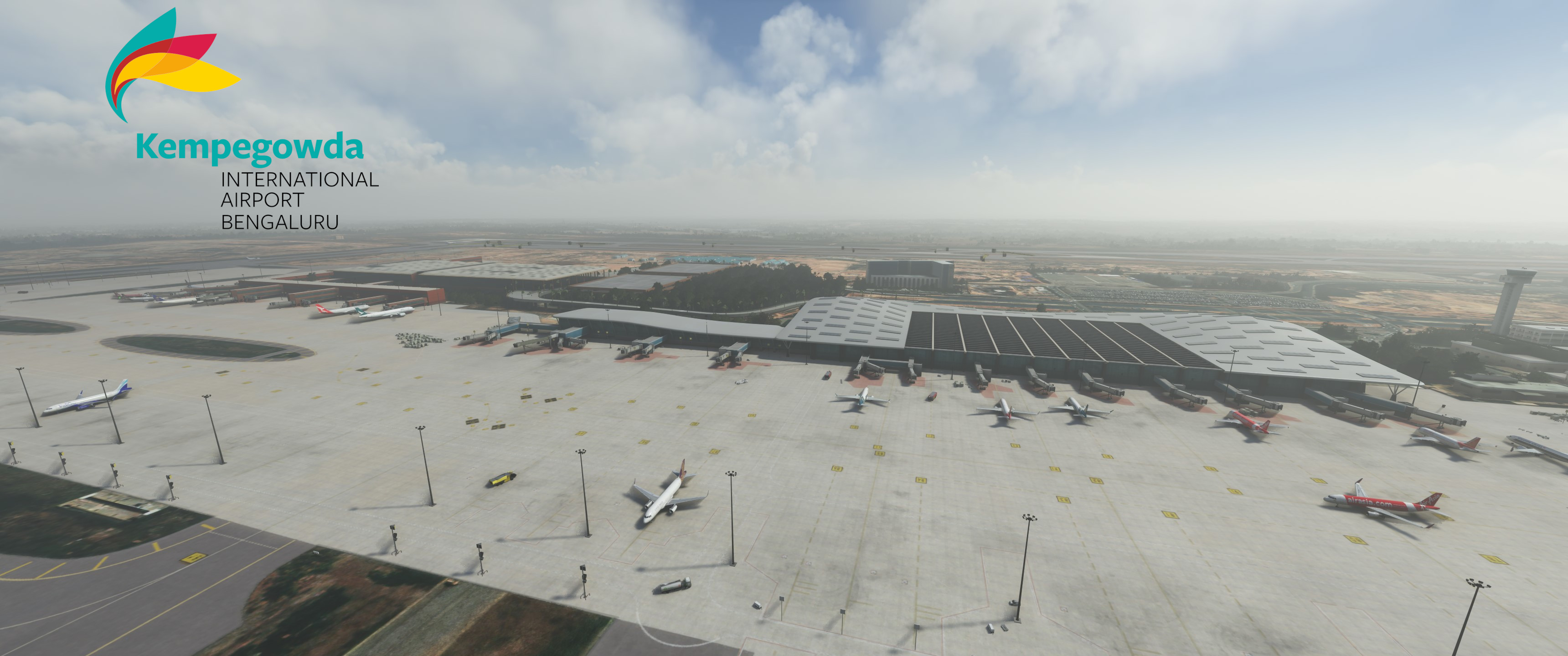
    GSX Profile - VOBL Kempegowda Int. Airport Bengaluru (FSDG) - Image 1

    Beschreibung

    GSX Profile for Bengaluru Airport by FSDG


    Features:

    • Custom stopping positions for each aircraft
    • Custom vehicle placement
    • Custom ground handling and catering operators
    • Custom pushback routes
    • VDGS
    • Adjusted jetway floor height (PAX visible underneath the jetway nevertheless, because of bad jetway design)
    • Renamed and reordered parking position names

    Please Note:

    • I had to put some stopping positions further back in order for the jetways to connect more or less properly
    • I've never been to Bengaluru Airport in real life so if you find something missing or incorrect, please write a comment or contact me

    Installation:

    Extract the .zip file and move the .ini and the .py files to %APPDATA%\Virtuali\GSX\MSFS

    Kommentare(20)

    Melden Sie sich an, um an der Diskussion teilzunehmen

    Anmelden
    a

    about 1 year ago

    Hi.I have both FSDG VOBL(1.3) and GSX pro,I have tried to put the profile i the right folders but the jetways are still default and wont operate with gsx. I ant seem to connect the jetways (both terminals).All other gates without jetways the profile works well.How do i fix this?
    J
    JulSomAuthor

    about 1 year ago

    Did you disable the gsx jetways in the FSDT installer? Other than that, unfotunately there is nothing I can do about jetways. GSX does not have control over the scenery jetways other than requesting to connect them. If this does not happen, it is most likely a scenery issue. FSDG actually has problems with jetways in their other sceneries too
    a

    about 1 year ago

    Yes.I did that and now it works.Thankyou .
    S

    almost 2 years ago

    GSX profile is not working :( even after putting the file in correct location

    J
    JulSomAuthor

    almost 2 years ago

    What exactly is not working? It would be very odd if the whole profile was not working. Do you own GSX Pro and the scenery?
    S

    over 1 year ago

    yes i do, when i open gsx it shows only 8 gates and some parkings the T2 ones doesnt show . In other gsx profiles it shows some location when i open the file in notepad {ex: afcad_path = "E:\community\vomm\scenery\vomm.bgl"} but in this VOBL profile nothing is mentioned
    J
    JulSomAuthor

    over 1 year ago

    The AFCAD path isn't needed in the ini file since a long time, I think since around Sim Update 10. But I saw that there was an update for the scenery. Maybe this has something to do with it. I will have a look maybe this evening or tomorrow
    S

    over 1 year ago

    ok, np take your time and thanks
    J
    JulSomAuthor

    over 1 year ago

    So I loaded the newest version of the scenery (2.1) and tried several stands. For me it's working fine. Can you maybe explain your problem a little bit more? Maybe you can send me some screenshots of the problem via DM.
    S

    over 1 year ago

    i tried somethig and got this result, i have purchased VOBL scenery (FSDG) in msfs store and i use this gsx profile this profile doesnt work, but if i use cracked version of VOBL scenery(FSDG) and use this profile it works
    J
    JulSomAuthor

    over 1 year ago

    For my knowledge, GSX profiles should work with marketplace scenery aswell. I don't know if FSDG did something different with their scenery on the marketplace. With my normal version it works. Do you have other marketplace airports where the GSX profile doesn't work?
    S

    over 1 year ago

    unfortunately i dont own any other airport scenery , but will check it out and update you
    Z

    almost 2 years ago

    Is this only for premium deluxe?
    J
    JulSomAuthor

    almost 2 years ago

    No, this is for VOBL made by FSDG. You need to buy the scenery and you need to buy GSX in order to use this profile.
    k

    about 2 years ago

    Thank you!
    T

    over 2 years ago

    Can y'all do VIDP Feelthere next?
    m

    over 2 years ago

    Awesome, please do VOHS next
    c

    over 2 years ago

    Love it! Please VABB by MSK next
    J
    JulSomAuthor

    over 2 years ago

    I'm glad you love it. Will do VABB next
    c

    over 2 years ago

    Awesome, any update for VABB please?
    MSFS 2020MSFS 2024

    GSX Profile - VOBL Kempegowda Int. Airport Bengaluru (FSDG)

    Enhance your ground handling experience at Bengaluru Airport with this GSX Profile add-on by FSDG. Features include custom stopping positions, ground handling operators, pushback routes, and more. Note: Some adjustments were made for better jetway connections. Installation is simple - just extract the files to the designated folder.

    Downloads3K
    Version1.0
    Dateigröße37.34 KB
    VeröffentlichtVor 2 Jahren
    AktualisiertVor 2 Jahren

    More Information

    Simulator
    MSFS2020/24
    KategorieMiscellaneous
    Sub-CategoryGSX Pro Profiles
    Bewertung0.0 (0)
    ICAOVOBL

    Versionsgeschichte

    Keine Versionsgeschichte verfügbar.

    Ähnliche Addons
    GSX Profile - OTHH Doha Hamad Int. Airport (MXI Design)

    GSX Profile - OTHH Doha Hamad Int. Airport (MXI Design)

    Enhance your experience at Doha Hamad International Airport (OTHH) with this GSX profile designed for the MXI Design rendition. This add-on features custom stopping positions, vehicle placements, passenger waypoints, and pushback routes tailored for improved realism. Additionally, it includes adjustments for jetway height and reorganized parking positions for better navigation. Two profiles are provided: one with GSX-VDGS support and one designed for Aerosoft VDGS compatibility.

    von JulSom
    4.7
    GSX Profile - VRMM Malé/Velana Int. Airport (FSDG)

    GSX Profile - VRMM Malé/Velana Int. Airport (FSDG)

    This GSX profile enhances the ground handling experience at Malé/Velana International Airport (VRMM) by FSDG. It features customized stands for both domestic and international flights, with tailored passenger flow and bus stand configurations. The add-on includes specific stopping positions for aircraft, personalized vehicle placements, and optimized pushback routes alongside custom ground operators. Installation instructions provide guidance on integrating the profile into your Microsoft Flight Simulator setup.

    von JulSom
    5.0
    GSX Profile - HECA Cairo Int. Airport (TAIMODELS)

    GSX Profile - HECA Cairo Int. Airport (TAIMODELS)

    Enhance your ground handling experience at Cairo International Airport with this GSX Profile by TAIMODELS. Features include custom stopping positions, vehicle placement, PAX and walker waypoints, pushback routes, jetway adjustments, parking position names, and VDGS additions. Please note the adjustments made for realistic aircraft positioning based on images and videos.

    von JulSom
    5.0
    GSX Profile - RKPC Jeju Int. Airport (SamScene3D)

    GSX Profile - RKPC Jeju Int. Airport (SamScene3D)

    Enhance your ground services experience at Jeju International Airport with this GSX Profile add-on by SamScene3D. Features include custom stopping positions, ground handling operators, pushback routes, and more. Note: Feedback for accuracy is welcomed, as the developer has not visited the airport personally. Installation is simple - just extract the files and move them to the designated folder in your MSFS directory.

    von JulSom

    5.0