
Beschreibung
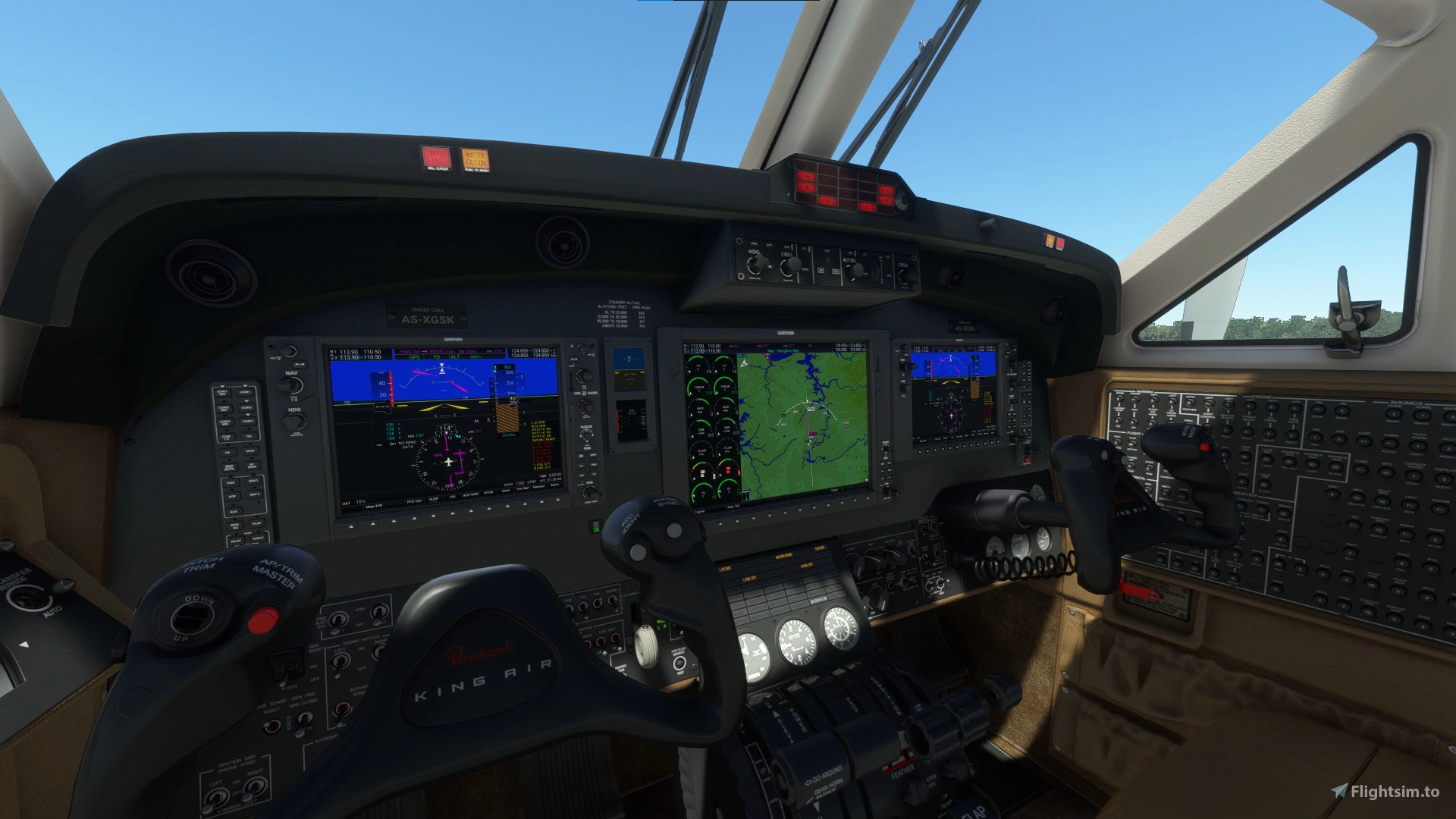
A cockpit mod that swaps out the default King Air 350's screens for Working Title's G1000 NXi. If you like flying the King Air but hate the default G3x avionics, this mod is for you. Comes with 2 PFDs, MFD, autopilot panel and audio panel.
Installation:
- Extract zip
- Copy folder "husk-g1000kingair" into community folder
This mod will replace the cockpit model of the default aircraft.
Known issues:
- Some button sounds are missing
- Some add-on liveries are incompatible, and cause the displays to show the default avionics
- Map rendering at the edges may be incomplete due to map resizing after adding eis columns
Microsoft Flight Simulator © Microsoft Corporation. King Air 350 G1000 Cockpit Mod has been created under Microsoft's "Game Content Usage Rules" using assets from Microsoft Flight Simulator, and it is not endorsed by or affiliated with Microsoft.
King Air 350 G1000 Cockpit Mod
Enhance your King Air 350 experience with this cockpit mod featuring Working Titles G1000 NXi avionics system. Includes 2 PFDs, MFD, autopilot panel, and audio panel to upgrade your cockpit. Some button sounds may be missing, and certain liveries could cause display issues. Installation instructions included.


Nutzerbewertungen
35 Bewertungen
Versionsgeschichte
-Fixes for compatibility with SU14 -Added functional pedestal control pad based on Garmin GCU 477, with functional alphanumeric keys -Added configurable Vr V2 and Vref speed bugs to PFD
Ähnliche Addons
King Air 350 Pro Line 21 Mod
Enhance your King Air 350 cockpit experience with this mod by Working Title, replacing default screens with WT21 avionics. Includes 2 PFDs, MFD, RTU radio tuner, and FMC. Note: Not compatible with G1000 cockpit mod.
von Husk

Wembley Stadium
Explore the iconic Wembley Stadium in London, UK, boasting a massive seating capacity of 90,000. This detailed add-on provides a realistic rendition of the largest stadium in the UK, offering a captivating virtual experience for aviation enthusiasts.
von u/Huyster
Kommentar-Zusammenfassung
Das Community-Feedback zum King Air 350 G1000 Cockpit Mod ist überwiegend sehr positiv. Nutzer loben, dass das Mod die Standard-Avionik und das Flugerlebnis im King Air erheblich verbessert und viele empfinden es als große Bereicherung. Besonders hervorgehoben werden die verbesserte Bedienbarkeit, neue Funktionen wie VNAV-Unterstützung und die übersichtlichere Darstellung. Häufig werden jedoch Installations- und Kompatibilitätsprobleme berichtet, insbesondere in Bezug auf MSFS 2024 sowie bei bestimmten Liveries und anderen Mods, was oft zu fehlerhaften oder fehlenden Anzeigen führt. Zu den wiederkehrenden Fehlern zählen Probleme mit COM/NAV-Reglern, die die aktive statt der Standby-Frequenz verstellen, sowie das nächtliche Abschalten der Avionik oder Bugs nach Updates. Anwender teilen Workarounds wie das Wechseln zur Standard-Livery, das Entfernen störender Mods oder das Anpassen von Paneldateien. Wiederholt werden Updates für SU15 und MSFS 2024 sowie weitere Verbesserungen angeregt. Insgesamt ist die Modifikation sehr geschätzt, bedarf aber weiterer Wartung zur Fehlerbehebung und Kompatibilität.
Zusammengefasst am 14. Nov. 2026
Melden Sie sich an, um an der Diskussion teilzunehmen
AnmeldenKommentare177
Would it be possible to check out if you can put this as in any othewr MSFS airplane - when tunning a frequency one moves the STANDBY channel and not the ACTIVE COM radio channel.
Two screenshots taken... last second with LNAV/VNAV active, ILS armed... and next second when CDI autochanges to NAV1 but ROLL-mode active.
I do not have the same problem as you. I capture LOC and GS well.
I have added the main unpacked folder to:
C:\Users\tobbe\AppData\Roaming\Microsoft Flight Simulator\Packages\Community
It does not show up on any livery I have tried (I only have default ones)
Any ideas? Really wish the ILS would work but its not fully working with the G3000.
Best Regards
Turbopleb
Thank you.