
Beschreibung
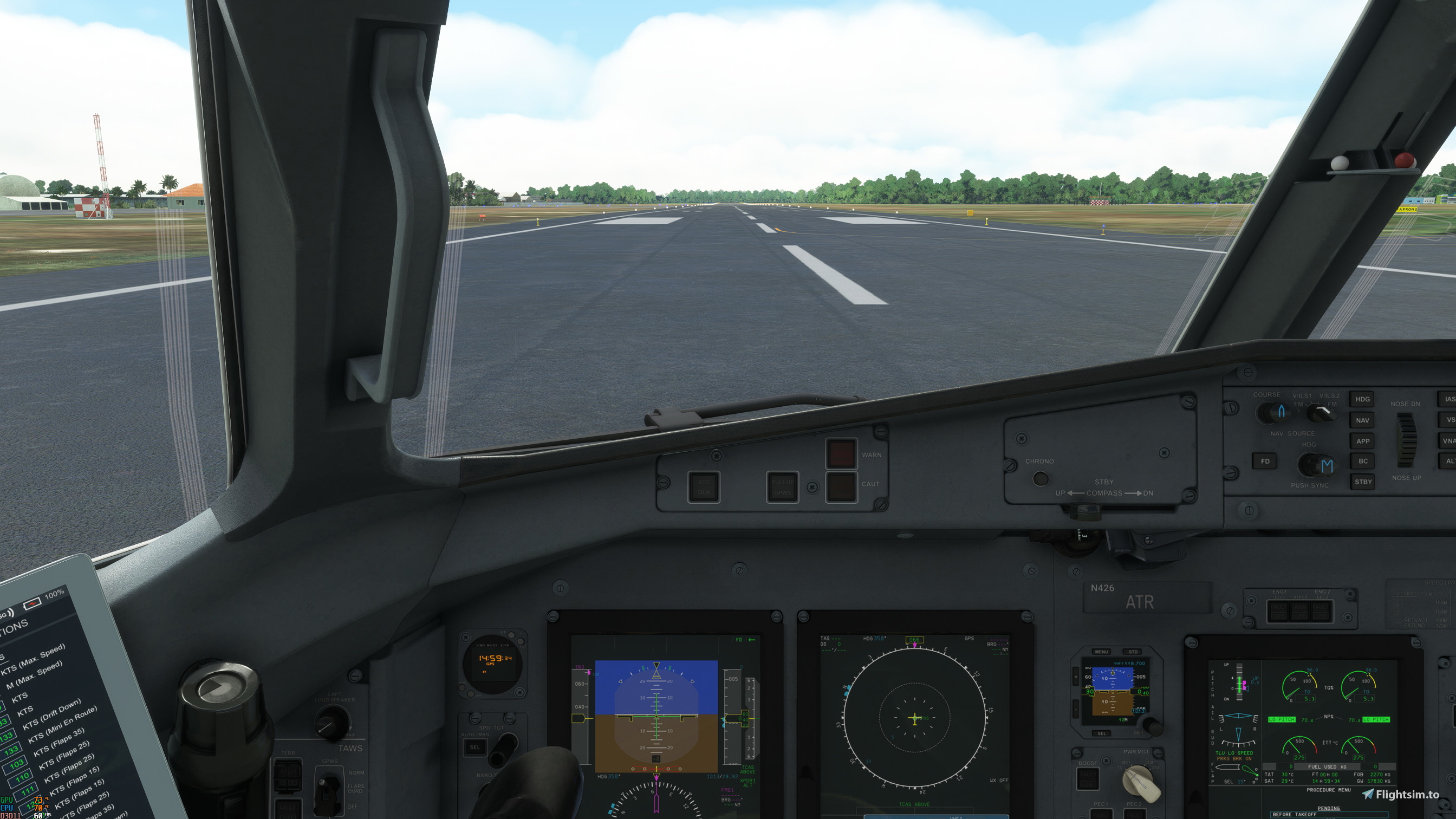
I´ve created a set of new cameras, specially for those who use smaller smaller zoom levels around 50 to 60. The standard is ok for wider zoom 70 and up, but too close for the others.
Also in the standad the yoke is not centered in the screen. This one it is.
Works for the 42 and 62 versions.
Includes:
Pilot and copilot views.
Right side of the panel, overhead panel, tablet and center panel for the captain perspective.
Overhead in close, posterior overhead in close.
FMS in close.
Hope you enjoy.
+++++++++++++++++++++++++++++++++++++++++++ INSTALLATION+++++++++++++++++++++++++++++++++++
Extract and move the cameras.txt file into the following paths:
Steam:
C:\Users\[yourUsername]\AppData/Roaming/Microsoft Flight Simulator/SimObjects/Airplanes/Microsoft_ATR_72_600/
C:\Users\[yourUsername]\AppData/Roaming/Microsoft Flight Simulator/SimObjects/Airplanes/Microsoft_ATR_42_600/
Microsoft Store:
C:\Users\[yourUsername]\AppData\Local\Packages\Microsoft.FlightSimulator_8wekyb3d8bbwe\LocalCache\SimObjects\Airplanes\Microsoft_ATR_72_600/
[yourUsername]\AppData\Local\Packages\Microsoft.FlightSimulator_8wekyb3d8bbwe\LocalCache\SimObjects\Airplanes\Microsoft_ATR472_600/
If you already have a camera file inside the folder I suggest you to backup (rename) it before you try this one. If you don´t like, just delete the camera.txt and re-rename the backuped file
Kommentare(9)
Melden Sie sich an, um an der Diskussion teilzunehmen
Anmeldenover 1 year ago
%AppData%\Microsoft Flight Simulator\SimObjects\Airplanes\
Open the folder. Place the camera.cfg inside whatever verisons of the ATR you want. There are various inside it.
Tell me if works.
about 3 years ago
Hey i did as instructed but it doesn't seem to work. And when i replace the camera cfg in the community folder my camera starts in the middle of the plane.
about 3 years ago
You shouldn´t place the downloaded folder into the community folder, but the camera.txt file in the folder described in the installation part of this page.
"Microsoft Store installation:
ATR-42:
C:\Users\(Username)\AppData\Local\Packages\Microsoft Flight Simulator\LocalCache\SimObjects\Airplanes\Microsoft_ATR_642_600
ATR-62
C:\Users\(Username)\AppData\Local\Packages\Microsoft Flight Simulator\LocalCache\SimObjects\Airplanes\Microsoft_ATR_62_600
Steam installation:
ATR-42:
C:\Users\(Username)\AppData\Roaming\Microsoft Flight Simulator\SimObjects\Airplanes\Microsoft_ATR_42_600
ATR-62
C:\Users\(Username)\AppData\Roaming\Microsoft Flight Simulator\SimObjects\Airplanes\Microsoft_ATR_62_600
If you already have a camera file inside the folder I suggest you to backup (rename) it before you try this one. If you don´t like, just delete the camera.txt and re-rename the backuped file"
about 3 years ago
Yeah, for me it's the same.
about 3 years ago
You´re installing in the corect path? IF yes, you´re on Steam or Microsoft version?
Mine is Steam, maybe there´s a difference?
about 3 years ago
Yes, tried the path suggested. I'm using the store version, maybe there´s a difference.
about 3 years ago
i´ve updated the installation instruction into the descritpion and added another view. Can you please give it a try and tell me if works? Thanks.
about 3 years ago
It's not working in the path suggested for the store version. C:\Users\xmyuserx\AppData\Local\Packages\Microsoft.FlightSimulator_8wekyb3d8bbwe\LocalCache\SimObjects\Airplanes\Microsoft_ATR_72_600
Thank you very much for your effort anyway!
More realistic cameras for your ATR´s 42 and 72
Enhance your ATR 42 and 72 flight experience with new, more realistic cameras. These specially designed cameras cater to smaller zoom levels, ensuring a centered view without sacrificing detail. The set includes pilot and copilot views, various panel perspectives, and close-up angles for a more immersive simulation. Simply follow the easy installation steps to enjoy a more lifelike cockpit environment.

Nutzerbewertungen
1 Bewertungen
More Information
Versionsgeschichte
Added a wing view for 0 and correct instalation path instructed.
over 1 year ago