
Beschreibung
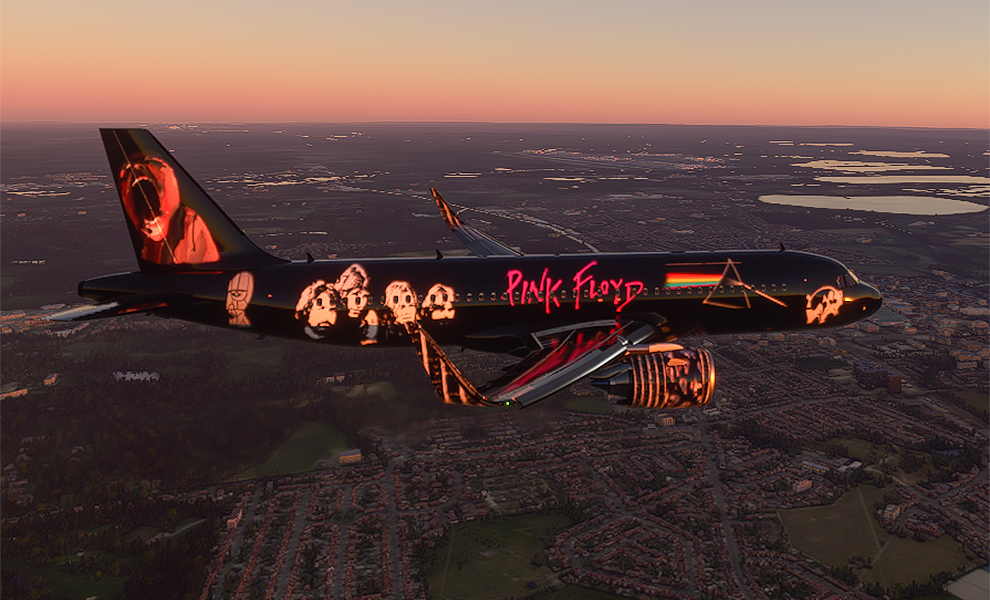
A320neo Pink Floyd Tribute
My tribute to one of my favorite bands and artists of my generation. I followed this band since the early 1970's starting with Animals being one of my first 8-track tapes. And knowing the backstory of this band, I could not omit founding bandmate Syd Barrett. If you want to hear an insanely well-composed song that was decades ahead of its time, Google-up the song "See Emily Play."
I felt it befitting to fly this bird over London for the aerial images and never in a million years would I imagine I'd move to where dozens of my rock-n-roll icons grew up.
As with all of my liveries, you can fly this plane without your tail letters/call sign covering up the fuselage and images. Before flying, click on World Map> then click the airplane image> click ATC Options> then leave your "Tail Number" blank. Normally, MSFS 2020 would automatically add the call letters ASXGS back into this field if it's left blank. But thanks to a special code provided by fellow livery creator Crispy136, no tail sign or call letters will appear.
Recent update: ATC now calls plane by name "Pink Floyd" and corrected some minor wing painting issues.
A320neo Pink Floyd Tribute
Experience the A320neo Pink Floyd Tribute livery, a homage to the iconic rock band. Fly over London and enjoy the custom design without tail letters obstructing your view. Updates include ATC calling the plane by name and minor wing painting corrections.


Nutzerbewertungen
6 Bewertungen
Versionsgeschichte
ATC now calls plane by name "Pink Floyd".
Ähnliche Addons

Pink Floyd Dark Side Of The Moon 50th Anniversary
Celebrate the 50th anniversary of Pink Floyds iconic album with this tribute livery for the Fenix A320. Explore the dark side of the moon with this unique add-on.
von PacmanPilot

A320neo Hatsune Miku World Tour II
Fly in style with the Airbus A320neo Hatsune Miku World Tour II livery! Featuring custom "Miku" tail lettering and a glossy exterior, this unique design is a must-have for fans of the virtual pop star. Enjoy a seamless flight experience with no tail letters or call sign covering up the stunning visuals.
von PacmanPilot

A320neo Hatsune Miku Vocaloid World Tour
Fly in style with the Airbus A320neo featuring a unique Hatsune Miku Vocaloid World Tour livery. Designed with vibrant colors inspired by the popular anime virtual artist, this livery allows you to customize your flying experience without tail letters covering the fuselage. Enjoy this special design created with love and attention to detail for all virtual pilots to appreciate.
von PacmanPilot

The Beatles White Album Tribute
Immerse yourself in a tribute to The Beatles with this unique Airbus A320neo livery. Fly in style while enjoying references to iconic songs from The White Album. Customize your flying experience by removing tail letters/call sign. Let the ATC address your plane as "The Beatles" with the latest update.
von PacmanPilot
Melden Sie sich an, um an der Diskussion teilzunehmen
AnmeldenKommentare20
Thanks for the awesome livery. I'm a huge Pink Floyd fan so now I can fly around pretending Roger and David are arguing back in First Class. :)
Sorry, I need some clarification. Are you saying the Pink Floyd livery replaced your default Neo livery? If so, you'll have to customize the code in the layout.cfg file as Asobo stacks your planes and files in alphanumeric order.
I did not intentionally write the livery for it to become your default livery but Google "how to organize flight sim 2020 community folder" or similar for how to organize the folder.
If that's not your question, let me know.
Cheers!
Frank
I have many liveries and scenery in my community that work perfect, however, when I place this livery in my community folder, it prevents MSFS from loading to the main page (gets stuck on the loading screen). I removed your livery and MSFS loaded correctly with everything working. I am not sure what is wrong with this livery and preventing MSFS to load. I wanted to report that to you.
With that said, I just uploaded the Pink Floyd livery file that is in my Community folder that has worked.
Can I ask you to remove and delete the existing PF livery and re-download and install the new file I just uploaded. Don't overwrite the existing PF livery in your Community folder but delete it first, then drag this new one in.
If you could let me if things now load properly.
Thanks much!
this liverie is blocking my content manager. I tested it. Can anybody confirm this ?
I removed all of my liveries and then re-launched Flight Sim and I still get the spinning wheel and no content access.
I'll look over on the FlightSim zendesk to see if there's an issue with MS servers.
Keep on your good work ! ;-)
You've done the lads proud, though they're slightly older codgers than I. Cheers!