
![[reshade.me] Realistic Filter (V2) - Image 1](https://cdn.flightsim.to/images/24/reshade-me-realistic-filter-green-effect-blocker-sharpener-eham-eRQ8z.jpg)
Beschreibung
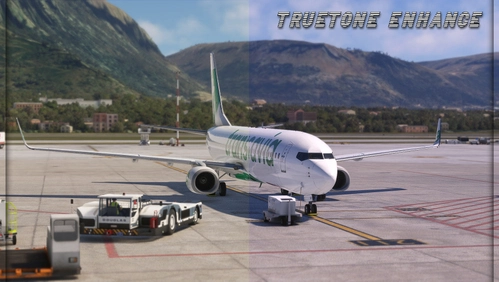
Many ReShade presets on this website require you to manually adjust parameters using the Nvidia game overlay filters. However, a simpler method is to use the ReShade application directly.
I have done my best to create a realistic-looking preset by adjusting the overall color, reducing mist, sharpening objects, and making other enhancements. I will also update this file whenever I make new changes to the preset.
Thank you, and happy flying!
The application used;
https://reshade.me/
How to install (steam version):
- Download the RFilter preset
- Download ReShade (I suggest downloading the one with full add-on support)When selecting the rendering API make sure to select DirectX 10/11/12 and DISABLE OPENXR!!
- When ReShade asks for effects to install go to the very bottom; here select the path to the RFilter preset.
- Put the downloaded preset (the INI file, not the ZIP) into (Program Files (x86), steam, steamapps, common, MicrosoftFlightSimulator2020)
- Done! (HOME is the standard button to open reshade)
How to install (MS version):
- https://www.reddit.com/r/MicrosoftFlightSim/comments/15hcr8a/reshade_for_ms_store_version/?rdt=41451&onetap_auto=true&one_tap=true
If something is wrong with the preset/you have any questions about installing or using ReShade, leave a message!
Häufig gestellte Fragen
Kommentare(31)
Melden Sie sich an, um an der Diskussion teilzunehmen
Anmeldenabout 1 year ago
over 1 year ago
over 1 year ago
over 1 year ago
What is wrong with people?!.......
almost 2 years ago
almost 2 years ago
almost 2 years ago
almost 2 years ago
almost 2 years ago
almost 2 years ago
almost 2 years ago
almost 2 years ago
about 2 years ago
about 2 years ago
over 2 years ago
almost 3 years ago
almost 3 years ago
about 3 years ago
OK.
[reshade.me] Realistic Filter (V2)
[reshade.me] Realistic filter, sharpening effects, colour blending and more

Nutzerbewertungen
10 Bewertungen
More Information
Versionsgeschichte
This version features reduced sharpening, subtle color tweaks, and new effects. It combines elements from my TrueTone Enhanced file with the original file, making it my best preset yet.
about 1 year ago