

Beschreibung
GSX PRO PROFILE FOR YOUR STREAMDECK
This is a profile for your Streamdeck (XL Version only) to use GSX Pro without using the Menu in FS. For installation advisory check out the README.txt inside this archive. Make sure you have the latest version of AAO and the latest AAO Streamdeck plugin. Get it from here. Also check that you are on the latest version of the Streamdeck software (at least 6.0), otherwise you will get a blank page!
Operation:
Actually it is pretty selfexplanatory if you used GSX already.
RED REFRESH MENU BUTTON: To refresh the Menu you have to push the red "REFRESH MENU" button to get actual items shown in the GSX Menu (this changes when you pushed an item from the list).
YELLOW BUTTON: Just indicates the actual order list within GSX.
DARK BLUE BUTTONS: This will always be the last positions (9 and 0) from the GSX MENU.
LIGHT BLUE BOTTONS: These are the actual order (menu) buttons from GSX.
BLACK BUTTONS (2): These are the status information buttons (no push option).
Then you have more indications to the bottom line. These buttons will show you the status of the ordered services (red -> nothing ordered, yellow -> item ordered/on the way , green -> item docked/arrived)
If you find any bugs or have suggestions/problems just drop a line or join my discord server for help and support. Please also consider a donation as this creation was very time consuming (finding VARs, writing Scripts, making Icons etc.) and this will keep up the development.
Credits for GerdW which gave me inspirations for the PB page.
Thank you and enjoy!
GSX PRO STREAMDECK (XL ONLY) PROFILE to use with AAO
Customize your GSX Pro experience with this Streamdeck profile designed for XL version users. Easily navigate GSX Pro without accessing the in-game menu. Simply follow the installation instructions in the included README.txt file. Stay up-to-date with the latest AAO and AAO Streamdeck plugin versions for seamless integration. Streamline your GSX operations with color-coded buttons and status indicators for efficient ground handling. Join the community for support, share feedback, and consider contributing to sustain future developments.

Unterstützer
Nutzerbewertungen
9 Bewertungen
Versionsgeschichte
Changes in this update: - optimized codes in SD profile Erase old profile and import new version.
Ähnliche Addons
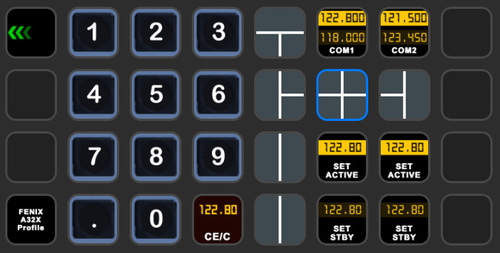
StreamDeck XL and SD+ Profile for FBW A320neo
Enhance your FBW A320neo experience with a comprehensive StreamDeck XL and SD+ profile. Enjoy features like Main page, Overhead Panel, MCDU, ECAM, and much more. The profile is tested and works with the latest FBW A320neo experimental version, offering customization options for specific setups. Easy installation process with detailed instructions provided for a seamless setup.
von ChrisG9111
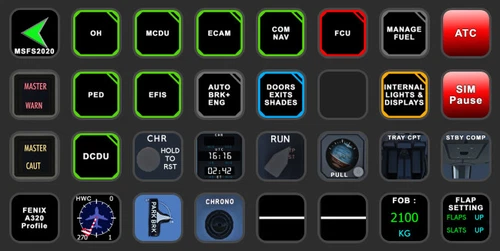
StreamDeck XL and SD+ Profile for FENIX A3XX (incl. compl. Script package and FCU readouts and more)
Enhance your FENIX A3XX experience with this StreamDeck XL and SD+ Profile add-on, featuring a complete Script package, FCU readouts, and more. Access various cockpit functions such as the Overhead Panel, MCDU/DCDU, ECAM, and Internal Lights with this detailed profile. Compatible with the latest FENIX A320, this add-on offers a seamless integration for a more immersive simulation experience.
von Chris_PU_A320
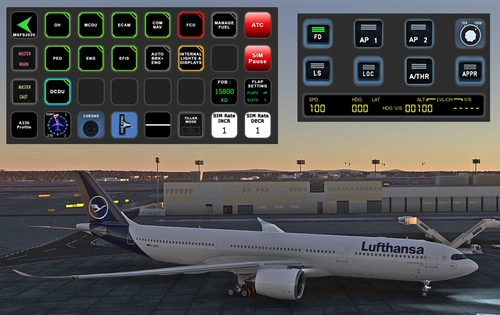
StreamDeck XL and SD+ Profile for A330-900neo (Headwind)
Customize your flying experience with the Headwind A330-900neo StreamDeck XL and SD+ Profile. This feature-packed profile includes functions for Main Page, MCDU, ECAM, EFIS, COM/NAV, and more. Compatible with the latest version of Headwinds A330Neo, adjustments may be needed for specific setups. Join the Discord server for support and enjoy enhanced control over your aircraft systems.
von Chris PU A320
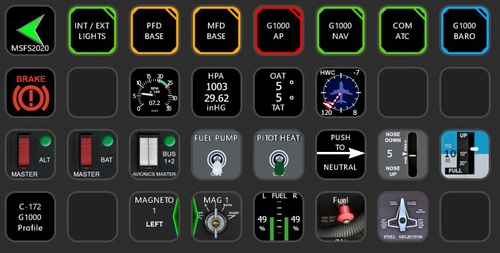
StreamDeck XL Profile for Cessna C-172 G1000 Version
A comprehensive StreamDeck XL profile for the Cessna C-172 G1000 version, tailored for pilots using the Asobo Cessna 172 Garmin 1000 model. Features include various pages such as Lights, G1000 PFD, MFD, AP, Baro, NAV, and COM/ATC. Ensure to have the required plugins installed for optimal functionality. Adjustment for specific setups may be necessary, with support available through comments or the creators Discord channel.
von ChrisG9111
Melden Sie sich an, um an der Diskussion teilzunehmen
AnmeldenKommentare(62)
6 months ago
This is FREE and takes quite some time and skill to create. Ask questions, but please be polite and respectful.
Keep up the awesome work Chris, and drop a PMDG 737 profile for 2024 soon
6 months ago
thanks for the flowers :-) this is indeed a really time consuming work.
BTW: The 737 profiles should work in MSFS2024 too.
Rgds
Chris
7 months ago
about 1 year ago
about 1 year ago
Rgds
Chris
over 1 year ago
wirklich tolle Arbeit. Dir und Deiner Familie eine schöne Weihnachtszeit
over 1 year ago
LG
Chris
over 1 year ago
i have two questions:
where can i adjust the timer to select a cathering vendor or airline company.
because i have less then a second to select these options.
and also when i load up the sim at a proper gate it looks like there are some services automaticly started (jetway)
can i turn this off?
about 2 years ago
over 2 years ago
May be it would be a good idea to distribute the aao xml files with the standard paths you mentioned in you README.txt file. The files which I was able to download contained wrong pathes: something on drive J:\...
over 2 years ago
rgds
Chris
almost 3 years ago
I have the latest versions of AAO and StreamDeck, and followed the instructions in the Readme.
almost 3 years ago
For further help and support pls join my discord server as help is provided there much easier than here...
cheers
Chris
about 3 years ago
Fantastick work, very useful. Thanks Chris !
For information, in case some (like me) have a Logitech headset and the Logitech G-HUB software, this software starts a service (lghub_agent) hat use the same port than AxisAndOh streamdeck plugin webapi (9080). So you have to change this (in Axis and Oh and in the plugin config file)... That tooks me time to fix !
about 3 years ago
Thanks for the info. This is already known and is mentioned in the AAO manual. Logitech software and AAO don't match very well. In the upcoming version of AAO the standard ports will be set to different ports now. So problem will vanish :-)
rgds
Chris
about 3 years ago
Damned. I only focused on the AAO Streamdeck plugin manual .... :-)
about 3 years ago
Also check the AAO manual (as this is much bigger than just for the plugin). You can also change your ports from AAO itself. Make sure you put EVERYTHING which is NOT assigned in AAO onto your blacklist in order to prevent issues!
cheers
Chris
over 3 years ago
Awesome stuff, Chris. Just wanted to point out to users having issues with the profiles etc, Please check the readme File it is there for a reason. The File paths will need to be edited in RPN Scripts Editor. I presume Chris HAs his GSX installed on his J: Drive You will need to change this To the relevant drive that Your GSx Is installed in Mine for example is Drive C:
And my file path looks Like below.
(LOADTEXTFILE:C:\Program·Files·(x86)\Addon·Manager\MSFS\fsdreamteam-gsx-pro\html_ui\InGamePanels\FSDT_GSX_Panel\menu|GSX_MENU|11)
(LOADTEXTFILE:C:\Program·Files·(x86)\Addon·Manager\MSFS\fsdreamteam-gsx-pro\html_ui\InGamePanels\FSDT_GSX_Panel\tooltip|GSX_TOOLTIP|1)
over 2 years ago