

Beschreibung
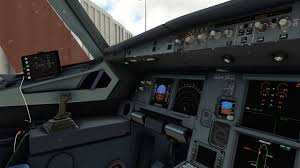
Custom views for the PMDG 737-800
Views:
[0] FMC
[1] Radio panels
[2] Captain view
[3] Overhead panels
[4] Left engine
[5] Left overwing view
[6] Right engine
[7] Left Wing view
[8] Nose view
[9] Right Wing View
New in 1.1
The cockpit views are more realistic, you now have the cockpit views from the pilot's perspective, and not from below or above, also the FMC has been given a realistic perspective.
Updated Views:
[0]
[1]
[3]
PMDG 737-800 Custom Views
Customize your PMDG 737-800 experience with this addon featuring a variety of cockpit and external views. Version 1.1 ensures more realistic cockpit perspectives and updates to key views.


Nutzerbewertungen
1 Bewertungen
Versionsgeschichte
New in 1.1 The cockpit views are more realistic, you now have the cockpit views from the pilot's perspective, and not from below or above, also the FMC has been given a realistic perspective. Updated Views: [0] [1] [3]
Melden Sie sich an, um an der Diskussion teilzunehmen
AnmeldenKommentare(20)
over 3 years ago
How do you change the cameras?
about 4 years ago
When I replace the file, then start the game, I end up in the cargo hold of the 738 and not in the cockpit, all views are through each other. What am I doing wrong
almost 4 years ago
You aren't doing anything wrong, I perfectly followed the installation path and when I start the sim and spawn with the PMDG 737-800 the camera view goes to the bottom middle part of the aircraft.
about 4 years ago
how do you save therm to a key bind
about 4 years ago
hey! just download it, and for me its not in the right position, the cockpit it stays way back, i can send you a screenshot if you want
about 4 years ago
Unfortunately, in my case MSFS freezes.
about 4 years ago
thx my friend
about 4 years ago
howd u get the old look on cockpit?
about 4 years ago
Hi, i made that myself.
about 4 years ago
woul you mind posting?
about 4 years ago
Hi, it's private for now, it still has some buggs, i will upload it when i can confirm it's bugg free.
about 4 years ago
Amazing, works fine!
How did you get that ''old'' look in the cockpit?
about 4 years ago
Hi, i made that myself.
about 4 years ago
why is this in the liveries section?
about 4 years ago
Does this just go into the Community folder?
about 4 years ago
For the Microsoft Store installation, the path is as follows:
C:\Users\[UserName]\AppData\Local\Packages\Microsoft.FlightSimulator_8wekyb3d8bbwe\LocalCache\SimObjects\Airplanes
For Steam installation the path is:
C:\Users\xxxxx\AppData\Roaming\Microsoft Flight Simulator\SimObjects\Airplanes
about 4 years ago
how do you get on app data
about 4 years ago
Press Windows Key + R and Run window will pop up.
Then type %AppData% and press Enter.
(THIS IS ONLY FOR STEAM USERS)