
Beschreibung
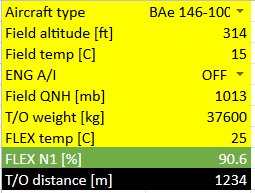
This worksheet computes the N1% for a flexible temperature derate in the BAe 146. It uses the tables from the 146 Professional operations manual and obeys all the rules written there. For now, it only does the calculation in Engine Anti-Ice OFF situation. It also does a rough take-off distance (up to 35 ft above the field) calculation based on density altitude, N1% and TOW.
Usage:
- in the Aircraft type drop-down menu, choose your variant
- insert field altitude, temperature and QNH
- you also have the option of choosing wether it's an engine anti-ice ON or OFF takeoff
- insert take-off weight; if it is greater than the variant's MTOW, it will turn red
- insert FLEX temp you want to compute; the cell will turn red if bellow 15 C with engine anti-ice ON or bellow 20 without engine anti-ice; try a higher flexible temperature if that happens
- the FLEX N1 percentage will show in the respective cell; if it doesn't obey all the rules stated in the tables, it will turn red, so try another flex temperature
- the T/O distance will show a rough calculation of the take-off distance; compare it with the runway at hand
!!!NOT FOR REAL LIFE FLIGHTS!!!
P.S. I've also made 5 airframes for the -100, -200, -300, -200QT and -300QT in SimBrief reflecting their respective parameters (e.g. weights, passengers, payload). You can use them via the following links:
-100
-200
-300
-200QT
-300QT
BAe 146 FLEX N1 calculator
FLEX derate calculator for the BAe 146. It takes the take-off parameters and returns the FLEX N1 and a rough estimation of the take-off distance. It uses the tables provided in the operations manual that come with the 146 Professional and it's NOT FOR REAL LIFE FLIGHTS!


Nutzerbewertungen
1 Bewertungen
Versionsgeschichte
Fine tuned the take-off distance calculator even further by adding TAS correction based on density altitude.
Ähnliche Addons

ATR 42/72-600 smart loadsheet generator
ATR smart loadsheet generator customized for the MSFS loadout UI fields. It uses a lot of randomizing over smartly chosen ranges for the different loadout's under the cover parameters. Please read the description and I hope you enjoy this and it makes your flying even better.
von achitan

C152 trip planner
C152 trip planner to help v-pilots do these calculations faster and spend more time in the air. Please read the detailed description for info on how to use it and even though it was made based on a 1979 real aircraft POH, it still should not be used for real life flight planning.
von Adrian Chițan
Melden Sie sich an, um an der Diskussion teilzunehmen
AnmeldenKommentare9
because the procs say that you should not use a lower than 20 C flex temp. In that case do a normal takeoff. I think the limit is lower (15 C) when you use anti-ice.
Thanks for the useful tool and the Simbrief profiles. Got to look after the engines on this old girl but probably won't use it at LCY!
Kick A$$! Thanks
Hey, thanks! very brave, derating a 146 :D it's a good sanity check tool too, though.
Thanks for the simbrief profiles also, although the -100 link is apparently invalid.
just changed the -100 link and seems to be ok now. thanks for your comment.