
Beschreibung
Just a heads up to all..
After many years, I have pretty much stopped flight simming.
No further support or development is planned for rsFO.
I will leave it up for anyone who wants to use it as-is.
Signing off. - Rob (May 2026)
rsFirstOfficer is a standalone program that reads specially formatted text files to simulate interaction between pilot flying and pilot monitoring in MSFS2020 or 2024.
100% AI free - no AI slop code here. Any mistakes, errors or hallucinations are totally my own ;-)
Read checklist items
- In Azure Voices or CereProc voices.
- Read pilot monitoring and pilot flying, or just pilot monitoring side.
Perform actions *
- Simple; like Gear Up, Flaps 1, etc (see Actions file in the download).
- Complex; multiple actions in sequence like doing clean up - lights, flaps, etc.
- Actions can be added/removed from your checklist so you decide what you want rsFO to do, and what you want to do manaully.
Readback information *
- Switch state; like engine and wing anti-ice (see Callouts file in download).
- V-speeds, baro, etc.
Event based callouts and actions *
- Examples of event based callout: "Passing transition level", "Positive rate".
- Examples of event based action: Landing lights off/on when passing 10K feet.
Play audio files
- Checklist item can trigger playing of mp3 file (some supplied).
- Use in conjuction with action, (a)73X_seat_belts_off (a)play:seatbelt_off2.mp3
In-game Panel
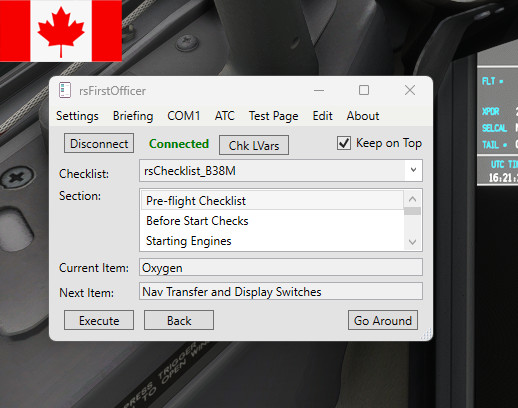
- Simple panel for montoring sequence on items, showing current and next.
- Helpfull in VR ;-)
- Connect / disconnect from MSFS.
- Load briefing data (V-speeds and transition levels) from FMC. *
Play live ATC
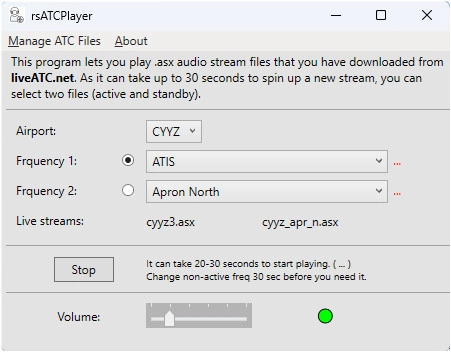
- Play audio stream files you have downloaded from liveatc.net**
Note: Theses are live streams, not old recordings. - Listen to ground while setting up your flight, listen to IRL taxi instructions.
More details in pdf here
Azure Voices
- 200+ free voices *** to read your rsFirstOfficer checklist files and made callouts.
- More details in pdf here
Multi-Language
- You can create your own translations of checklist files, and select the appropriate voices in Azure.
Example here - More deatils in pdf here
- All callouts are stored in language files. The checklist file tells rsFO which language file to use.
User defined Actions (coming in 3.0.3 April 2025)
- rsFirstOfficer now supports user defined actions for triggering published LVARs in MSFS 2020 and 2024.
- If you have an aircraft not currently supported by rsFirstOfficer, or a supported aircraft where an LVAR for a switch or control is not in the default support, you can create your own action commands for rsFirstOfficer.
- These action commands can be added to your rsChecklist files to trigger the appropriate action.
- A simple ini file, user_actions.ini, is used to add your own (a)commands to rsFO.
- See instructions here.
* Aircraft specific availablity based on vendor data accessable via FSUIPC
** The Terms of Use at liveatc.net prevent distribution of .asx files, so you will need to download your own copies. With rsFirstOfficer you can import and play when appropriate.
*** Azure Free Tier gives you .5 million characters per month (enough for 4 or 5 rsFO flights every day) free.
The checklist files are simple text files setup as prompt/response phrase pairs.
rsFirstOfficer offers no voice command or speech recognition.
rsFirstOfficer is a Windows only program.
Installation
Unzip and run the installer rsFirstOfficerSetup.msi
rsFirstOfficer is a standalone Windows executable and should not be installed into MSFS community folder.
In-Game Panel
- Located in the download zip file.
- Unzip into your Community folder
There are several rsChecklist text files included:
- rsChecklist_CRJ.txt - for Aerosoft CRJ V2
- rsChecklist_A350.txt - for IniBuilds A350
- rsChecklist_A330.txt - for IniBuilds/MSFS A330 & A321
- rsChecklist_A380X.txt - for FBW A380X
- rsChecklist_B38M - for iFly 737 MAX8
- rsChecklist_A320.txt – for Fenix A320
- rsChecklist_B737.txt – for PMDG B73X family
- rsChecklist_B777.txt - for PMDG B777-300ER
- rsChecklist_A20N.txt – for FBW A32NX (use also for LVFR/HorSim A318/A319/A321)
- rsChecklist_A310.txt - for IniBuilds/MSFS A310
- rsChecklist_ATR.txt - for MSFS ATR24/72
- rsChecklist_EMB.txt - for FSS E170/175
- rsChecklist_A20N_V2.txt - for IniBuilds/MSFS A320Neo
- rsChecklist_A300F.txt - for IniBuilds A300
Some of the new functionality for FBW, ATR and PMDG, requires FSUIPC be installed.
The free version from fsuipc.com works fine.
PMDG
PMDG 737_Options.ini may need a line added to have it broadcast LVars for rsFirstOfficer to read.
In file:
C:\Users\[your name]\AppData\Local\Packages\Microsoft.FlightSimulator_8wekyb3d8bbwe\LocalState\packages\pmdg-aircraft-737\work\737_Options.ini
Add:
[SDK]
EnableDataBroadcast=1
FSUIPC
rsFirstOfficer Works best with FSUIPC version 7.5.2 (or higher) from fsuipc.com.
Two steps:
1. Download and install FSUIPC 7.5.2
2.Copy the wasm folder to your Community folder.
After installation, look for the FSUIPC-WASM.zip file in folder C:\FSUIPC7\SDK.
In that zip file look for file fsuipc-lvar-module.zip
Unzip that file and copy the fsuipc-lvar-module folder to your MSFS Communinty folder.
3. FSUIPC now defaults the LvarScanFrequency to 0 so it does not hang with MSFS 2024, but that means it only reads Lvars on startup so things like V speeds which don't get set until later, cannot be seen by rsFO. This is only an issue for MSFS2024 but it means MSFS2020 suffers,
The best work around so far is to set LvarScanFrequency=-15 in the MSFS2020 Community folder and leave it as 0 in the MSFS2024 folder. :-(
Troubleshooting
If rsFO is not seeing your aircraft local varaibles, try shutdown and restart of rsFO.
As a rule, for MSFS 2024, it is best to start rsFO AFTER you are fully loaded into the sim, in your aircraft.
See FSUIPC section above, and note from FSUIPC..
https://forum.simflight.com/topic/98821-msfs-fsuipc7-wasm-crash-and-how-to-prevent-presets-stop-working-lvars-stop-updating-etc/
These are not official checklists but rather just checklists I have cobbled together over the years, that meet my needs.
You are encouraged to make your own checklist files or edit those to suit your requirements.
The pdf included in the download gives more information on making your own checklist files.
You can also have your checklist trigger audio files for cabin sounds or announcements.
Video sample of rsFirstOfficer in operation.. here
Enjoy,
OwnNavigation
(YYCeeYa in MSFS)
User Contributed Addon
FENIX a3xx - Auto Respond Checklist for rsFirstOfficer - Stream Deck ProfilersFirstOfficer
rsFirstOfficer is a standalone program for MSFS2020/2024 that simulates interaction between pilot flying and pilot monitoring. The add-on reads checklist items, performs various actions, provides readback information, and offers event-based callouts and actions. Additionally, it allows users to play audio files, utilize in-game panels for monitoring, and access live ATC audio streams from liveatc.net.




Nutzerbewertungen
29 Bewertungen
Versionsgeschichte
rsFirstOfficer version 3.0.6 January 3, 2026 - Fixed a couple of bugs with RSFO's PMDG 737 implementation - A few new actions for the PMDG 737 (a)73X_start_sw_cont (a)73X_start_sw_off (a)73X_probe_heat_on (a)73X_probe_heat_off (a)73X_autobrake_off
Melden Sie sich an, um an der Diskussion teilzunehmen
AnmeldenKommentare(240)
3 months ago
- Is it possible to add some (all ?) keys of the keyboard to trigger messages ? For the time being it's only letters from A to Z... not friendly.
3 months ago
3 months ago
4 months ago
After many years, I have pretty much stopped flight simming.
No further development is planned for rsFO.
I will leave it up for anyone who wants to use it as-is.
3 months ago
However I must find how to increase volume because sometime inside the cockpit and with ATC chat during checklist the voice volume is not strong enough.
Any idea ?
about 8 hours ago
4 months ago
Getting problems with v3.0.6 :
With several actions, either under testing, or execute, rsFO closes itself !?
I have to relaunch it, and of course connection is lost, I have to reconnect to the sim.
Is it a known prob ?
4 months ago
4 months ago
I just discovered and installed it yesterday. Very impressive, it'll take sometime to get used to it !
Question:
The voice volume is rather low, too low, regarding the sim sounds. It is almost impossible to hear the voice in noisy phases.
How to increase the volume ? The settings are at their max level (100).
Thx
4 months ago
If MSFS is at 100%, I set rsFO to about 60% with the Windows volume mixer.
4 months ago
4 months ago
4 months ago
Another option is to use JoytoKey and assign your joystick control to a key, then set rsFO to trigger on that key.
5 months ago
5 months ago
5 months ago
For example in VA you can set the text "Beacon On" to call the plugin with a context:
"(a)Fenix_beacon_on | "optional text"
The beacon is switched on and the pilot monitoring says the optional text.
Still needs work but should be coming soon. :-)
4 months ago
If anyone wants to try this out, just message me and I will send a copy to test.