
Beschreibung
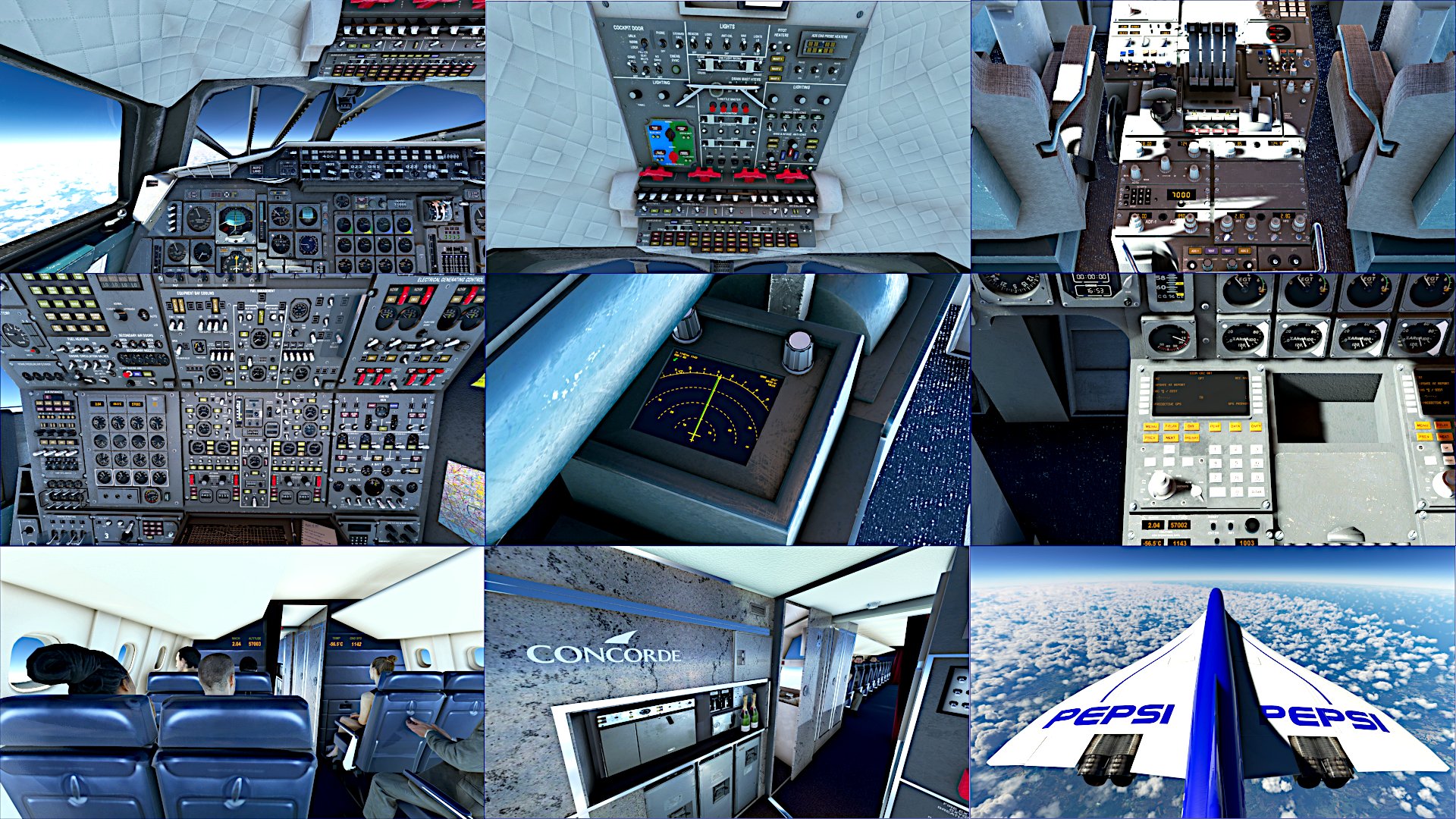
Concorde Custom Camera Views - This package contains custom camera views for Concorde from DC Design
The custom cameras have been defined as follows:
Camera 1 - pilot view
Camera 2 - copilot view
Camera 3 - overhead
Camera 4 - FMC
Camera 5 - pedestal
Camera 6 - engineers panel
Camera 7 - WX radar
Camera 8 - galley
Camera 9 - passenger view
Camera 0 - top view fuselage
📖 INSTALLATION
Unzip the file 'cameras.CFG' into 'dcdesigns-aircraft-concorde' folder located at C:\Users\[UserName]\AppData\Local\Packages\Microsoft.FlightSimulator_8wekyb3d8bbwe\LocalCache\SimObjects\Airplanes\
Overwrite it if the file already exists!
If the folder dcdesigns-aircraft-concorde doesn't exist, create one
Don't extract the folder or file in the community folder, it won't work!
📖 INSTALAÇÃO
Extraia o arquivo 'cameras.CFG' dentro da pasta 'dcdesigns-aircraft-concorde' localizado em C:\Users\[UserName]\AppData\Local\Packages\Microsoft.FlightSimulator_8wekyb3d8bbwe\LocalCache\SimObjects\Airplanes
Sobrescreva o arquivo se já existir!
se a pasta dcdesigns-aircraft-concorde não existir, crie uma
Não coloque a pasta ou o arquivo na pasta community que não irá funcionar!
▧ ▨ ▦ ▩ ▧ ▨ ▦ ▩ ▧ ▨ ▦ ▩ ▧ ▨ ▦ ▩
❤️ Follow me on social networks
Youtube Channel ☛ www.youtube.com/vicgames2000
Instagram ☛ https://www.instagram.com/vicgames2000/
Twitter ☛ https://twitter.com/VICgames15
Enjoy!
Concorde Custom Camera Views
Customize your Concorde experience with this package featuring a variety of unique camera views, including pilot, copilot, passenger, and more. Easily install by adding the cameras.CFG file to your Concorde folder - dive into the detailed cockpit perspectives and enhance your flight simulation.


Versionsgeschichte
Keine Versionsgeschichte verfügbar.
Melden Sie sich an, um an der Diskussion teilzunehmen
AnmeldenKommentare(8)
over 3 years ago
In my AppData directory I couldn't find the route inform in the instalation guide. Instead I found many cameras.cfg files in
C:\Users\[username]\AppData\Roaming\Microsoft Flight Simulator\SimObjects\Airplanes\
I create the folder dcdesigns-aircraft-concorde and put the file into this folder.
I use a steam instalation with comunity folder in another disc.
about 4 years ago
HI there,
When I use CTRL 1 through to 0 it wont take me to the passengers. Is this what you're supposed to press?
over 1 year ago
over 4 years ago
Hi, i downloaded this and couldn't find the file which you previously put on the comments, i did however add it to my community folder ( creating a back up of all files ) but when i loaded the aircraft it literally showed me the wheels and wouldn't let me see anything else unless i was on external view. I am using steam version what did i do wrong?
about 4 years ago
I got the same
over 4 years ago
hello, excuse the question but how did you manage to send the passengers? thanks for the great file
over 4 years ago
'If you wish to see passengers sitting in the passenger cabin, you will need to ensure that their weights are entered into the Payload Manager. There is also a switch beside the engineer’s left knee marked “Passengers” – with this on and the weights entered, you will both see the passengers and hear their conversation in the cabin'
over 4 years ago
wow i didn't know! thank you for the reply, i will.