


Beschreibung
This navdata has been developed by Ali Rıza Mortas, in order to add LTFM Navdata for non-Navigraph users.
Simply drag the file into your Community Folder.
With this file you'll be able to select SID, STAR and ILS approach for available runways
Special thanks to Ali Rıza Mortas for this project.
Enjoy your flights
Location
LTFM Navdata
Add-on Summary: This navdata by Ali Rıza Mortas adds LTFM Navdata for non-Navigraph users, allowing selection of SID, STAR, and ILS approaches for available runways. Simply drag the file into your Community Folder to enhance your flight experience. Special thanks to Ali Rıza Mortas for this project.


Nutzerbewertungen
5 Bewertungen
Versionsgeschichte
Keine Versionsgeschichte verfügbar.
Ähnliche Addons
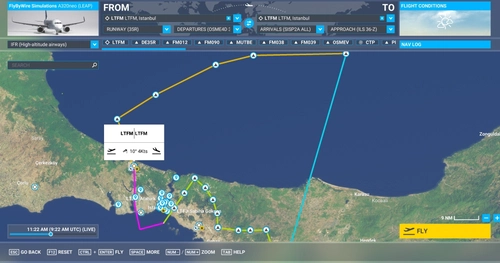
LTFM - Navdata V2 - Turkey
Enhance your navigation with LTFM Navdata Version 2 for non Navigraph users. This add-on allows you to select SID, STAR, and ILS approaches for available runways at LTFM airport in Turkey. Simply drag the file into your Community Folder to start using it. Ensure to remove any previous versions before installation for optimal performance.
von Ali Riza Mortaş
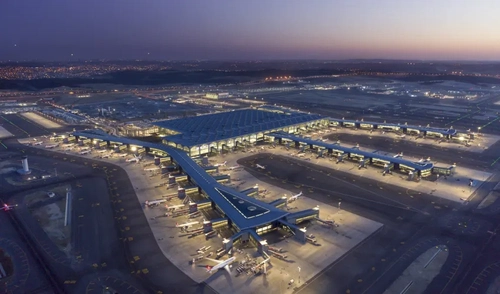
LTFM SceneryTR Design night lighting enhancement
This add-on improves night lighting for the SceneryTR Design Istanbul Airport LTFM scenery in Microsoft Flight Simulator, providing a more realistic illumination for the terminal and its surroundings. Functionality relies on external light pack dependencies, which must be installed separately. Due to LOD limitations, terminal lighting activates only after getting close and then stays visible during your session. Compatibility is ensured solely for the specified SceneryTR Desing LTFM scenery Tested in FS2024 and it works nicely.
von Nimic
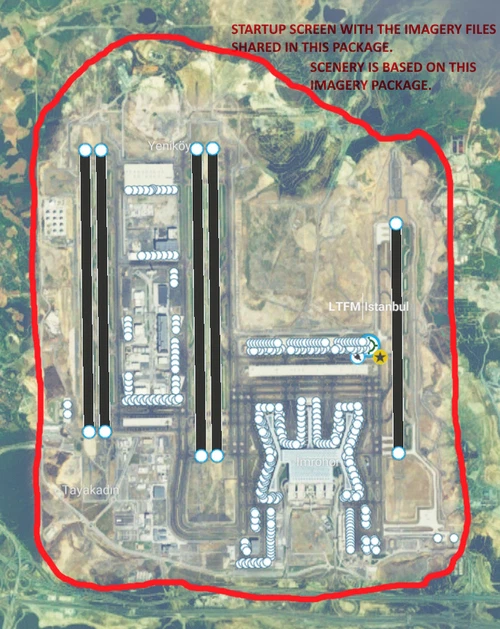
LTFM Istanbul Base Imagery and GSX profile
This add-on provides custom base imagery for LTFM Istanbul Airport, sourced from Google Maps. It is compatible with airport scenery versions up to v2.0.23 and designed for use in both MSFS 2020 and 2024. Installation involves extracting the files to your Custom scenery folder.
von Argaeus
![[Redundant] LTFM - ILS GS fix](https://cdn.flightsim.to/images/28/20260802_082625_c569f7e0298f0fe2_ltfm-ils-gs-fix.png?width=500)
[Redundant] LTFM - ILS GS fix
NOTAM: This addon has been fully integrated into the latest freeware LTFM v2.0.40, so it's no longer needed.
von ntnv
Melden Sie sich an, um an der Diskussion teilzunehmen
AnmeldenKommentare(17)
over 1 year ago
over 1 year ago
almost 4 years ago
Thanks for your efforts!
about 5 years ago
Actually nice work, but the ILS frequencies are incorrectly positioned, they are positioned the wrong way round. Localizers DME are always at the end of the runway, not at the beginning, so thats why it doesn't work properly. For example, the frequency for runway 35R is 111,950 not 109,550, that is the frequency from the inverted runway 17L.
about 5 years ago
Planning to install this because the airport add-on is so good and it's a shame to not be able to IFR. So what you're saying is that if I for example want to land on 17L, I would need to input the ILS frequency for 35R?
about 5 years ago
Nevermind just tried it and the ILS was perfect. For 35R at least. I'm not sure about the others
about 5 years ago
Yes, or if it is Possible if you can edit the Data and Correct it.
over 4 years ago
Pls chk and test V2. U were right. I do not have Buberci&Oguducu blueprints.
over 4 years ago
Actually you are right. Keep in mind that I didn,t and still don't have blue prints of LTFM scenery of Oguducu&Buberci. I had to try and find best position. Well issue was true versus magnetic heading, try V2.
about 5 years ago
herhangi bir güncelleme olacakmı eskide kalmış gibi görünüyor
over 4 years ago
V2 Aratabilirsiniz.
almost 6 years ago
over 4 years ago
Well what to do? Speed was and still is not available MSFS Navdata scheme, shout at MSFS! For transitions check v2.
almost 6 years ago
almost 6 years ago
almost 6 years ago
almost 6 years ago
However I have checked the ILS, for both 24 35 and 36 and all of them were working correctly (Deleted Navigraph before testing it)
If you have any navdata addon which may create conflict with this, it may be the problem