
Beschreibung
Flight Plan Manager
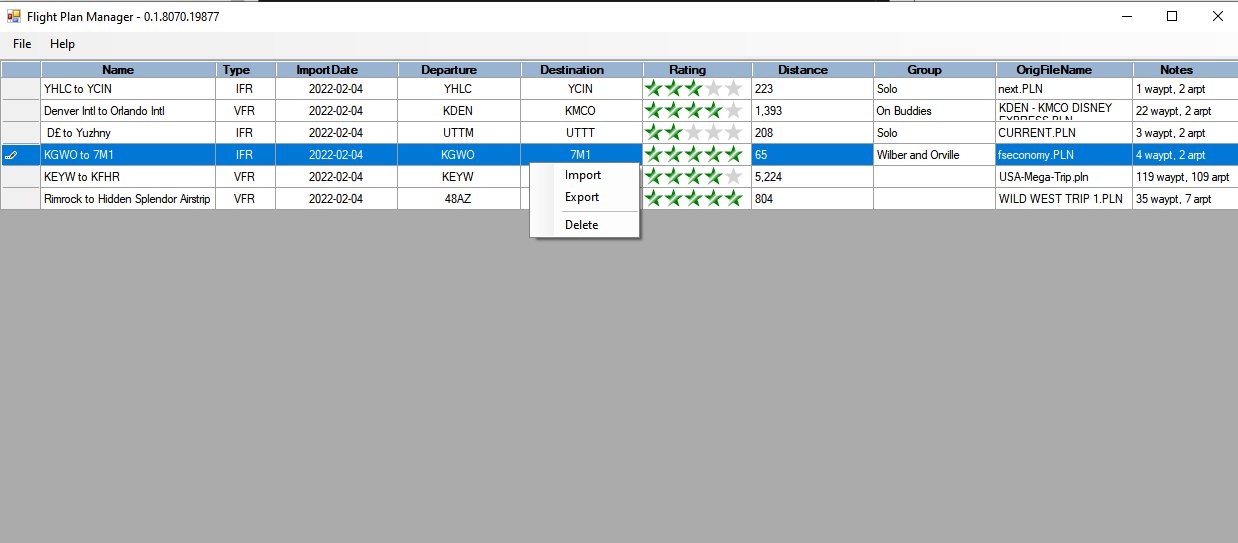
Please note, this is an early Beta, still deciding what data to allow the user to store, so any suggestions welcome and if there is enough interest, I can add. Also looking to add filtering and user selectable columns.
This application will let you import and store information about flight plans. Note that it is not for creating/editing flightplans (there are plenty of great applications for that) but is just to help organize your flight plans.
Features
- Import and save flight plans
- View map of plan
- Rate flight plans
- Get type of flight plan (VFR/IFR)
- Capture Departure, Destination and Total Distance
- Add comments to flight plans, such as who flown with or personal notes
- Sort and filter ata on the screen
Documentation
[Help Page](https://htmlpreview.github.io/?https://raw.githubusercontent.com/kenz67/FlightSim-FlightPlanManager/master/docs/Help.html)
[Discussion](https://github.com/kenz67/FlightSim-FlightPlanManager/discussions)
[Issues](https://github.com/kenz67/FlightSim-FlightPlanManager/issues)
Installation
To deploy this project unzip to any location and execute FlightPlanManager.exe
Flight Plan Manager
A Flight Plan Manager application designed to help organize and store information about flight plans. Import and save flight plans, view maps, rate plans, and add comments with this early Beta version. Explore features like sorting, filtering data, and user-selectable columns for a customized experience.


Nutzerbewertungen
8 Bewertungen
Versionsgeschichte
New Feature: Flitering -- The ability to filter Bug Fixes: Delete -- When clicking cancel on delete, the flight plan was still deleted Airport/Waypoint Count -- Counts were not coming in correctly in some instances
Melden Sie sich an, um an der Diskussion teilzunehmen
AnmeldenKommentare(37)
almost 3 years ago
over 4 years ago
Very nice work - this has hidden potential written all over it - would you consider allowing the import feature to scan a directory tree and import all plns at once? many thanks!
over 4 years ago
That request was already made and is in the backlog. My day job is getting in the way of fun now, but hopefully will be getting back to some improvements here. Any and all suggestions are welcome
over 4 years ago
Very nice, thanks!
over 4 years ago
Love the new airport/waypoint columns! i noticed one bug while deleting the previous notes info - if you mis-click and the whole line is selected and you press delete- when you click NO on the dialog it still deletes it!. Also- i had 2 duplicate plans, one filename had a (1) in it, when i deleted this one, both were deleted
over 4 years ago
Thanks, I will look into both of those issues
over 4 years ago
I've put in a new update. The issue with delete after hitting cancel was interesting. It deleted from the display but not the db, so if you closed and reopened it would be back.
I couldn't reproduce the second problem, but wonder if it was related to the first. The code deletes by an internal id, so i don't see a path through the code to make that happen
over 4 years ago
Sorry for the delay, got a new PC and spent a lot of time getting things setup. I was able to resolve the issue with cancel not working. I could not reproduce the other issue.
over 4 years ago
When I run the FlightPlanManager.exe nothing starts up. I look in task manager and it is not running? I installed in a folder on my desktop along with other programs for MSFS 2020 and have no issues with them. I'm running Windows11, MSFS2020 is the download version, and I use MSFSAddonLinker.
over 4 years ago
Can you look in the folder with the exe for a .log file and see if there is anything in there? I don't have win 11, but I don't see any reason that it should not be compatible so this might explain what is happening
over 4 years ago
No log file gets generated. So I ran it in administrator mode from a command prompt "flightplanmanager.exe > debug.txt". The debug.txt file is empty. It's like it doesn't even execute.
over 4 years ago
I agree, it sounds like it isn't starting at all. Does it show running in task manager? As far as I know, no one else is having any issues.
over 4 years ago
One other thought, do you know how to check event viewer to see if there is an error in there?
over 4 years ago
Faulting application name: FlightPlanManager.exe, version: 0.7.8090.22127, time stamp: 0x6217bdb0
Faulting module name: KERNELBASE.dll, version: 10.0.22000.434, time stamp: 0x78dc11b6
Exception code: 0xe0434352
Fault offset: 0x0013ec52
Faulting process id: 0x6ad4
Faulting application start time: 0x01d82e558378ce2e
Faulting application path: C:\Users\pgilbr\Desktop\Temp\FlightPlanManager.exe
Faulting module path: C:\WINDOWS\System32\KERNELBASE.dll
Report Id: efe6e76f-f6e2-4702-8baa-0effa38387dd
Faulting package full name:
Faulting package-relative application ID:
Application: FlightPlanManager.exe
Framework Version: v4.0.30319
Description: The process was terminated due to an unhandled exception.
Exception Info: System.IO.DirectoryNotFoundException
at System.IO.__Error.WinIOError(Int32, System.String)
at System.IO.FileStream.Init(System.String, System.IO.FileMode, System.IO.FileAccess, Int32, Boolean, System.IO.FileShare, Int32, System.IO.FileOptions, SECURITY_ATTRIBUTES, System.String, Boolean, Boolean, Boolean)
at System.IO.FileStream..ctor(System.String, System.IO.FileMode, System.IO.FileAccess, System.IO.FileShare, Int32)
at FlightPlanManager.DataObjects.ConfigureDb.InitDb()
at FlightPlanManager.Forms.MainForm..ctor()
at FlightPlanManager.Program.Main()
over 4 years ago
Thanks for that information. It looks like it having problems creating the database. I have added code that I hope will resolve the issue. If this doesn't work, I can add logging and get a better idea of what is happening. Please let me know if the new version works out for you
over 4 years ago
Your latest fix worked, as so far as I can now run the program and import flight plans.
However I get the following errors when I try to use the map feature.
See the end of this message for details on invoking
just-in-time (JIT) debugging instead of this dialog box.
************** Exception Text **************
System.InvalidCastException: Unable to cast object of type 'System.DBNull' to type 'System.String'.
at FlightPlanManager.Services.DbData.GetData(Int32 id) in C:\Users\kenz\Source\MSFS\FlightPlanManager\Services\DbData.cs:line 46
at FlightPlanManager.Map.ConfigureMap(Int32 id) in C:\Users\kenz\Source\MSFS\FlightPlanManager\Forms\Map.cs:line 54
at FlightPlanManager.Forms.MainForm.ShowMapToolStripMenuItem_Click(Object sender, EventArgs e) in C:\Users\kenz\Source\MSFS\FlightPlanManager\Forms\MainForm.cs:line 359
at System.Windows.Forms.ToolStripItem.RaiseEvent(Object key, EventArgs e)
at System.Windows.Forms.ToolStripMenuItem.OnClick(EventArgs e)
at System.Windows.Forms.ToolStripItem.HandleClick(EventArgs e)
at System.Windows.Forms.ToolStripItem.HandleMouseUp(MouseEventArgs e)
at System.Windows.Forms.ToolStripItem.FireEventInteractive(EventArgs e, ToolStripItemEventType met)
at System.Windows.Forms.ToolStripItem.FireEvent(EventArgs e, ToolStripItemEventType met)
at System.Windows.Forms.ToolStrip.OnMouseUp(MouseEventArgs mea)
at System.Windows.Forms.ToolStripDropDown.OnMouseUp(MouseEventArgs mea)
at System.Windows.Forms.Control.WmMouseUp(Message& m, MouseButtons button, Int32 clicks)
at System.Windows.Forms.Control.WndProc(Message& m)
at System.Windows.Forms.ScrollableControl.WndProc(Message& m)
at System.Windows.Forms.ToolStrip.WndProc(Message& m)
at System.Windows.Forms.ToolStripDropDown.WndProc(Message& m)
at System.Windows.Forms.Control.ControlNativeWindow.OnMessage(Message& m)
at System.Windows.Forms.Control.ControlNativeWindow.WndProc(Message& m)
at System.Windows.Forms.NativeWindow.Callback(IntPtr hWnd, Int32 msg, IntPtr wparam, IntPtr lparam)
************** Loaded Assemblies **************
mscorlib
Assembly Version: 4.0.0.0
Win32 Version: 4.8.4470.0 built by: NET48REL1LAST_C
CodeBase: file:///C:/Windows/Microsoft.NET/Framework/v4.0.30319/mscorlib.dll
----------------------------------------
FlightPlanManager
Assembly Version: 0.8.8096.31746
Win32 Version: 0.8.8096.31746
CodeBase: file:///C:/Users/pgilbr/Desktop/FSTools/FlightPlanManager/FlightPlanManager.exe
----------------------------------------
NLog
Assembly Version: 4.0.0.0
Win32 Version: 4.7.13.493
CodeBase: file:///C:/Users/pgilbr/Desktop/FSTools/FlightPlanManager/NLog.DLL
----------------------------------------
System.Windows.Forms
Assembly Version: 4.0.0.0
Win32 Version: 4.8.4488.0 built by: NET48REL1LAST_C
CodeBase: file:///C:/WINDOWS/Microsoft.Net/assembly/GAC_MSIL/System.Windows.Forms/v4.0_4.0.0.0__b77a5c561934e089/System.Windows.Forms.dll
----------------------------------------
System
Assembly Version: 4.0.0.0
Win32 Version: 4.8.4488.0 built by: NET48REL1LAST_C
CodeBase: file:///C:/WINDOWS/Microsoft.Net/assembly/GAC_MSIL/System/v4.0_4.0.0.0__b77a5c561934e089/System.dll
----------------------------------------
System.Drawing
Assembly Version: 4.0.0.0
Win32 Version: 4.8.4395.0 built by: NET48REL1LAST_B
CodeBase: file:///C:/WINDOWS/Microsoft.Net/assembly/GAC_MSIL/System.Drawing/v4.0_4.0.0.0__b03f5f7f11d50a3a/System.Drawing.dll
----------------------------------------
System.Configuration
Assembly Version: 4.0.0.0
Win32 Version: 4.8.4341.0 built by: NET48REL1LAST_C
CodeBase: file:///C:/WINDOWS/Microsoft.Net/assembly/GAC_MSIL/System.Configuration/v4.0_4.0.0.0__b03f5f7f11d50a3a/System.Configuration.dll
----------------------------------------
System.Core
Assembly Version: 4.0.0.0
Win32 Version: 4.8.4470.0 built by: NET48REL1LAST_C
CodeBase: file:///C:/WINDOWS/Microsoft.Net/assembly/GAC_MSIL/System.Core/v4.0_4.0.0.0__b77a5c561934e089/System.Core.dll
----------------------------------------
System.Xml
Assembly Version: 4.0.0.0
Win32 Version: 4.8.4161.0 built by: NET48REL1
CodeBase: file:///C:/WINDOWS/Microsoft.Net/assembly/GAC_MSIL/System.Xml/v4.0_4.0.0.0__b77a5c561934e089/System.Xml.dll
----------------------------------------
System.Data
Assembly Version: 4.0.0.0
Win32 Version: 4.8.4455.0 built by: NET48REL1LAST_C
CodeBase: file:///C:/WINDOWS/Microsoft.Net/assembly/GAC_32/System.Data/v4.0_4.0.0.0__b77a5c561934e089/System.Data.dll
----------------------------------------
System.ServiceModel
Assembly Version: 4.0.0.0
Win32 Version: 4.8.4455.0 built by: NET48REL1LAST_C
CodeBase: file:///C:/WINDOWS/Microsoft.Net/assembly/GAC_MSIL/System.ServiceModel/v4.0_4.0.0.0__b77a5c561934e089/System.ServiceModel.dll
----------------------------------------
System.Runtime.Serialization
Assembly Version: 4.0.0.0
Win32 Version: 4.8.4455.0 built by: NET48REL1LAST_C
CodeBase: file:///C:/WINDOWS/Microsoft.Net/assembly/GAC_MSIL/System.Runtime.Serialization/v4.0_4.0.0.0__b77a5c561934e089/System.Runtime.Serialization.dll
----------------------------------------
Accessibility
Assembly Version: 4.0.0.0
Win32 Version: 4.8.4161.0 built by: NET48REL1
CodeBase: file:///C:/WINDOWS/Microsoft.Net/assembly/GAC_MSIL/Accessibility/v4.0_4.0.0.0__b03f5f7f11d50a3a/Accessibility.dll
----------------------------------------
System.Data.SQLite
Assembly Version: 1.0.115.5
Win32 Version: 1.0.115.5
CodeBase: file:///C:/Users/pgilbr/Desktop/FSTools/FlightPlanManager/System.Data.SQLite.DLL
----------------------------------------
System.Transactions
Assembly Version: 4.0.0.0
Win32 Version: 4.8.4161.0 built by: NET48REL1
CodeBase: file:///C:/WINDOWS/Microsoft.Net/assembly/GAC_32/System.Transactions/v4.0_4.0.0.0__b77a5c561934e089/System.Transactions.dll
----------------------------------------
System.EnterpriseServices
Assembly Version: 4.0.0.0
Win32 Version: 4.8.4161.0 built by: NET48REL1
CodeBase: file:///C:/WINDOWS/Microsoft.Net/assembly/GAC_32/System.EnterpriseServices/v4.0_4.0.0.0__b03f5f7f11d50a3a/System.EnterpriseServices.dll
----------------------------------------
Microsoft.GeneratedCode
Assembly Version: 1.0.0.0
Win32 Version: 4.8.4161.0 built by: NET48REL1
CodeBase: file:///C:/WINDOWS/Microsoft.Net/assembly/GAC_MSIL/System.Xml/v4.0_4.0.0.0__b77a5c561934e089/System.Xml.dll
----------------------------------------
System.Device
Assembly Version: 4.0.0.0
Win32 Version: 4.8.4161.0 built by: NET48REL1
CodeBase: file:///C:/WINDOWS/Microsoft.Net/assembly/GAC_MSIL/System.Device/v4.0_4.0.0.0__b77a5c561934e089/System.Device.dll
----------------------------------------
GMap.NET.WindowsForms
Assembly Version: 2.0.2.0
Win32 Version: 2.0.2.0
CodeBase: file:///C:/Users/pgilbr/Desktop/FSTools/FlightPlanManager/GMap.NET.WindowsForms.DLL
----------------------------------------
GMap.NET.Core
Assembly Version: 2.0.3.0
Win32 Version: 2.0.3.0
CodeBase: file:///C:/Users/pgilbr/Desktop/FSTools/FlightPlanManager/GMap.NET.Core.DLL
----------------------------------------
************** JIT Debugging **************
To enable just-in-time (JIT) debugging, the .config file for this
application or computer (machine.config) must have the
jitDebugging value set in the system.windows.forms section.
The application must also be compiled with debugging
enabled.
For example:
<configuration>
<system.windows.forms jitDebugging="true" />
</configuration>
When JIT debugging is enabled, any unhandled exception
will be sent to the JIT debugger registered on the computer
rather than be handled by this dialog box.
over 4 years ago
Progress, that is good. I will look into the map issue, hopefully in the next day or 2
over 4 years ago
I couldn't reproduce this issue, but i see the area of the code that had failed and I think I resolved the issue
over 4 years ago
All looks good. Thank you for the quick fixes too.