
Beschreibung
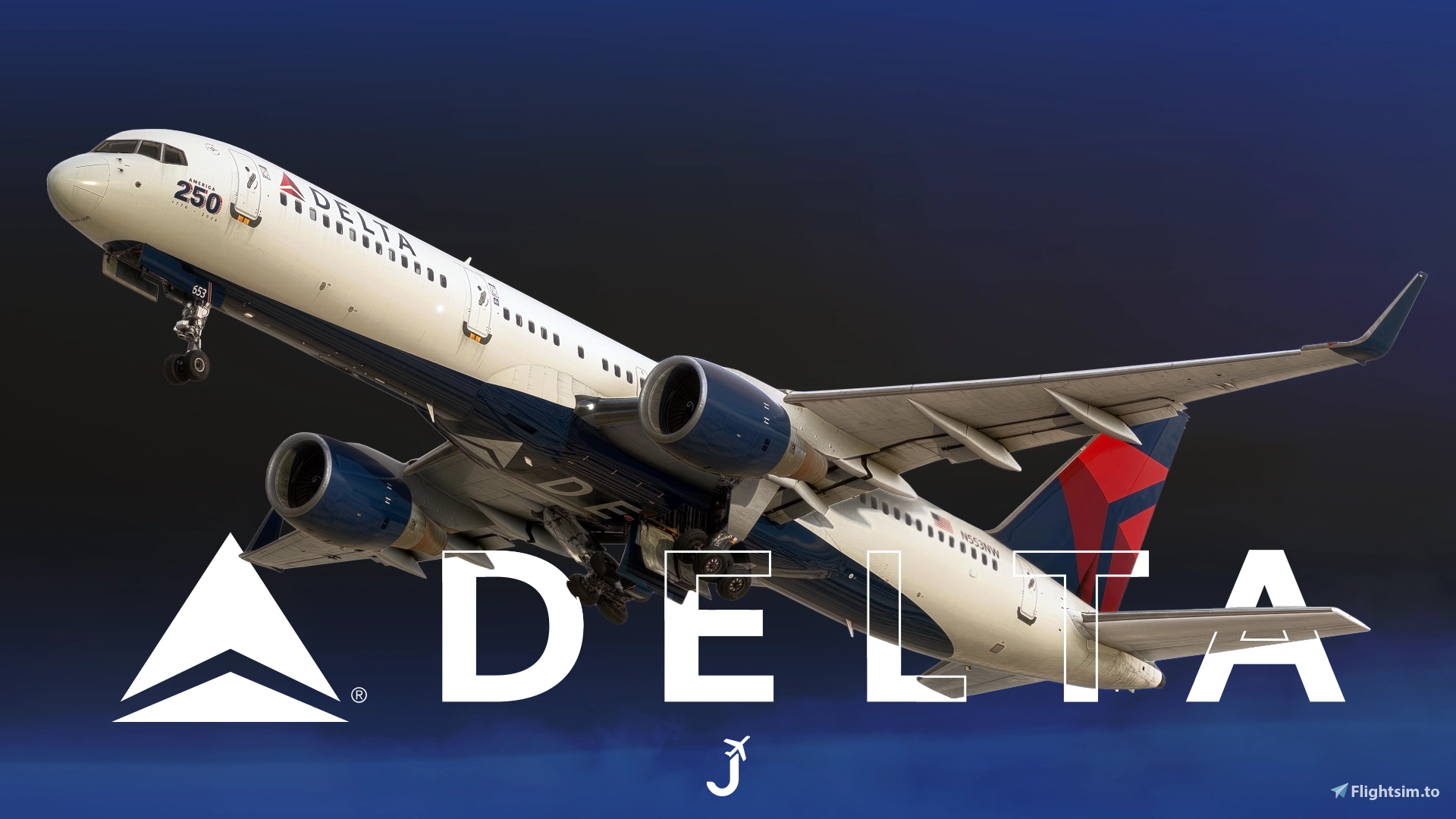
Delta Air Lines livery collection for the Bluebird Simulations B757-200.
Features:
- Custom Delta Air Lines cabin
- Accurate DAL-specific stencils
- Realistic DAL-aircraft/equipment configuration pre-installed
- Delta Air Lines cockpit decals and placards (Cabin Alt. Chart, EEC Reset Reminder, Yoke Checklist, etc.)
- Improved textures, metallics, and normal maps
- EFB wallpaper Included
Includes:
- N553NW | America 250th
- N694DL | The Spirit of Freedom
- N713TW | 8-Door B75S
- N6704Z | Standard -232 WL
- N6712B | ATLANTA: Where You Belong
- N698DL | Standard -232 Non-WL
LIVERY INSTALLATION – 2024/2020
- 1. Extract the 'BBS-B752-JVDAL-Collection.zip' file.
- 2. Drag and drop the extracted 'BBS-B752-JVDAL-Collection' folder into your Community folder.
- 3. IMPORTANT: The 'bbs-757-200-pw-livery-JVDAL-COMMON' folder must remain installed, even if you only choose to install a single livery. Do not remove or modify this folder when adding or removing individual airframes. The common folder will not show up in the sim's aircraft selection menu. This is intentional. As long as you drag and drop the extracted collection folder into your Community folder, everything should work fine.
To Install Aircraft Configurations
- 1. Locate your Bluebird Sim work/liveries folder. Default paths (FS2024):
Steam version:
%APPDATA%\Microsoft Flight Simulator 2024\WASM\MSFS2020\bluebirdsim-aircraft-757-200\work\liveries
Microsoft Store version:
%LOCALAPPDATA%\Packages\Microsoft.Limitless_8wekyb3d8bbwe\LocalState\WASM\MSFS2020\bluebirdsim-aircraft-757-200\work\liveries
- 2. Drag and drop the "NXXXXX-opt.json" file(s) into the liveries folder. Overwrite if prompted.
To Install EFB Wallpaper
- Open the contents of 'DAL EFB Wallpaper'
- Drag and drop the 'bluebirdsim-aircraft-757-200' file into your community folder. We will be overriding one of the default wallpapers.
- In the simulator, within the EFB, to activate the EFB: Settings → General → EFB Background → Option 1
IMPORTANT BLUEBIRD NOTICE(S) | COMMON ERRORS/ISSUES
- 8-Door / AWE Configuration: The BBS 757 can be quirky when loading its 10-door and 8-door configurations. Ensure that BBS Nest is running. For MSFS2024 users, make sure the Identification tab is blank in the aircraft selection/configuration menu before starting your flight.
- Cabin & Future Updates: The cabin required an extensive amount of work, and BBS has confirmed that it will change in future updates. While it's unlikely I'll put this much effort into custom cabins for other liveries, please note that upcoming BBS updates may break cabin textures or functionality. This livery will also receive changes and improvements as BBS releases future art updates.
- BBS Nest Liveries: These are the same liveries I originally created and supplied to the BBS Nest livery manager. I've uploaded them separately to deliver updates and fixes faster and provide a more organized installation option. I recommend uninstalling the BBS Nest Delta liveries if you choose to install these versions instead. As of now, BBS Nest does not regenerate the layout.json file when uninstalling liveries, so you'll need to do this manually. Download MSFSLayoutGenerator (first GitHub result on Google), navigate to Community -> 'bluebirdsim-aircraft-757-200-liveries', and regenerate the layout.json by dragging and dropping the 'layout.json' file onto the MSFSLayoutGenerator executable.
- Satcoms Not Showing: Ensure that you've installed the corresponding -opt.json configuration files.
- LNAV/VNAV Not Working as Expected: Delta uses a different climb thrust/autopilot configuration (VNAV Option 2), which reflects the airline's actual configuration. You must arm VNAV and, upon reaching acceleration altitude, press CLB on the Thrust Mode Selector panel. The previous BBS Nest liveries used VNAV Option 1 (automatic thrust mode change) because the configuration files weren't working correctly. This explains the difference in behavior.
Feel free to join the Canvas Corner discord server where you can download other liveries from myself and good friends of mine: Canvas Discord
If you like my work and would like to support me, you can donate via this link: My PayPal
Please do not modify, redistribute, or reupload this livery or the contents of this livery without permission. I've redone nearly the entire cabin in some capacity and many of the original textures. Please be mindful about simply copying and pasting elements of my livery.
Häufig gestellte Fragen
Delta Air Lines [Collection] | w/Cabin | Bluebird B757-200
This add-on provides a collection of Delta Air Lines liveries for the Bluebird Simulations B757-200, featuring a custom Delta-themed cabin and cockpit decals. It includes accurate Delta-specific stencils, realistic equipment configurations, and enhanced textures. Several unique aircraft registrations and EFB wallpaper are included. Installation instructions for liveries and configurations are provided for both MSFS 2020 and 2024.

Nutzerbewertungen
27 Bewertungen
Versionsgeschichte
- Corrected N694DL cockpit registration typo - Added further information to readme and documentation
In Sammlungen enthalten(1)


Ähnliche Addons

[A32NX] Delta Air Lines "2007 livery"
A detailed livery add-on featuring the Delta Air Lines "2007 livery" for your A32NX aircraft. Simply extract and install the files in the "community" directory for an enhanced visual experience during your flights.
von UnitDeath
Delta Air Lines Livery Pack w/ Cabin | iniBuilds A350 | Smart Decals
The Delta Air Lines Fleet Pack for the iniBuilds A350 offers realistic livery designs featuring accurate stencils and detail representations of the aircraft. This add-on includes a custom cabin layout with bespoke seating and in-flight entertainment screens, along with custom exterior weathering effects. The package includes several specific aircraft models, enhancing the overall immersive flying experience. Installation is straightforward, requiring only a drag-and-drop into the community folder.
von SilkySmooth
DELTA AIRLINES N402DX A330-900 8K
Repaint of the Delta Airlines N402DX A330-900 aircraft for Microsoft Flight Simulator. Install by unzipping and placing in your Community Folder for an enhanced visual experience during your flights.
von JanT73

[A32NX] FlyByWire | Airbus A320neo DELTA AIRLINES N325US - Dirty in 8k
A new livery for the Airbus A320neo DELTA AIRLINES N325US featuring a dirty design in 8k resolution, now compatible with FlyByWire. Easily install the livery in your community folder and take to the skies in style. Share your experience and support future livery requests with a rating or donation.
von Selcuk Dikilitas
Melden Sie sich an, um an der Diskussion teilzunehmen
AnmeldenKommentare101
If you had a same livery/REG installed via BBS Nest beforehand, deinstall it there and go into the Community -> "bluebirdsim-aircraft-757-200-liveries" folder and update the layout.json with MSFSLayoutGenerator. Deinstalling the livery in NEST, doesn't create a new JSON.
Dieser Kommentar wurde gelöscht
Dieser Kommentar wurde gelöscht
2. Please send me a PM with screenshots of the relevant folders.
3. Is the ATC ID blank when selecting the aircraft in the MSFS Menu?
4. I'm currently away on holiday, but I'll take a look at the folders myself to double-check when I get a chance.
Respectfully, it's reviews and comments like yours that are going to result in me disabling comments going forward. Quite literally thousands of other users have been able to get the satcoms working, but for whatever reason, they're not working on your end, and you've rated my add-on 2/5 despite the weeks of work that went into it and the fact that it works correctly on my end and for other users.
Saying you "followed it to a T" doesn't really provide any useful clarification or help me diagnose the issue, hence why sending me a PM with screenshots is generally far more productive than leaving a 2/5-star review before attempting to troubleshoot.
Maybe HUES was onto something with distancing themselves from FS.to. Cheers.
Dieser Kommentar wurde gelöscht
N754AT FOR Mexicana year 1997
Cheers!!