
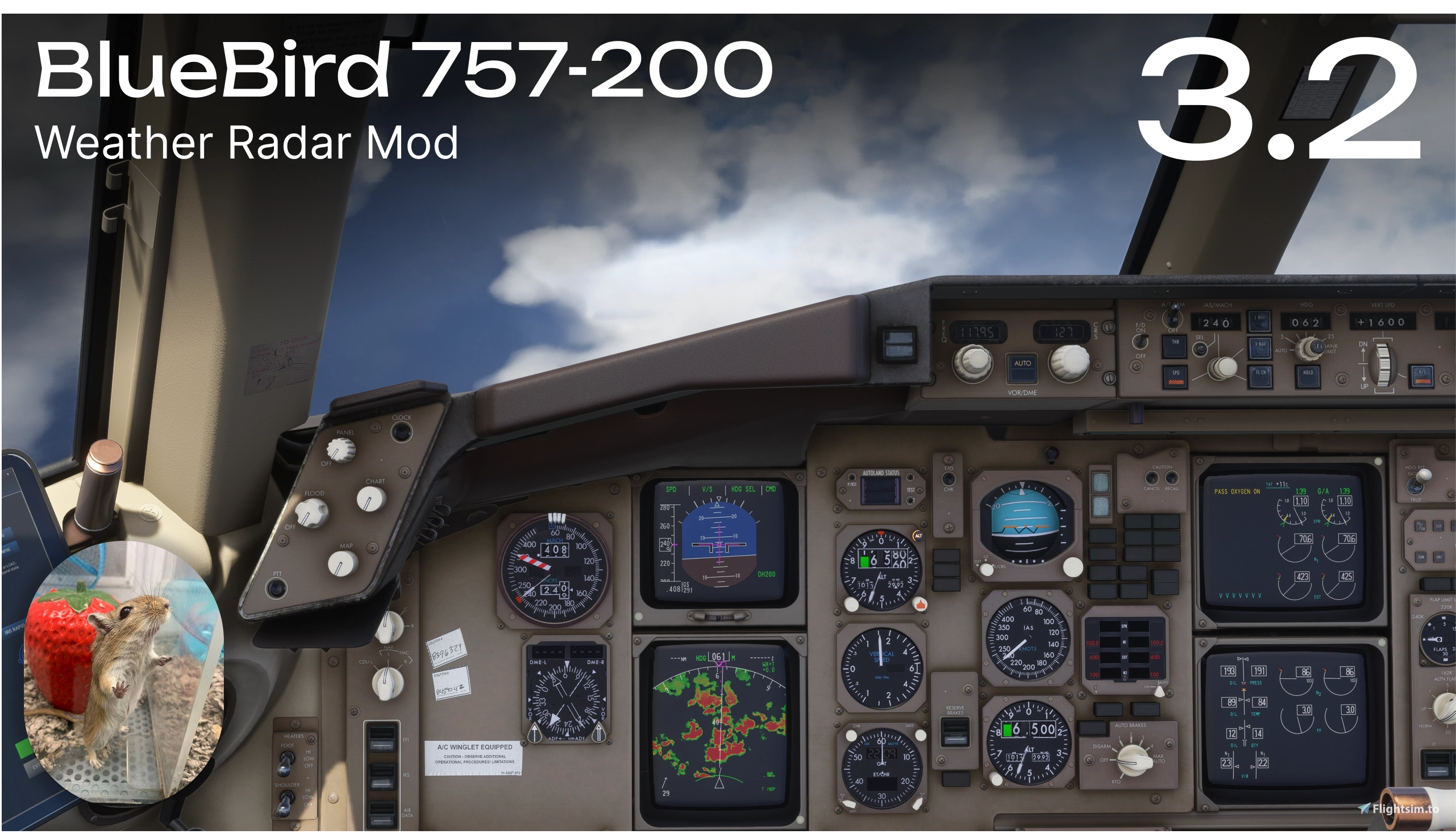
Beschreibung
A fully functional weather radar mod for the BlueBird 757-200, built from scratch
Version 3.0 introduces a completely reworked standalone architecture, allowing the mod to run as an independent Community add-on without modifying the aircraft's original files.
Features
- Functional weather radar using the aircraft's original controls
- Adjustable Tilt, Radar Gain, and Brightness
- Selectable radar modes: TFR, WX/T, WX, MAP, GCS, and TEST
- Plays the “Windshear, Windshear” aural alert when WXR TEST mode is activated
- Independent radar settings for the Captain's and First Officer's NDs
- Supports all ND ranges — 10, 20, 40, 80, 160, and 320 NM
Early Preview
This mod is currently in an early stage of development and may contain bugs.
Known Limitations
The MSFS 2024 Weather API does not provide the necessary data for TFR, WX/T, MAP, and GCS modes. When selected, an INOP indication will appear in the lower-right corner of the ND.
Weather API range is limited to 165 NM on ultra clouds setting.
Occasional rendering artifacts, especially at high Tilt angles or during sharp maneuvers, are also caused by limitations of the Weather API.
Compatibility
This mod was developed for BlueBird 757 v1.1 only. Future aircraft updates may cause compatibility issues. I will do my best to update the mod as soon as new aircraft versions are released.
This mod for MSFS2024 only.
Installation
- Extract the zz-bbs757-wxr folder into your MSFS Community folder.
Donation
BSC Bep20: 0x09f352124a31770675d484c00a589855c2e6a6d0
BlueBird 757 — Weather Radar Mod 3.2
This add-on provides a fully functional weather radar for the BlueBird 757-200 in MSFS 2024, featuring adjustable tilt, gain, and brightness. It supports several radar modes and independent settings for the Captain's and First Officer's navigation displays, supporting all ND ranges. Due to current limitations in the MSFS 2024 Weather API, some modes are not functional and display INOP. Version 3.0 introduces a standalone architecture that requires no modifications to the aircraft's original files.


Nutzerbewertungen
14 Bewertungen
Versionsgeschichte
Version 3.2 - Hotfix • Fixed an issue where leftover files from Weather Radar 2.x could cause white patches or bands on the ND when WXR was enabled or the gain was adjusted. • Fixed compatibility with BlueBird 757 Full GSX Integration mod. The radar now preserves the GSX instrument registration so the EFB can connect to GSX.
In Sammlungen enthalten(1)





Ähnliche Addons

BlueBird 757 — Texture & Lighting Improvements
This add-on addresses cockpit texture issues in the BlueBird 757, enhancing label and marking clarity at medium and lower texture settings. It removes unnecessary mipmaps, upscales certain textures, and improves dim overhead panel backlighting. Only essential textures were modified to minimize VRAM impact. External texture improvements are under development and MSFS2020 compatibility has not been tested.
von Temag
BlueBird 757 ReLight — Exterior Lighting Overhaul
This add-on provides a comprehensive exterior lighting overhaul for the BlueBird Boeing 757 in Microsoft Flight Simulator. Lighting has been reworked based on real aircraft specifications, including adjustments to color temperature, intensity, beam angles, and alignment. Updated elements include wing lights, white position lights, strobe lights, red beacon, landing lights, runway turnoff lights, and logo lights. The changes are optimized for MSFS 2024, with some compatibility expected in MSFS 2020.
von Temag
BlueBird 757 — Light Knobs Rotation Boost
This mod enhances the BlueBird 757-200 in Microsoft Flight Simulator 2024 by increasing the rotation speed of lighting-related knobs. Users can select either double or quadruple the default adjustment speed. Installation involves placing the provided folder into the Community folder. Compatibility with MSFS2020 has not been tested.
von Temag
Kommentar-Zusammenfassung
Das Nutzerfeedback zum BlueBird 757 — Weather Radar Mod 3.1 ist überwiegend positiv. Besonders gelobt wird die neue, eigenständige Add-on-Struktur ab Version 3.0, welche die Installation vereinfacht und keine Änderungen mehr an den Flugzeugdateien erfordert. Dennoch berichten einige Anwender von Installationsfehlern, Kompatibilitätsproblemen mit BlueBird Version 1.1 und anderen Mods, Anzeigefehlern (etwa weiße Flächen oder leere Displays) sowie vereinzelt zu Abstürzen (CTDs). In den Kommentaren werden häufig Workarounds, wie Neuinstallationen oder Anpassungen an bestimmten Dateien, ausgetauscht. Der Entwickler reagiert regelmäßig mit Updates oder Hilfestellungen auf gemeldete Probleme. Zudem wird oft klargestellt, dass das Mod nur mit MSFS 2024 kompatibel ist, da die notwendigen Schnittstellen in MSFS 2020 fehlen. Insgesamt wird die Funktion geschätzt, auch wenn es weiterhin Herausforderungen bei Stabilität und Installation gibt.
Zusammengefasst am 16. Nov. 2026
Melden Sie sich an, um an der Diskussion teilzunehmen
AnmeldenKommentare168
• Potential CTD fix - addressed an issue that caused crashes to desktop (CTDs) for some users. The mod has been successfully tested during an 8-hour flight without any crashes. Further testing is still needed to confirm the issue is fully resolved.
• Standalone Community add-on - the weather radar has been completely reworked and is now distributed as a standalone add-on.
• Independent WASM architecture - no longer requires patching or modifying BlueBird's original `BBS752.wasm` file.
• New NanoVG rendering system - weather radar returns are now rendered as an overlay on the original Navigation Display using additive blending, preserving the aircraft's native navigation symbology and display elements.
Note: The TERRAIN brightness fix from previous versions is not included in v3.0.0, as it required modifications to the aircraft's native rendering code.
• Installation Instructions - If you have an older version installed, run Uninstall.bat or reinstall the aircraft to remove the previous modifications. Then, to install the new version, simply move the zz-bbs757-wxr folder into your Community folder.
Installed the new version and this white patch is what I am seeing on the display. When I increase or decrease the gain, the white patches spin around the map and even across the green when there is weather.