
Beschreibung
This app is no longer maintained. Please move to TechLog.
Fenix TechLog, PMDG TechLog and FSL TechLog are now one free app. PMDG TechLog gets no more updates, and this page will be removed at a later date.
TechLog does everything this app does and also covers the Fenix A319, A320 and A321, the FSLabs A321neo, and the iniBuilds A350 and A340 (beta). The PMDG 737, 777 and 777F are all included.
Your data comes with you: the setup finds PMDG TechLog and offers to bring your airframes, flights and defects across.
Every time you load the aircraft, it is brand new. No wear. No history. No consequences.
PMDG TechLog changes that. It gives each airframe a memory: a tech log, an MEL, part wear and a flight log that carry on from one session to the next. When a part gives out, or you abuse the aircraft, the failure is set in the PMDG. You deal with it, then fix it or defer it on the tablet against a real-world date.
For the PMDG 737, PMDG 777 in Microsoft Flight Simulator 2024. Free.
This is a test build, version 0.0.1. It has been tried by a small group of people only. It works in the tests so far, and I say below what has not been seen. If you fly the 737, please try it and tell me what you find.
If you know Fenix TechLog
This is a separate program with the same idea and the same rules: nothing fails at random, wear comes from how you fly, the MEL is TechLog's own, and the pages look and work the same.
What is different is how it talks to the aircraft.
- The Fenix lets other programs set and clear its failures directly. Fenix TechLog uses that: a failure is set within a second, in flight too.
- The PMDG has no such door. It shares what the aircraft is doing with other programs, but it gives no way to set a failure from outside. So PMDG TechLog does what you would do: it opens the aircraft's own FAILURES pages on one CDU, presses the keys, and reads the screen back to be sure the failure took. A failure takes a few seconds, not a fraction of one.
- Because it uses a CDU, you choose which one in Settings (the one you are not using), and it tidies the CDU afterwards.
- The PMDG has no failure for some things (flaps, slats, gear structure, doors). Those defects go in the tech log and the card says "not set in the PMDG".
How it reads the aircraft, and how it changes it
Reading. The PMDG shares the state of the aircraft with other programs: switches, lights, fuel, weights, the FMC screens. TechLog reads that, and the sim's own flight and engine data. This is how it knows the aircraft, the phase of flight, the landing, the exceedances.
Changing. There are four things it does in the aircraft, and each is something you could do by hand:
- Failures: keys on the aircraft's FAILURES pages, as above.
- Fuel: at a cold-and-dark load it puts back the fuel of your last shutdown through the aircraft's own FUEL page.
- Worn engines: an engine with worn parts loses a little thrust, so the autothrottle adds N1 and it burns more fuel.
- Send to FMC: on the Performance page, the button types the takeoff figures into the FMC.
It never edits the PMDG's own files while you fly. The one setting it changes is at install: it turns on the data sharing the PMDG offers (the installer says so).
What it does
- Persistent aircraft. Open and deferred defects are set in the PMDG again at the start of every session. Fuel from the last shutdown is put back. Tyre pressures, brake and tyre wear, oil, hours and cycles all carry on. One record per registration.
- Failures with a cause, not dice. 134 part types are tracked, each with its own life. The same flights on the same aircraft always end the same way. Worn parts show a degraded fault first, then fail when they work hardest.
- The aircraft's own failures are written up. What the PMDG raises itself (a tail strike, a tyre) is read from its failed-items list and goes in the tech log under its MEL item.
- Damage the moment it happens. Hard landings, flap and gear overspeeds, tail strikes, hot brakes, takeoff thrust held too long. Each leaves its item in the tech log.
- A worn aircraft does not fly like a new one. Worn engines really push less: the autothrottle adds N1 and the fuel flow goes up.
- Tech log with an MEL. 205 items with categories, placards and restrictions, in TechLog's own wording for simulation use. NO-GO items ground the aircraft. The others can be deferred to a real date. Look an item up by the alert or part name.
- Takeoff and landing performance, on a page of its own. The figures come from the PMDG's own tablet calculator: V1, VR, V2, thrust, flap and trim, with the runway drawn to scale, and the landing distance with and without the defects in your tech log. Send to FMC types the takeoff figures into the FMC.
- A maintenance planner. One page says READY, CAUTION or NOT READY for the next flight and lists what comes due.
- Fix it, or replace it. Worn parts are listed on the Service page.
- Used airframes. Start with an aircraft that is several years old, with a few items deferred and the small findings every aircraft in service carries.
- A report for every flight. The condition of every part before and after, what was used up, what aged most and what broke, next to the score and the timeline.
- Your units. kg or lb, metres or feet, °C or °F.
- The airline can use the aircraft while you are away (off by default).
- A guide inside the app. Start here, every page, a searchable guide and a glossary.
- Every flight recorded. Touchdown rate and G, approach stability, a timeline of what happened, the systems affected, and a score.
Setup
1. Run the installer. It installs for your user (no administrator rights), makes shortcuts, turns on the PMDG's data sharing in its options file (a copy is kept beside it), and puts the tablet app in the Community folder if you leave that box ticked.
2. Start PMDG TechLog from its shortcut, before or after loading the aircraft, and open `http://localhost:7755/` in a browser, or on a tablet on your network.
3. For the Performance page: turn on Developer mode in the game (Options → General Options → Developers → Developer Mode). The page asks the aircraft's calculator through the sim's developer port, which only Developer mode opens.
What I have seen, and what I have not
Seen in MSFS 2024: the aircraft identified; failures set and cleared through the CDU; the aircraft's own failures picked up; worn engines pushing less with the autothrottle compensating; the Performance page against a running PMDG, and Send to FMC accepted by the FMC.
Not seen yet: a part wearing out during a long flight; a normal approach and landing judged from start to finish; every variant's CDU pages (the -800 and -700 have been tried, the -600 and -900 little); the airline using the aircraft while you are away; the tablet app inside the PMDG's own tablet.
Limits
- A failure takes a few seconds of key presses. TechLog uses the CDU you choose, so choose the one you are not using. It clears what is typed in it, and it waits if something is.
- The PMDG ignores writes to the sim's tank variables, so a fuel leak cannot take fuel out of the tanks in flight.
- Send to FMC types speeds, flaps, CG and the assumed temperature. It does not set the derate, and it does not enter weights on the PERF INIT page.
- Parts and the MEL are approximated for the 737NG and are not checked against Boeing or PMDG documents.
- The PMDG rewrites its options file on some updates. If the data sharing stops working after an update, use Settings → Fix PMDG options.
You need
- Windows 10 or 11 (64-bit). Nothing else: the installer brings its own .NET.
- MSFS 2024 and the PMDG 737, with the data sharing on (the installer does it).
Feedback
If something is wrong or missing, tell me which variant you fly and what the aircraft and TechLog did. The last lines of the console window are the most useful thing to send. Comments here on the page are very welcome: I will read them and fix what I can quickly.
PMDG TechLog
PMDG TechLog introduces persistent wear, failures, and maintenance tracking for the PMDG 737 and PMDG 777 in Microsoft Flight Simulator 2024. The add-on maintains a detailed technical log, MEL, and flight logs that carry forward between sessions, reflecting aircraft condition and history. Failures and defects are caused by pilot actions and operational stress, allowing for repairs or deferred maintenance according to realistic procedures. Features include real-time defect recording, performance calculation integration, and a maintenance planner accessible via a local web app.


Nutzerbewertungen
9 Bewertungen
Versionsgeschichte
PMDG Techlog Support Officially over. Techlog added as download before delisting addon. https://flightsim.to/addon/118113/techlog
Ähnliche Addons
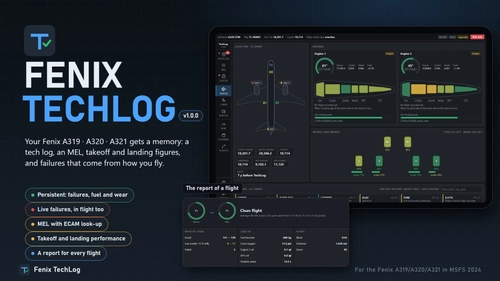
Fenix TechLog
Fenix TechLog adds persistent aircraft state, maintenance logs, and detailed part wear tracking to the Fenix A319, A320, and A321 in Microsoft Flight Simulator 2024. It simulates ongoing part degradation, realistic in-flight and ground failures, and interactive MEL procedures that carry over across sessions. The add-on records every flight, cabin item wear, and key maintenance actions, allowing management of repairs or part replacements. Data is managed locally, integrates with the in-sim EFB tablet, and requires no changes to Fenix or simulator files.
von NaughtyPickle
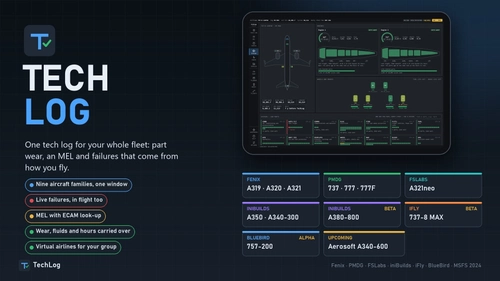
TechLog
TechLog is a centralized maintenance and flight logging application compatible with multiple aircraft families from popular developers in Microsoft Flight Simulator. It tracks each aircraft’s state, records flights, manages failures based on component wear, and maintains detailed logs including technical and Minimum Equipment List items. Users can manage fleets, set maintenance profiles, import previous data, and access logs via window, EFB, or browser. The tool simulates realistic maintenance and operational scenarios, supporting both individual and airline-style operations.
von NaughtyPickle
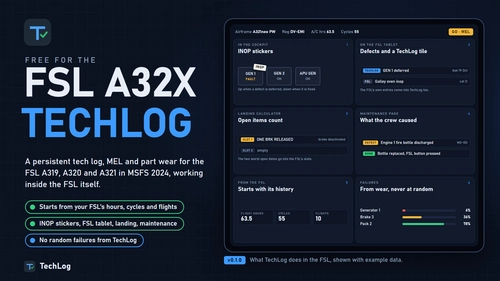
FSL TechLog
FSL TechLog introduces persistent aircraft state and maintenance tracking for the FSLabs A319, A320, and A321 in Microsoft Flight Simulator 2024. It features a detailed tech log, MEL, component wear, and flight logging that persist between sessions. Failures are linked to real usage and pilot actions, with defects reflected in the cockpit and the FSL’s EFB tablet. Users can manage maintenance, deferred items, and cabin wear, with integrated flight planning, performance tools, and flight reporting.
von NaughtyPickle
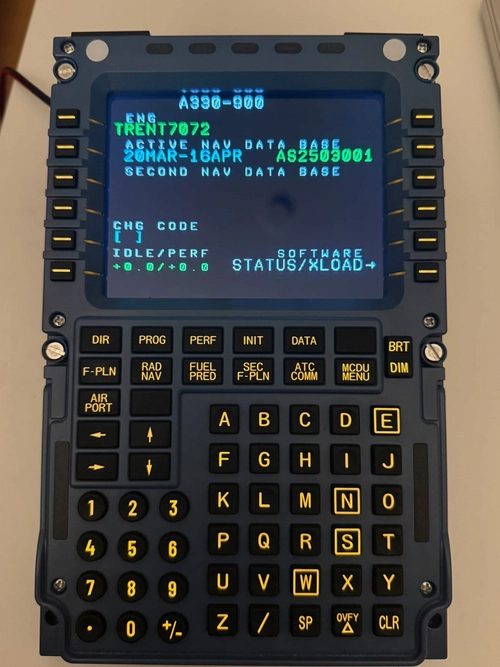
A339 WinCtrl MCDU Bridge
Shows the MCDU screen of the Aerosoft A330 Neo (A339) in MSFS 2024 on a Winwing / WinCtrl MCDU, and makes the unit's buttons work in the aircraft.
von NaughtyPickle
Melden Sie sich an, um an der Diskussion teilzunehmen
AnmeldenKommentare65
Hello everyone,
First of all, thank you for your incredible interest and support!
I'm excited to announce that Fenix TechLog, PMDG TechLog, and FSL TechLog have been unified into one completely free application: TechLog.
As a result, PMDG TechLog is no longer maintained and will not receive further updates. This page will also be removed in the future.
What's new with TechLog?
TechLog includes everything you already know and love from Fenix TechLog, along with support for even more aircraft:
- Fenix — Airbus A320 family
- PMDG — Boeing 737 and 777
- FSLabs — Airbus A321neo
- iniBuilds — Airbus A350 and A340 (Beta)
What happens to your existing data?
Don't worry, your progress comes with you!
The TechLog installer automatically detects your existing PMDG TechLog installation and offers to migrate your airframes, flight history, and defects. You can continue right where you left off.
Download TechLog
All your aircraft. One TechLog. Completely free.
https://flightsim.to/addon/118113/techlog
Thank you again for being part of this journey and helping TechLog grow through your feedback and support. I look forward to continuing to improve it for the community!
Dieser Kommentar wurde gelöscht
Hello everyone,
First of all, thank you for your incredible interest and support!
I'm excited to announce that Fenix TechLog, PMDG TechLog, and FSL TechLog have been unified into one completely free application: TechLog.
As a result, PMDG TechLog is no longer maintained and will not receive further updates. This page will also be removed in the future.
What's new with TechLog?
TechLog includes everything you already know and love from Fenix TechLog, along with support for even more aircraft:
- Fenix — Airbus A320 family
- PMDG — Boeing 737 and 777
- FSLabs — Airbus A321neo
- iniBuilds — Airbus A350 and A340 (Beta)
What happens to your existing data?
Don't worry, your progress comes with you!
The TechLog installer automatically detects your existing PMDG TechLog installation and offers to migrate your airframes, flight history, and defects. You can continue right where you left off.
Download TechLog
All your aircraft. One TechLog. Completely free.
https://flightsim.to/addon/118113/techlog
Thank you again for being part of this journey and helping TechLog grow through your feedback and support. I look forward to continuing to improve it for the community!
A whole new layer of cake to the already delicious cake.
Truly, thank you for making something I did not even know I needed.
....Bluebird in the pipes?
I’m an Airbus pilot with a home cockpit. I know the A320 well and the 737 & 777 much less, so I need people who fly the PMDG 737 & 777 to tell me where this is wrong.
This is a test build (0.2.0). It has only been tried by a small group of people, so expect rough edges.
What it is. PMDG TechLog gives your 737 a memory. Parts wear from how you fly, defects go in a tech log with an MEL, and the failures are set in the aircraft. Nothing fails at random. Your airframes, defects and flights are kept between sessions.
It works differently from Fenix TechLog. The Fenix lets TechLog set failures directly. The PMDG has no such door, so TechLog works the aircraft’s own FAILURES pages on a CDU, the way a pilot would, and reads the screen back to check it took.
Attach a CDU to TechLog. In Settings, choose the left or the right CDU, and choose the one you are not using. A failure takes a few seconds of key presses on it. TechLog waits if something is typed in that CDU, and tidies it afterwards.
Known limits: the PMDG has no failure for flaps, slats, gear structure or doors. By default TechLog raises no defect for those parts; Settings → Failures lets you list them as “TechLog only”. Send to FMC types speeds, flaps, CG and the assumed temperature, but not the derate or the weights.
I will read and answer the comments here. The Fenix TechLog was shaped by the people who used it, and I want the same for this one. Tell me which variant you fly, what the aircraft did and what TechLog did. The last lines of the console window help most.
To get started
Run the installer. It turns on the data sharing the PMDG offers (one small section in its options file, with a copy kept beside it).
For the Performance page (takeoff and landing figures, Send to FMC), turn on Developer mode in the game: Options → General Options → Developers → Developer Mode.
Start PMDG TechLog and open http://localhost:7755/ in a browser, or on a tablet on your network.
It is free.
Discord: https://discord.gg/8UVBZ7VnpU