
Beschreibung
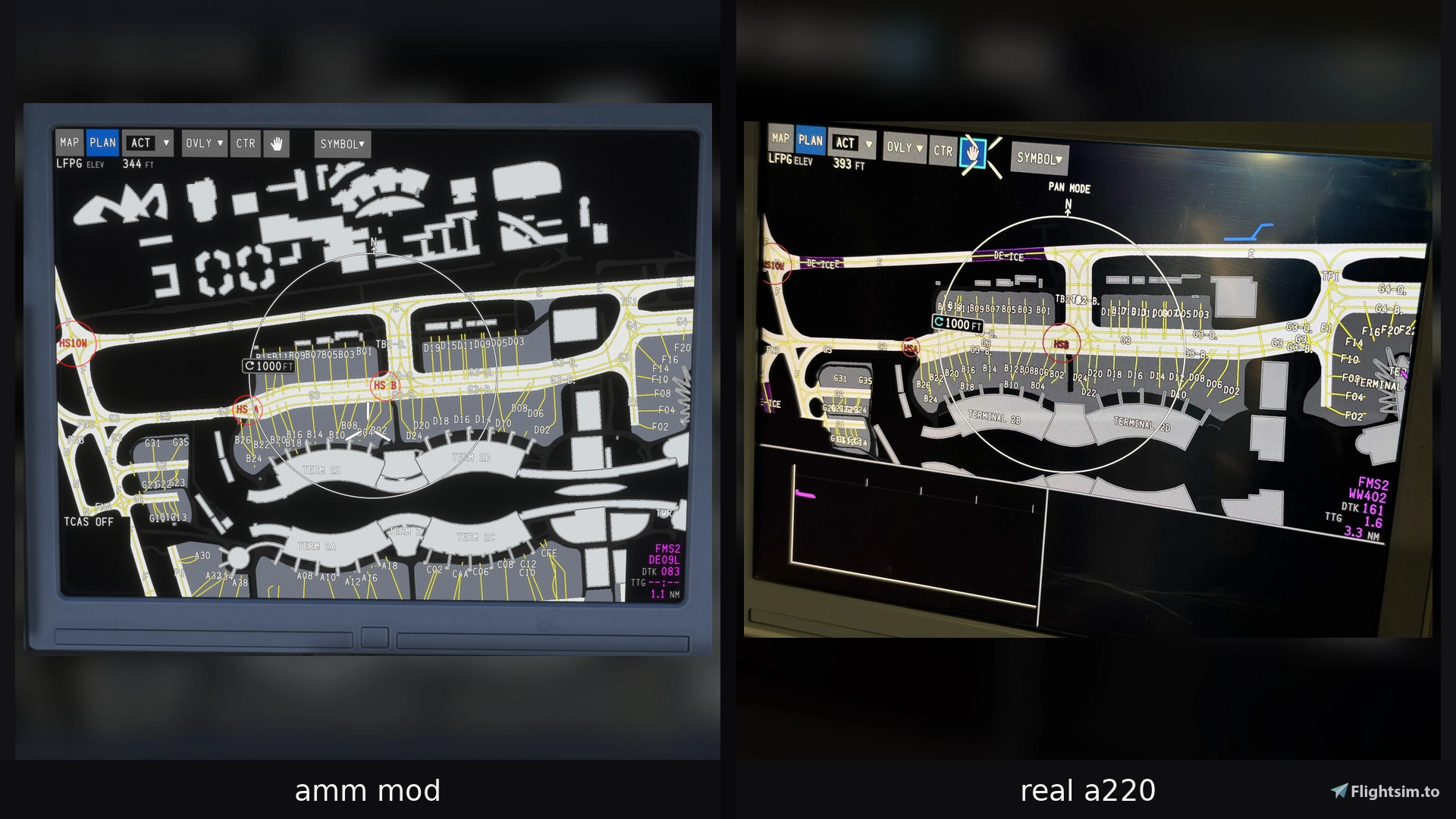
A220 Airport Moving Map adds a functional Airport Moving Map (AMM) to the Synaptic Airbus A220-300 in Microsoft Flight Simulator 2024.
The add-on uses the A220's existing Navigraph session and retrieves Airport Mapping Database (AMDB) data at runtime. No Navigraph airport data, login credentials, access tokens or Synaptic aircraft source files are included in this package.
Features
• Airport Moving Map for the native A220 ND
• Supports both MAP and PLAN modes
• Native AMM ranges: 1000 FT, 2000 FT, 3000 FT and 1 NM
• Independent AMM operation on the left and right displays
• Supports normal and full-screen L/R display expansion
• Accurate Heading-Up orientation in MAP mode
• North-Up display in PLAN mode
• PLAN mode map dragging and panning
• Remote airport selection: pan the PLAN map toward another airport, zoom into an AMM range and the map automatically snaps to the detected airport and loads its AMDB
• Runways and runway markings
• Taxiways and aprons
• Terminals and airport buildings
• Taxiway centerlines
• Stand guidance lines
• Hold-short markings
• Taxiway designators
• Runway designators
• Parking stand numbers
• Terminal, pier and airport-area names
• Runway incursion hotspots
• Windsock locations
• Aerodrome Reference Point (ARP)
• Cyan FMS departure runway
• Magenta FMS arrival runway
• AMM remains hidden while the A220 FMS position is invalid or INS alignment is incomplete, matching the native FMS MAP behavior
• Departure and arrival airport AMDBs are automatically prefetched from the active FMS flight plan
• Departure and arrival airports are prioritized in the cache to reduce loading pauses during departure and arrival
• Maximum of two parsed airports cached in memory
• Optimized Path2D rendering
• PLAN mode uses dirty rendering and does not continuously redraw an unchanged airport map
Version 1.0.9
• Improved Airport Map performance with further optimizations to the MAP rendering and airport caching system, especially when working with
departure and arrival airports.
• Improved taxiway label visibility and priority, so important runway holding point and intersection labels are less likely to disappear in dense airport
areas.
• Improved parking stand label declutter at 3000 FT, providing a cleaner and more useful overview at large airports based on the real AMM.
• Improved handling of related taxiway names, including BLUE / ORANGE taxiway variants, based on the real A220 AMM.
• Added a completely new A220-style windsock symbol, based on real A220 reference images, with corrected size, visibility and map layering.
• Further visual refinements and cleanup while keeping the existing MAP/PLAN behavior and performance optimizations intact.
• General stability and release cleanup.
Version 1.0.9a
• Improved runway chevron rendering with more robust AMDB recognition, including split, capped and complex chevron variants.
• Added Blast Pad rendering and improved PLAN runway-marking handling, including valid markings extending outside the runway surface.
• Grass/turf and glider landing areas are no longer rendered as normal runways, including related unwanted runway markings and identifiers.
• Fixed runway identifier positioning for one-way / takeoff-only runways, such as EDDF Runway 18. The marker now stays correctly aligned with and moves along the runway centerline.
• Fixed an MFW soft crash when switching AVIONIC from AVIO to CTP while the GM5 SMS RUNWAY control is active.
• SMS RUNWAY now correctly hides on the CTP page and returns when switching back to AVIO, while preserving the native A220 font, cursor layering and UI behavior.
Version 1.0.10
• Fixed PLAN mode redraw issues introduced by recent MSFS 2024 SU7 Coherent rendering changes. Airport maps now update immediately after zooming and panning, without requiring mouse movement to refresh missing or outdated areas.
• Fixed map visibility when zooming out. The AMM now disappears immediately when selecting a range beyond 1 NM, instead of leaving the previous map visible. This was also introduced with SU7.
• Improved PLAN mode panning. Eliminated the occasional map jump or snap-back when releasing the mouse after dragging, providing smoother transitions.
• Updated compatibility with Synaptic A220 v1.0.11a and the latest MSFS 2024 rendering changes.
Requirements
• Microsoft Flight Simulator 2024
• Synaptic Airbus A220-300 v1.0.10
• A valid Navigraph login in the Maintenance Menu of the A220
Use the built-in Navigraph login provided by the Synaptic A220. No separate GM5 login or external application is required.
Installation
- Remove any older version of
gm5-a220-ammfrom your Community folder. - Extract the downloaded ZIP.
- Copy the
gm5-a220-ammfolder into your MSFS 2024 Community folder. - Start or reload the simulator and aircraft.
- Sign in to Navigraph through the A220's normal built-in Maintenance Menu
- Use the ND range selector. Entering 1 NM, 3000 FT, 2000 FT or 1000 FT displays the Airport Moving Map when valid AMDB data is available.
No executable, background application or additional setup is required.
Compatibility
A220 Hardware Bridge
https://de.flightsim.to/addon/113703/a220-mcdu-bridge-winctrl-winwing-cdu-hardware-support
Synaptic A220 ACARS / CPDLC
https://flightsim.to/addon/113136/synaptic-a220-acars-cpdlc
Navigraph
Navigraph AMDB data is requested directly at runtime using the Navigraph session established through the Synaptic A220's built-in login.
This add-on does not include or redistribute Navigraph airport mapping data, usernames, passwords, access tokens, API secrets or permanently stored AMDB databases.
Only parsed airport data required for the current simulator session is held temporarily in memory, with a maximum cache size of two airports.
Notes
• Airport detail depends on the AMDB information available for the selected airport
• Future Synaptic A220 updates may require an updated version of this add-on
• If an issue appears after an A220 update, verify that the AMM version explicitly supports that aircraft version
If you like to support my work:https://www.paypal.me/Gunman5
And if you like to buy me a coffee: https://www.buymeacoffee.com/Gunman5
Disclaimer
This is an unofficial community enhancement and is not affiliated with or endorsed by Airbus, Synaptic Simulations, iniBuilds or Navigraph.
A220 Airport Moving Map / TLAF - Takeoff and Landing Awareness Function
A220 Airport Moving Map introduces a functional Airport Moving Map to the Synaptic Airbus A220-300 in Microsoft Flight Simulator 2024. It integrates directly with the aircraft’s existing Navigraph session, displaying airport surfaces, markings, runways, taxiways, and key annotations on the navigation display in both MAP and PLAN modes. The map supports independent operation on left and right displays, full-screen expansion, and efficient airport selection and data caching. The add-on requires the Synaptic A220-300 and a Navigraph login, and does not include any Navigraph data or credentials.


Nutzerbewertungen
17 Bewertungen
Versionsgeschichte
• Fixed PLAN mode redraw issues introduced by recent MSFS 2024 SU7 Coherent rendering changes. Airport maps now update immediately after zooming and panning, without requiring mouse movement to refresh missing or outdated areas. • Fixed map visibility when zooming out. The AMM now disappears immediately when selecting a range beyond 1 NM, instead of leaving the previous map visible. This was also introduced with SU7. • Improved PLAN mode panning. Eliminated the occasional map jump or snap-back when releasing the mouse after dragging, providing smoother transitions. • Updated compatibility with Synaptic A220 v1.0.11a and the latest MSFS 2024 rendering changes.
Ähnliche Addons

Aerosoft CRJ | WINWING FCU | MobiFlight Profile
Enhance your flight simulation experience with this MobiFlight profile designed for the WINWING FCU and Aerosoft CRJ aircraft. Full support for Winwing FCU displays in an Airbus-style layout. Get access to beta versions with the possibility of future updates and improved configurations. Discover a range of normal functions and advanced A/THR press and hold modifiers for more immersive gameplay.
von Gunman5
Toliara Airport FMST - Madagascar
Experience the vibrant Toliara Airport in Madagascar with this detailed add-on. Located in the picturesque southwestern region, this international airport serves as a vital gateway for travelers exploring the diverse landscapes and cultural richness of Madagascars southwestern coast. Enhance your simulation with custom 3D models, ground and night lighting, terrain adjustments, and runway slopes for a realistic airport experience.
von Gunman5, DSKY
![[4K][ATR 72-600] TSARADIA Madagascar 5R-EJA](https://cdn.flightsim.to/images/25/4katr-72-600-tsaradia-madagascar-5r-eja-476926-1686947845-27sxv.jpg?width=500)
[4K][ATR 72-600] TSARADIA Madagascar 5R-EJA
Experience Madagascars Tsaradia airline with this ATR 72-600 livery featuring the registration 5R-EJA. Immerse yourself in the vibrant Malagasy culture with a design inspired by the colorful ring-tailed lemur. Enhance your Microsoft Flight Simulator experience with this accurate recreation of Tsaradias distinctive livery.
von Gunman5
SYNAPTICS A220 | WINWING WinCtrl 32 MCDU | MobiFlight Profile
This package offers a MobiFlight profile enabling basic integration of the SYNAPTICS A220 with the Winwing WinCtrl 32 MCDU. It supports keyboard input, EXEC status light functionality, and Flight ID and scratchpad output through a companion app. Installation involves importing the profile via the MobiFlight software with beta features enabled. The add-on is intended for users combining these specific hardware components in Microsoft Flight Simulator.
von Gunman5
Melden Sie sich an, um an der Diskussion teilzunehmen
AnmeldenKommentare(80)
about 8 hours ago
Could this be looked at?
about 7 hours ago
about 6 hours ago
about 4 hours ago
Once AMM addon is removed, it works as it should.
I am also on v1.0.11a
13 days ago
12 days ago
16 days ago
22 days ago
All three addons provide their own `DisplayUnits/instrument.html`, so the startup path depends on which package takes priority. There was already some integration: WXR loads ACARS, and ACARS automatically loads GM5. Simply merging all their script imports would therefore risk initializing GM5 twice.
The correction involves three files:
- **`instrument.html`**: one shared entry point loads GM5, ACARS and WXR/VSD in a fixed order, followed by Synaptic’s native `instrument.index.js`. The separate GM5 and WXR DisplayUnits host scripts are no longer used.
- **ACARS `plugin.js`**: its automatic GM5 loader now checks whether GM5 has already started.
- **`gm5-a220-amm.js`**: an initialization guard prevents a second execution from creating duplicate map instances, timers, animation loops and TLAF processing.
The package’s `layout.json` and `manifest.json` were also rebuilt. The WXR/VSD scripts, CTP controls and both WASM modules were preserved unchanged.
This addresses the overlapping startup mechanisms without attributing the issue to one addon alone. The duplicate-initialization risk was verified during integration testing; it was not established as the cause of the original installation’s behavior.
All three addons are now working together on my installation.
For making this compatibility fix available to other users, I see three possible approaches:
1. **A combined package, with permission from all three developers.** With your approval to modify and redistribute the three addons together, I could share the package with users who want to run all three simultaneously. The main challenge would be ongoing maintenance: without access to your original source projects and build environments, future updates would need to be reviewed and the compatibility changes reapplied or adapted.
2. **Coordination between the three developers.** You could agree on a shared loading mechanism and integrate the necessary changes into your respective addons. Each addon would remain independently distributed and maintained by its author. This would probably be the most sustainable solution.
3. **A standalone Windows batch patcher, with your permission.** If all three developers approve the modifications to their files, I could provide a batch tool that applies the corrections to users’ own installed copies. Users would download the original addons from your respective pages, and the patcher would contain no complete addon files. It would create backups, support restoration and verify compatible versions before applying changes. Future addon updates could still require an updated patcher.
24 days ago
23 days ago
26 days ago
27 days ago
besides it could create more issues ?
this is the AMM without your mod,
27 days ago
27 days ago
By the way I really appreciate your work 😊
27 days ago
27 days ago
26 days ago